Cash Flow Planning
In order to enable the Cash Flow Planning data processes in a given process, it is necessary to:
- Click on the Processes tile, Navbar > Processes & Workflows > Process > select the process to parametrize and use the Actions (
 ) > Process definition window menu
 - Data Processing area on the right hand side of the window;
- enable the Cash Flow Planning option;
- save.
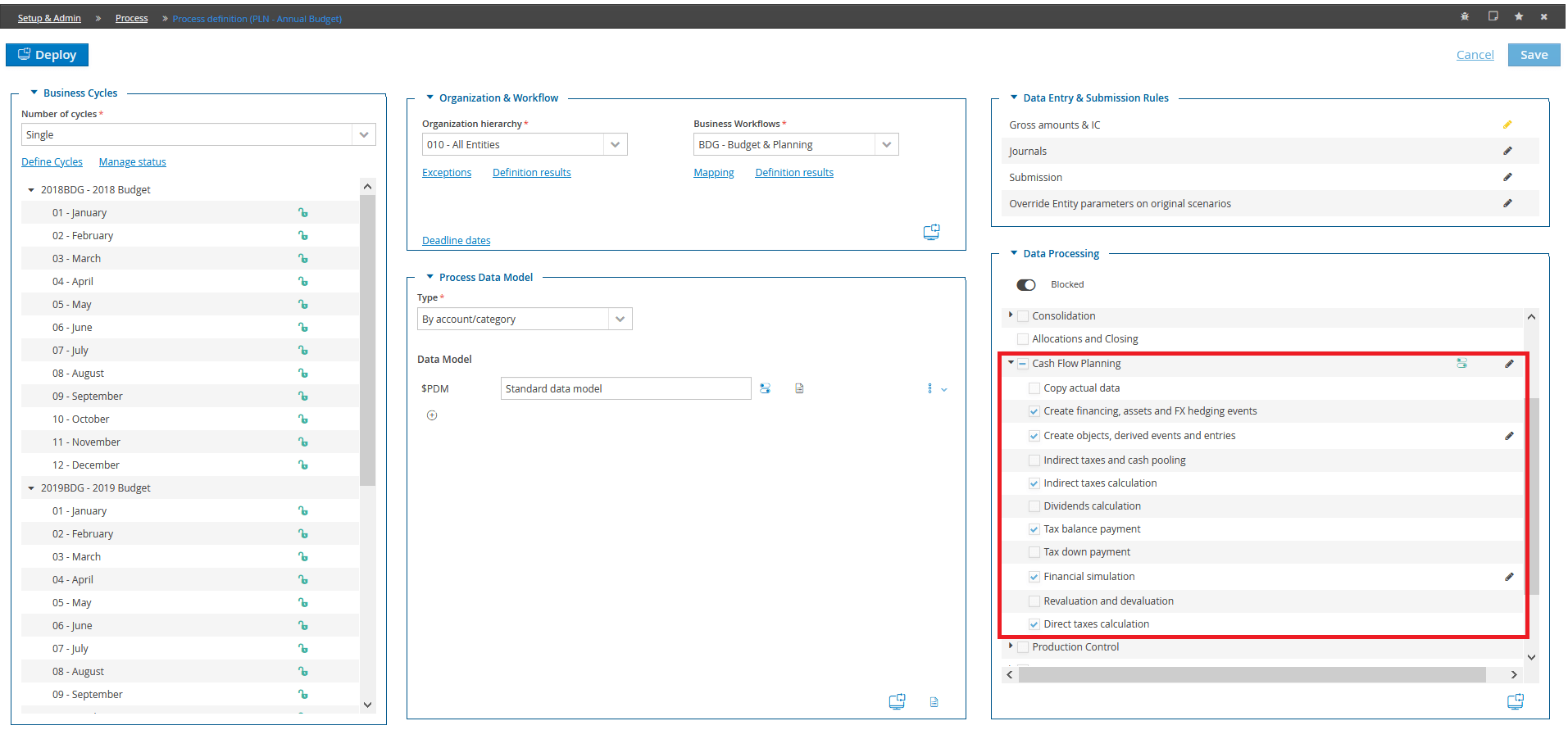
Available data processes:
- Copy actual data
- Create objects, derived events and entries
- Indirect taxes and cash pooling
- Indirect taxes calculation
- Tax balance payment
- Tax down payment
- Financial simulation
- Revaluation and devaluation
- Direct taxes calculation
Requirements
Once the execution of the CFP data processes has been enabled, the following information can be managed:
- Step. Step of the workflow model related to the current process to which the Cash Flow Planning data processing has to be related;
- Event Scenario. (Original) Scenario used to store the date events. It is possible to either use one of the process scenarios or create an ad hoc scenario;
-
Simulation period
-
Start date. Simulation start date;
- End date . Simulation end date;
-
Calculation start date. It specifies the date from which the system starts to perform the calculations according to the defined Planning rules. The entries will be recorded only in the months which are included in the Estimate start date / estimate end date time range. The calculation start date and the estimate start date differ from each other when the calculation must start before the simulation period. For example, the user might want to perform the calculation of the simulation from the month of December preceding the simulation start date so as to calculate automatically the Initial balance sheet effects by the collection and payment calculation methods related to the accounts with December year x-1 basis but having the financial event in the simulation months. Another example is that of a first Forecast in which the simulation start date is in April but the calculation start date is in January. In this way, in case of deferred semester billing, the system starts to calculate the amounts to aggregate from the calculation start date (January) and actually sells off the accrual of the first six months of the year in June. If you chose this collection and payment method with April as calculation start date, the deferred semester invoicing would lead to the entry of the first 6 months of simulation and therefore would record the entry in October.
-
Net result calculation Specifies if the system must run the net result calculation during the cash flow planning data processing.
-
Carry forward of Initial actual balance sheet Specifies if the system must run the calculation of carry forwards of the Initial Actual Balance Sheet scenario
Overrides
Category allows filtering the categories used for specific purposes
- Of read / write data from which the system reads the data of the Initial actual BS and Projected P&L account it uses to write the forecast BS and the integrations to the P&L account (automatic calculation of the depreciations, of the short and medium/long term financial income and expenses and with the taxation management);
- Of alternative data generation if sub-entities are involved in the financial planning process
- Of cash flows for direct cash flow the direct cash flow is based only on the cash flows for which this category is used
- Of cash flows for alternative cash flow if the figurative category is define in the process rules, the category on which to generate the alternative cash flows must exist for the sections with the "Cash flow" option enabled
Accounts
on which to enter the debit/credit FX rate difference (cost / revenue) generated by the conversion of accounts with a different currency from that used for the preparation of the financial statement
Revaluation account for FX rate difference
Devaluation due to Fx rate difference
Forecast: reason of initial amount for carry forward<
Depreciation calculation on actual data
In general, the budget data processing calculates the depreciation taking into account only the purchase events included in the simulation interval. When this option is enabled, the depreciation data processing processes also the purchase events with a purchase date preceding the simulation start date and generates the depreciations for the estimate periods. This is very useful when the user uses the copy of data between processes, since this copy transfers the purchase event by date and, therefore after the transfer to different periods, the purchase events may fall outside the simulation interval and the system may not calculate the depreciation.
Calculate financial policy for Ctp entity
In general, the budget data processing calculates the financial policy without considering the single amounts of the Ctp entities, therefore, whatever their value, if the amount on the main section is greater than zero, it is moved to the assets section, if it is less than zero it is moved to the liabilities section. For the calculation to take into account the amount of the ctp entities when sorting them in the two sections, it is necessary to enable this option.
The financial policy for ctp entity is incompatible with the cash pooling.
Indeed, in case of cash pooling, when the system sorts the amounts in the relevant section and generates the interests, it always sets up the ctp entity with the parent entity. Therefore, when calculating the financial policy for ctp, the system verifies that none of the actions involved in the sorting has the "Cash Pooling" option enabled and, if so, it generates a blocking error.