About Maps
The map displays below the Adjustments and Overrides table, if it has been turned on, and is used as part of capacity planning. This section helps you visualize where the part is in the scheme of the production cycle. The center is the current item. To the right, shows what is needed to create the part. To the left, shows where that part is going once it is finished.
Node Map
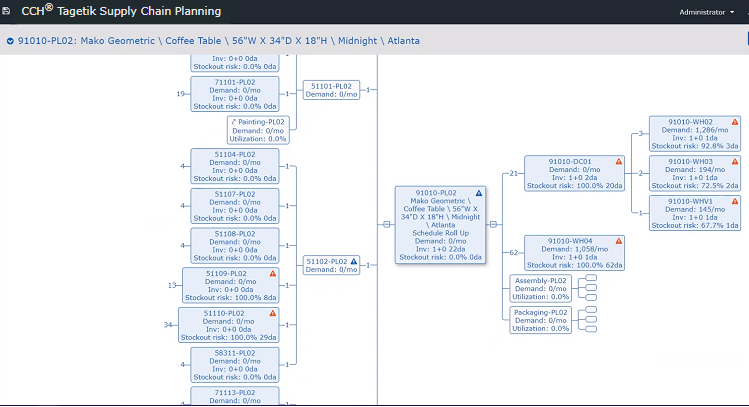
As you mouse over each square, all the information you have on the part displays:
Map Node Information
| Information | Description |
|---|---|
| Part Number | Number assigned to the part in the database |
| Description | A brief description to identify the part |
| Schedule Roll Up | When inventory is needed for another part |
| Demand | How much demand for this item per month |
| Utilization | The percent |
| Inv | Number of units in inventory and number of days it is expected to last |
| Stockout risk | Percent of risk and how many days until stockout |
| Warning triangles | A warning triangle displays when running out of this item will affect your production schedule.A red triangle means: - If the record is not a BOM Resource and if IO is set up, then a red warning predicts you will stock out: 1. within the replenishment lead time; and 2. based on the IO Strategy setting. This means you have no chance to place and receive a new order in time to avoid the stockout. For example, your replenishment lead time might be 3 days but you have a weekly Monday strategy and today is Tuesday. That means you have to wait 9 days before you could get more inventory (wait until the next Monday to place the order (6 days) and then wait until Thursday for the order to arrive (3 more days)). - If the record is a BOM resource, then a red warning means you are over-capacity. A blue triangle means - If the record is not a BOM Resource and if IO is set up, then a blue warning means there is a red warning upstream from that node in the node map. A blue warning is a soft warning that you might have a stockout issue in the future because of this, but as of right now you will not stockout within your replenishment lead time. |
Click on any square to go to that record.