Workflow panel
Excel > CCH® Tagetik >  Workflow - Grid
Note: the button is only available to users who have function "0003029 - Reporting.NET - Data Entry - Workflow table" enabled in their own role, or for whom the Sharepoint module is enabled.
Purpose of the panel
This panel allows you to run and/or submit tasks from the step of the process with which the form is associated, for which the panel was launched.
What it looks like
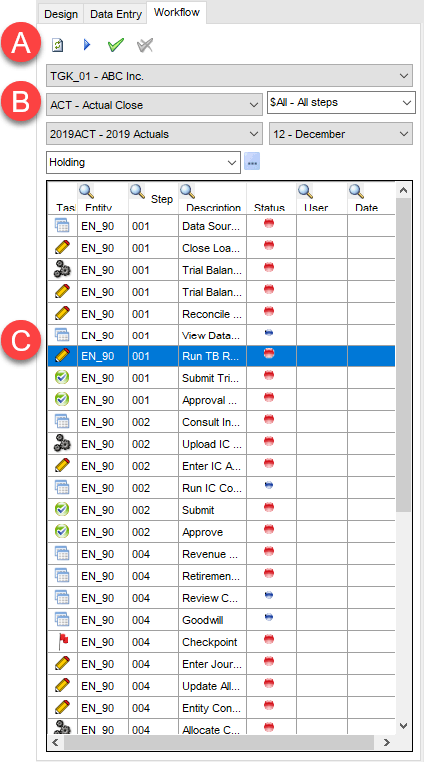
| Element | Description |
|---|---|
| A | Action buttons |
| B | Select run parameters |
| C | List of workflow tasks |
Sections of the panel
| Element | Description |
|---|---|
| Select run parameters | Allows you to set the following search criteria for the desired tasks: - the application database to which the process belongs - the process - the step or steps of the process - (only if the Enable submission by scenario/period option is active in the process) the desired scenario/period - the chosen entity or node of entities |
| Task list | Shows the list of tasks in sequential order for the selected step. |
Buttons on the panel
| Element | Description |
|---|---|
| Updates the list of workflow tasks according to the selected parameters | |
| Runs the task. | |
| Task is Complete. | |
| Removes Task is Complete status. | |
| Opens a window to search and select elements in the hierarchy of entities. |
Details of columns in List of steps
| Element | Description |
|---|---|
| Type | Task type. - : data edit task. When run, it opens a form in data entry mode. - : submission task. Only run when all other tasks have been completed and the relative data have been locked for the process/step. - : data processing task. When run, it starts CCH Tagetik data processing. - : opens a window in the web interface. |
| Code | Entity/node of entities code |
| Phase | Phase |
| Description | Description of the task |
| Status | Task status. - : task not yet started - : task in progress - : task complete - : optional task - : task locked because the user does not have the rights to run it |
| User | Identifier of the last user to work on the task. |
| Opens a window to search the content of the columns and allows the user to filter them according to defined operators. |