Data Entry panel
Excel > CCH® Tagetik >  Data Entry
Purpose of the panel
This panel allows you to select and run a data entry form.
What it looks like
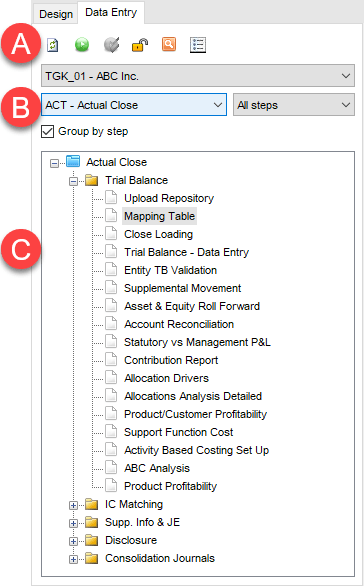
| Element | Description |
|---|---|
| A | Action buttons |
| B | Fields for selecting parameters |
| C | Forms tree |
Sections of the panel
| Element | Description |
|---|---|
| Run form selections | Allows you to set the following for running the desired form: - the application database on which the form is saved - the process in which the form has been included - the step of the process with which the form is associated Note: the Group by step option allows you to group forms by step. |
| Forms tree | Show list of available forms based on selections. |
Buttons on the panel
| Element | Description |
|---|---|
| Refreshes the forms tree. | |
| Opens the form in data entry mode. | |
| Only enabled if a report list saved in the forms tree is selected. Only opens selected forms that are included in the report list (see Report list). | |
| / | Lock/unlock form for editing. When the data entry form is locked, it can only be run in navigation mode. |
| Allows you to search the forms tree. | |
| Allows the user to select the display mode for forms on the panel: with description only, with code only or with both description and code. |