Proportional calculation data processing
Introduction
The proportional calculation data processing is the first contribution data processing and generates the proportional amount type on the consolidation scenario.
How it works
The data processing reads the following data:
- Amounts, intercompany declarations and entity journals of entities belonging to the consolidation area. For intercompany declarations, the filter is only applied to the declaring entity.
- Consolidation journals in which both entities in the header (entity 1 and entity 2) belong to the consolidation area. For journals, the filter is applied considering the entities in the header and not the entities in the journal rows.
The data processing excludes data related to the following:
- Entities to be consolidated using the at cost consolidation method.
- Entities which are labelled as “To be deconsolidated - initial balances only” or “to be deconsolidated - from previous period” in the consolidation area. For entities to be deconsolidated, the data processing only considers the elimination journal of the financial investment/net equity from the ownership structure register, which is therefore processed in any case.
If an accounts or categories filter has been set on the consolidation scenario, only the accounts and categories that are in the list or belong to the indicated node are processed.
To generate the proportional data, the proportional percentage indicated for the entity in the consolidation area is applied to the original data.
Proportional calculation options
The proportional calculation percentage applied to the consolidation journals can have the following values:
| Value | Description |
|---|---|
| None | No percentage is applied. The journal is copied by reading from the original scenario. |
| Lesser % | The lesser consolidation scenario proportional percentage of the two entities in the header is applied. The journal amounts are weighted in respect of the lowest % out of the two entities involved in the journal. If one of the entities is proportional, its proportional percentage will be used; however, if both entities are proportional then the system will apply the lower %. Typically used for IC reconciliation logics. |
| Greater % | The greater consolidation scenario proportional percentage of the two entities in the header is applied. |
| Entity 1 | The proportional percentage of Entity 1 in the journal header is applied. |
| Entity 1 * Entity 2 | - If the consolidation method of both entities in the header is Proportional, the lesser proportional percentage of the two entities in the header will be applied. - If the consolidation method of entity 1 in the header is Equity, of Non-consolidated controlled entity type, and the consolidation method of entity 2 in the header is Line-by-line, then the proportional percentage of entity 2 in the header will be applied. - In all other cases, the proportional percentage of entity 1 is multiplied by the proportionality percentage of entity 2 in the journal header. IMPORTANT: this option cannot be used in processes which use the “Database” consolidation engine. |
This information is indicated as Proportional calculation method (see ) and can be manually overridden on the header of each consolidation journal.
Other variations accounts and Other stocks accounts with the Exclude from proportional calculation option are simply copied onto the proportional amount type.
Particular cases for intercompany amounts and declarations
The proportional calculation data processing writes the amounts and intercompany declarations on the proportional amount type according to a different method from the one used for saving them on the tables of original data.
In particular, on the original amount type the gross figure is saved in the amounts and the intercompany declarations are saved as additional details of the gross figure. In the proportional amount type, however, the data are stored by counterparty. To obtain the gross figure, it is necessary to add up all the rows present on the proportional amount type, including those with an undefined counterparty, which represent the portion to minorities.
Change in proportional percentage compared with the opening scenario
In the case of a change in the proportional percentage between the scenario/period to be processed and the opening scenario/period, CCH Tagetik automatically defines the variation accounts which, in the Control Group, have been indicated as entry or exit Modify % variations or as Area change variations.
The choice between area change variations or modify % variations and, within these, between increase/decrease or entry/exit, is made on the basis of the change in the proportional percentage:
| If... | Then... |
|---|---|
| the percentage increases from zero to X or from X to zero. | the area change variations are chosen. |
| another type of change takes place. | the percentage change variations are chosen. |
The origin generated for these rows is ‘CONS_PROP_CHANGE’.
Percentage change in proportionality compared with the previous period (Periodic calculation)
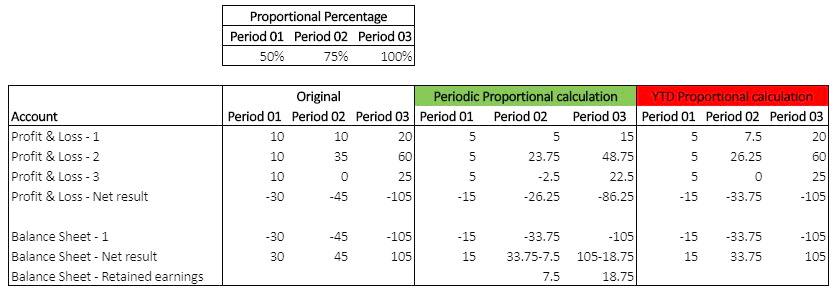
To manage the percentage change in proportionality compared with the previous period, it is necessary to activate the proportional calculation in periodic mode and indicate the account on which CCH Tagetik will write the difference between the P&L net result and the BS net result.
The algorithm for the periodic calculation is applied to the following accounts:
- Profit & loss accounts
- Other variation accounts
- Variation accounts
- Normal net result account in the Balance Sheet

IMPORTANT: The data processing must be run using the same calculation type for all periods linked to a scenario. To change the calculation strategy from a certain period onwards, it is also necessary to reprocess the previous periods of the scenario.
The current period’s cumulative proportional figure is calculated by adding up the following figures:
- the cumulated proportional figure from the previous period
- the periodic original figure multiplied by the period proportional percentage
To identify the previous period, CCH Tagetik considers the period length set on the consolidation scenario period.
The difference between the proportional P&L net result account calculated on a periodic basis and the proportional Balance Sheet net result account, calculated on a cumulated basis, is allocated to the reserve account defined in the configuration for the data processing for the calculation of the Proportional and Consolidable figure (Contra-entry account for BS and P&L result alignment). The percentage variation account defined in the variation control group is also adjusted at the same time.
For all balance sheet accounts, the percentage variations on the variation accounts compared with the previous period are allocated to the variation accounts dedicated to the percentage variation.
Requirements for the periodic calculation
To obtain the correct periodic values, the entity data, including the journals, must be present on the original scenario, in the period prior to its entry into the consolidation area. This normally happens when the entity is already consolidated line-by-line/proportionally in the previous period in other consolidation areas.
However, if the data are not present, the following will happen:
- CCH Tagetik returns the results as if the calculation had been cumulated.
- To have the periodic calculation, it is necessary to insert the data on the previous scenario and run certain data processing (e.g. counterparty eliminations) to have the data, amounts and journals with which to calculate, by difference, the periodic figure.
IMPORTANT: If the data are not complete, e.g. if the financial statements of the entity at Equity or at Cost, and the Intercompany declarations but not the Intercompany eliminations, exist on the previous period, then it is necessary to insert only the periodic part of the IC declarations in the data processing period. Otherwise, there could be incorrect contributions on the accounts of entities that were valued using the at Equity or at Cost method in the previous period.
Management of journals present in the previous period but not in the processed period
When a journal is present in the previous period but not in the period being processed, CCH Tagetik creates the journal header, and writes the proportional figure calculated on a periodic basis in the proportional amount type.
In the run step, it runs the following preliminary checks:
- In order to be calculated, the selected periods must be consecutive.
- The entities must be present in the consolidation area of all selected subsequent periods (of the same scenario).
IMPORTANT: The data of the entity that enters or re-enters the consolidation scenario during the same year are calculated on a cumulative basis.
Entities that entered the consolidation area during the fiscal year
CCH Tagetik also manages entities that entered the consolidation area during the fiscal year on the proportional amount type. In this case, the proportional calculation considers the “period data” to be consolidated and therefore performs the calculation on the P&L accounts, other variation accounts and all variation accounts. The proportional amount type is calculated by obtaining the difference between the figures for the current period and the figures for the period prior to the period in which the entity entered the area. To identify the previous period, it uses the period length defined on the period to be processed.
The flows related to the change in consolidation area are also regularly populated. Entities that entered during the fiscal year are identified in the consolidation area by the First consolidation period field.
Note: This functionality only appears on the in memory consolidation engine.
Reclassification of variations in financial investment elimination journals
The financial investment elimination data processing generates a journal on the original scenario and, if the proportional percentage changes, uses the percentage change or consolidation area change variations, as an increase or decrease, or an entrance or exit, respectively. The change in the proportional percentage is calculated by comparing the direct financial investment percentage of the processed event with the same percentage of the last event of the previous scenario.
The percentage change or consolidation area change variations and their sign might not be the same as those that were chosen in the consolidation area. In fact, the consolidation area is considered in its entirety and all the shareholding relationships are considered in the calculation of the percentages, not just those of individual events.
When this happens, the proportional calculation data processing writes off, on the proportional amount type, the variation account originating from the original one and reallocates that amount onto the correct variation account, choosing the appropriate sign.
Net equity merger variations are not subject to reclassification because, in the event of a merger, the event is unique both on the original scenario and on the consolidation scenario.