Intercompany matching and elimination logics
Introduction
The matching and elimination of intercompany entries are two fundamental consolidation processes. Through the logics that govern these two aspects, you can manage the automatic matching and elimination of al the declared intercompany amounts.
You can define an unlimited number of logics. By filtering the data collection and calculation process on the logics to be used, it is possible to implement different strategies in different contexts; for example, more rigorous and analytical matching on statutory consolidation processes, more simplified and aggregated matching for the consolidation of forecast and management data.
Before creating an intercompany matching or elimination logic, you must verify that the accounts to which to attribute the intercompany entries and the relative checks are correctly set in the Data Model. See .
Intercompany Matching
This represents the process of balancing intercompany entries between companies in the same group. It tries to make the amounts that a declaring entity presents to a counterparty entity consistent with the corresponding amounts that the counterparty presents to the declaring entity.
Typical examples of matching include: cost/revenue matching, financial income/financial charges matching and trade payables/trade receivables matching.
From the process cockpit, it is possible to manage the approval and rejection statuses and the consequent intercompany transaction matching between groups and complex business structures, both for “nodes” of entities and for individual entities. For more details, see .
Note: where necessary, the matching process can also be carried out by individual document (see Invoice IC matching).
Example of matching
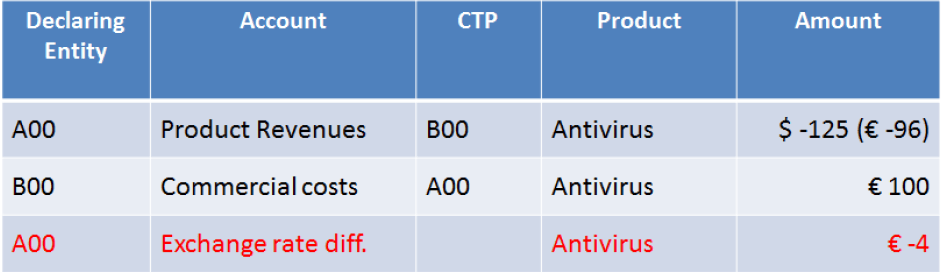
In this case, A’s declaration to B is different from B’s declaration to A. This is because small differences are often generated when using two different currencies. The matching process consists of justifying the origin of the difference by inserting the amount on particular accounts called Reconciliation accounts. In the example, the difference of 4 euros is justified as an FX rate difference.
Automatic IC matching
You can exclude entities from the IC matching cockpit and automatically balance the elimination journals related to these entities. This function is useful for small entities consolidated in large groups, for which the matching of IC entries has no effect.
To that end, the IC matching option is present in the list (see ) which allows you to specify the following matching characteristics:
- mandatory: if IC matching is not run, submission will be blocked.
- optional: IC matching is not mandatory for the entity because, for example, for reasons known in advance, it cannot carry out that activity in time for the closing date of the relative step. If A and B are entities for which IC matching is not mandatory while it is mandatory for entity C, then:
- C does not have to match its own intercompany entries to A and B
- A and B must match their own intercompany entries to C
- in cases of IC relationships between A and B, the first to submit data does not have to match, while the other is obliged to do so.
- automatic: the relationships in which at least one of the two entities has this option active are matched automatically, i.e.:
- they do not appear in the IC cockpit
- failure to run matching does not block submission
- the relationships are automatically balanced in the IC elimination journals regardless of the balancing threshold value
The value of this parameter can be overridden for individual processes using the Override Entity parameters on Original scenarios option (see ).
Reconciliation account
The reconciliation account, defined in the matching logic, is represented by an account, present in the list, chosen to register amounts that must “reconcile” IC entries in case of unbalanced amounts. For example:
- Goods in transit
- Invoices to be received
- Invoices to be issued
- Invoicing differences
- FX rate difference
For every matching logic, you can define several reconciliation accounts, or the difference between two groups of declarations can be justified by several causes.
Elimination
Indicates the consolidation impact that makes it possible to eliminate the intragroup relationships between entities included in the consolidation perimeter. A matching logic has the elimination as its impact, while the opposite is not always true. In many cases you must define elimination logics which, however, do not involve a matching process between the entities involved. For example, this happens for the elimination of dividends, financial investments, inventory profit, etc.
For more details on the definition of IC matching and elimination logics, see page .
Grouping
You can organise intercompany matching and elimination logics into a grouped aggregation structure. A predefined aggregation structure is available ($), but it is also possible to create customised ones by indicating the nodes to which each logic is to be related. These nodes are then used to simplify the selection of a set of logics: by selecting the desired node on the Requirements page, all the logics related to the node are enabled for that process. See .
For more details on the management of logic groupings, see .
Accounts involved in journals
Two different situations may arise:
- Two sets of accounts: for matching logics where it is necessary to compare the value declared by an Entity on a group of accounts (e.g. revenues), with the counterparty’s declaration on another group of accounts (e.g. costs). The details of the accounts must therefore be defined for two sets: the “primary” accounts and the “dependent” accounts
- One set of accounts: the intragroup data item is only present on one side of the relationship; for example, in dividends or inventory profit, so it is sufficient to define a single set of accounts, because typically the counterparty is generated automatically.
CCH Tagetik does not restrict the accounting nature of “Primary accounts” and “Dependent accounts”. For example, in a Revenues/Costs matching logic, the revenues can be inserted indifferently. Based on their own business requirements, the administrator then decides to insert as “Primary accounts” those accounts which, from an accounting point of view, must prevail in the event of an unbalanced situation. The entity that declares on the primary accounts is called the “Declaring” entity, while the entity that declares on the dependent accounts is called the “Counterparty” entity.
Matching and elimination logic reports
You can extract specific matching and elimination logics to Excel format. The following information is reported for every logic:
- if the logic is a counterparty matching logic and/or an elimination logic,
- the list of primary accounts specifying whether the account belongs to the counterparty matching logic and/or elimination logic,
- the list of dependent accounts specifying whether the account belongs to the counterparty matching logic and/or elimination logic,
- the reconciliation accounts,
- the categories.
Matching thresholds
The matching thresholds specify a value below which it is possible to submit an IC relationship even if it is not matched. It is also possible to define the threshold in a more sophisticated manner, not only as an absolute value, but also as a percentage. To keep the (dynamic) percentage threshold below a certain value, you must set the Maximum difference allowed.
The percentage threshold is therefore applied when the unbalanced amount is greater than the threshold in absolute terms, but lower than the maximum difference allowed. The value of the percentage threshold is calculated using the lower of the amount calculated for the declaring entity and the amount calculated for the counterparty entity, in respect of the total of the amounts.
Example
Consider a threshold set as follows:
- absolute value = 10
- calculated % threshold = 5
- maximum difference allowed = 100
| If the unbalanced amount is... | And... | Then... |
|---|---|---|
| ≤ 10 | - | the relationship is balanced |
| > 10 and > 100 | - | the relationship is unbalanced |
| > 10 and ≤ 100 | the calculated amounts for the declaring entity and the counterparty entity are both equal to 0 | the relationship is balanced |
| > 10 and ≤ 100 | only one of the two amounts is equal to 0 | the relationship is unbalanced |
| > 10 and ≤ 100 | both amounts are different from 0, the percentage ratio of the lower of the two (as an absolute value) out of the total and, if that ratio is lower than or equal to the % threshold, in this case 5 | the relationship is balanced |
Automatic balancing and counterparties
Elimination logics can manage automatic balancing and counterparties. These journals are generated automatically by CCH Tagetik but must be appropriately set.
- Generate contra-entry: this field is generally used when you only have the declaration from one side and you ask the system to balance the journal generated on the suitably chosen balancing accounts.
- Generate balancing: this option is activated when you want to use a tolerance threshold below which the system automatically balances the difference present in the journal.

IMPORTANT: the two options cannot be activated simultaneously.
Automatic balancing and counterparties are generated considering the rows of the elimination journal on the accounts indicated as Main accounts on Journals in the process.
This attribute is automatically associated with accounts that have the following characteristics:
- They are Normal accounts, not calculated by a calculation rule deriving from a control group whose parent is equal to the sum of the children.
- If a Normal account is calculated by a calculation rule deriving from a control group whose parent is equal to the sum of the children, then the attribute is removed from the normal account and activated on the children accounts. This happens in a recursive manner if the children are in turn calculated by that type of calculation rule.
IMPORTANT: To obtain a correct automatic balancing of the elimination journals, it is necessary to avoid defining, in the same elimination logic, balance sheet/profit & loss accounts and other stock/other variation accounts indicated as Main accounts on Journals. This is because the balancing amount would be calculated by totalling the contribution of both the balance sheet/profit & loss accounts and the other stock/other variation accounts. It is advisable to use Detail type other stock/other variation accounts where the Main accounts on Journals attribute is not activated, so they will not contribute to the calculation of the automatic balancing amount.

For elimination logics that only involve primary accounts, with the “Primary accounts only” option active, always use the automatic contra-entry. To do this, it is necessary to specify, in the Contra-entry tab, how and where to load the values of the automatic contra-entry for balancing of the elimination journal.
Manual deployment of logics
The deployment of IC matching and elimination logics can be performed manually from the tile dedicated to general deployment. See . Deployment will be run on all the defined logics.