IC cockpit page
 Processes tile > select process > Contributor > Detail summary tab > (Actions) IC Cockpit
Navbar > Processes & Workflows > Process > select process > Contributor > Detail summary tab > (Actions) IC Cockpit
Processes tile > select process > Consolidator > Detail summary tab > (Actions) IC Cockpit
Navbar > Processes & Workflows > Process > select process > Consolidator > Detail summary tab > (Actions) IC Cockpit
from a workflow task > select task that requires the running of the IC cockpit > Run
Purpose of the page
This page shows the IC relationships between the various entities. In particular, a row is shown for every pair of entities that declare IC amounts in accounts present in an IC matching rule. The displayed accounts depend on the filters set in the cockpit opening window and on the user rights.
The IC matching rules related to the process, or those indicated in the opening window, are shown on the columns. Every column represents a logic/rule, normally with a different group of accounts. For every relationship/matching logic combination, two amounts are typically shown, representing the unbalanced amount (see Displayed amounts).
For single submission processes only, if the Scenario/Period option is selected as Show on columns in the opening window, the scenarios/periods are shown on the columns and the matching logics can be selected from a drop-down menu.
What it looks like
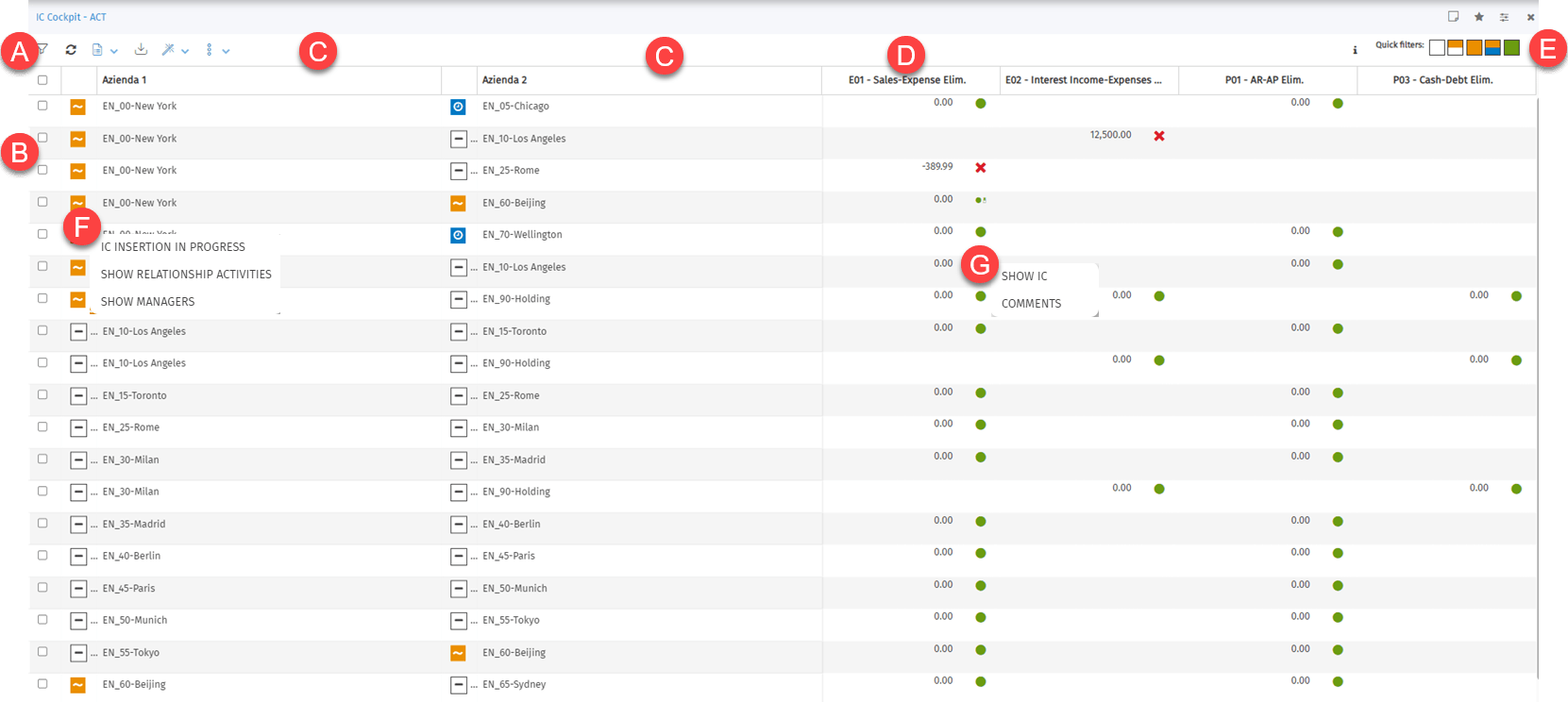
| Element | Description |
|---|---|
| To | Tool bar |
| B | List of inter-company relationships. Within the relationships, Entities are sorted alphabetically. |
| C | Entities, or nodes of entities, part of the relationship and specific targets, depending on the selected relationship type. |
| D | Matching logic applied or scenario/period, depending on the submission type and on the Show on columns option |
| E | Filter displayed relationships by status |
| F | Indicator and actions on the IC data management status |
| G | Indicator and actions on the unbalanced amount |
Actions on this page
| Element | Description |
|---|---|
| Allows you to extract reports from the IC Cockpit. See IC cockpit reports. | |
| Actions on Entities: allows you to run the same operation on several selected entities. The same actions can be run for individual entities, see Activities from the IC data management status indicator. Multiple actions are only available on cockpits that do not have the option 'Allow IC matching even without Balancing' enabled. | |
| Actions on multiple relationships: allows you to run the same operation on several selected relationships. The same actions can be run for individual relationships, see Activities from the IC data management status indicator. Multiple actions are only available on cockpits that do not have the option 'Allow IC matching even without Balancing' enabled. IC relationship by invoice: allows you to set the run parameters and start the relative data processing, see IC Matching window - Invoice matching. Only visible if invoice matching has been activated. | |
| Shows the legend of symbols and colours shown on the page. | |
| Quick filters | Allows you to filter the relationships shown in the list by relationship status. |
| IC data management step indicator | Indicates the current status of the relationship between the entities and the IC data processing status. Also shows you a list of actions that can be run on the entity. |
| Unbalanced amount indicator | Indicates the current status of the unbalanced amount and displays a list of actions that can be run on it. |
Quick filters
Allow you to filter the displayed relationships and see matching statuses when multiple actions are run. The filters follow the criteria below.
| Symbol | Description |
|---|---|
| White | Shows only relationships in which the status of both entities is IC insertion in progress. |
| White/yellow | Shows only relationships in which the status of one of the entities is IC insertion in progress, while the status of the other entity is IC insertion is complete. |
| Yellow | Shows only relationships in which the status of both entities is IC insertion is complete. |
| Yellow/Blue | Shows only relationships in which the status of one of the entities is IC insertion is complete, while the status of the other entity is Waiting for matching. |
| Green | Shows only relationships in which the status of both entities is Submitted. |
Several filters can be selected at once.
IC data management status
The status of the relationship between two entities is shown by the indicator for each entity that forms part of a relationship.
| Symbol | Description |
|---|---|
| The entity is still inserting the IC entries and matching cannot yet be carried out. | |
| The entity has finished inserting the IC entries. The matching process can only start once both entities in the relationship have this status. | |
| The entity has made the relationship available for submission. Before moving to this status, the system checks that the intercompany amounts are balanced. From this moment on, the IC entries between the two entities will no longer be edited. However, it is possible to return to the previous status (YELLOW) as long as the second entity has not completed the submission process. | |
| The relationship between the entities is submitted and the IC entries between the two entities can no longer be edited. Moving from GREEN to YELLOW, or the rejection of the relationship, can only be performed by the consolidator user of the node to which the relationship belongs. |
Balancing indicator
This indicator is shown for every amount and indicates the current balancing status.
| Symbol | Description |
|---|---|
| - Relationship = 0, the relationship/matching logic is perfectly balanced. - Relationship ≠ 0, the relationship/matching logic is unbalanced but the unbalanced amount is lower than the threshold value defined in the IC matching rule. In both cases, the relationship can be submitted. | |
| Balanced amount or unbalanced amount below the threshold with reconciliation account: the relationship can be submitted. The relationship/matching logic has been balanced manually by declaring an amount on the reconciliation accounts. | |
| Balanced amount or unbalanced amount below the threshold with comments: the relationship can be submitted. Comments on the amount are present. | |
| Balanced amount or unbalanced amount below the threshold with reconciliation account and comments: the relationship can be submitted. The relationship/matching logic has been balanced manually by declaring an amount on the reconciliation accounts. Comments on the amount are present. | |
| The relationship/matching logic is unbalanced and the unbalanced amount exceeds the threshold set in the rule: the relationship cannot be submitted. | |
| Unbalanced amount above the threshold despite the presence of reconciliation accounts: the relationship cannot be submitted. | |
| Unbalanced amount above the threshold with comments: the relationship cannot be submitted. Comments on the amount are present. | |
| Unbalanced amount above the threshold despite the presence of reconciliation accounts and comments: the relationship cannot be submitted. Comments on the amount are present. |
Activities from the IC data management status indicator
The IC data management status indicator displays a menu so you can run the following operations. Only the operations available for the specific entity are shown.
| Operation | Description | Conditions |
|---|---|---|
| IC insertion is complete | This operation indicates that the entity has completed the insertion of IC data. The traffic light changes from WHITE to YELLOW for all of the entity’s relationships as the “IC inserted” information relates to total contra-entries. | Only for entities with WHITE status |
| IC insertion in progress | This operation indicates that you want to restore the possibility of editing IC data. The traffic light changes from YELLOW to WHITE for all of the entity’s relationships. | Only for entities with YELLOW status |
| Lock IC data for submission | This operation makes the relationship available for submission. Before changing to BLUE status, the system checks that: - there are no forms open in data entry mode on the entity whose data is being locked - the intercompany amounts are balanced, or that the matching rules present on the cockpit are balanced or have unbalanced amounts below the threshold - the reconciliation accounts are of an amount below the threshold defined on the matching rule. Note: this check is not performed if the user is the relationship Consolidator. - if reconciliation accounts for other accounting have been defined for the cockpit, that the various defined pairs of debit/credit accounts are balanced or have unbalanced amounts below the threshold defined in the process validation rule If some of the checks are not passed, the relative causes are shown in a dedicated window. If it is only the checks on intercompany balancing and reconciliation accounts for other accounting that are not passed, the Consolidator can lock the data in any case. In fact, the warning window shows the Override submission button. | Only for entities with YELLOW status |
| Submit IC data | The declaring entity’s traffic light changes from YELLOW to GREEN and the counterparty’s traffic light changes from BLUE to GREEN. Before changing to GREEN status, the system checks that the intercompany amounts are balanced, showing the relative causes in a dedicated window. The Consolidator can submit the relationship in any case. | Only for entities with YELLOW status when the other entity is BLUE |
| Unlock IC data | The traffic light changes from BLUE to YELLOW. The user does not make the relationship available for submission and wants to continue to insert IC entries. | Only for entities with BLUE status |
| Reject IC data | Both traffic lights (that of the declaring entity and that of the counterparty) change from GREEN to YELLOW. This operation can only be run by the relationship Consolidator. | Only for entities with GREEN status |
| Show relationship activities | Opens a window that shows the history of activities carried out on the relationship (user, operation type, duration, date). | Only from the menu opened from the indicator |
| Show managers | Opens a window that lists the users authorised to run activities on the relationship. Certain users can be hidden using the Exclude from the managers list in the IC cockpit option in the user settings table. | Only from the menu opened from the indicator |

IMPORTANT: only from Actions on multiple relationships, the Lock/Submit IC data action allows you to submit the relationship in a single action, provided that submission rights on both entities.
Activities from the balancing indicator
The balancing indicator displays a menu to run the following operations. Only the operations available for each relationship/IC matching logic are shown.
| Operation | Description |
|---|---|
| Edit IC | Only displayed if the relationship submission step has not started yet, or if the two entities in the relationship have WHITE or YELLOW status. Opens an editable window to manage IC entries and the reconciliation accounts inserted by the entities in the relationship. See IC entry management page. |
| Show IC | Only displayed if the relationship submission step has started, or if one of the two entities in the relationship has BLUE status or both of them have GREEN status. Opens a read-only window showing the IC entries and reconciliation accounts inserted by the entities in the relationship. See IC entry management page. |
| Details | Only shown if the Show P&L on periodic data option is selected when the cockpit is opened (see IC cockpit opening window) or in the case of IC matching logics whose conversion type is at the period average FX rate. Opens a read-only window with the amounts and totals converted into the cockpit currency. |
| Further information | Opens the Comments page to insert comments, load or remove attachments justifying the values inserted. Every comment refers to the set of IC entries identified by the traffic light. these comments can be used to add historical information on the data submission. |
| Manual matching | This needs the component related to Transaction Matching to be active. Opens a window to match the intercompany relationships at the transaction level. The non-matched relationships are shown and you can match them manually For more documentation on Transaction Matching, see the specific documentation available in the CCH Tagetik community. |
| Review matching | This needs the component related to Transaction Matching to be active. Shows in read-only mode the reports that have already been matched manually at the transaction level. |