Credit terms
The credit terms rules allow the system to understand how long after, and how the financial entry is to be made for a cost, a collection, an asset purchase and receivables / payables present in the initial balance sheet.
The management of the credit terms rules is accessible from the administrator-user’s web interface by following the path Setup & Admin > Data Processing > Cash Flow Planning > Financial rules > Credit Terms.
Navbar> Data Processing > Cash Flow Planning > Financial rules > Credit Terms.
Three types of credit terms are available:
- basic: this type of credit terms is used for any type of P&L credit terms (purchases or sales) that do not need outstanding amounts or bills of exchange to be managed for collections/payments in the initial balance sheet that does not manage outstanding amounts. It allows the user to split a collection or payment into twelve due dates and indicate any percentage of the amount that will not be paid or collected.
- advanced with management of outstanding amounts: this type of credit terms is used to manage P&L accounts (typically sales) which provide for the differentiation of collections between direct and bills, it being possible to manage any outstanding amounts for both methods, or for the disinvestment of all those receivables, present on the initial balance sheet, for which it is necessary to manage an outstanding percentage.
- outstanding on Tickler: this type of credit terms is used to manage unpaid amounts to be applied to the cash schedule defined for a certain event representing colllections/payments in the initial balance sheet.
Every credit terms rule is identified by:
- a code. This identifies the credit terms rule. In cases of “$” entities it must always begin with the character “$” in order to avoid overlapping with credit terms inserted by individual entities;
- a description;
-
an entity code. This identifies the entity. It is possible to select either the $ value in order to specify that the rule is common to the group: it can be used by all Entities of the group or the actual Entity code in order to specify that the rule can only be used by that Entity.
-
a calculate credit terms starting from. By enabling this option, all the entries (from P&L account, initial balance sheet and accounting entries), that are generated by running the rule, have the date corresponding to the last day of the month in which the amount to which the credit terms are associated was booked. Otherwise, the date is the one used for the entry of the aforementioned amount. For example, an amount billed on 12/02, for which a credit terms rule of 15 days “month-end” has been defined, following the running of the rule, generates an entry with billing on 31/01 (month-end) and a financial variation on 15/02 (credit terms of 15 days).
The information that the system needs to generate a correct financial variation depends on the type of credit terms.
“Basic” credit terms
This type of credit terms allows the user to split a collection or payment into twelve due dates.
The user must specify:
- the percentage of the amount (in relation to the total amount) to be collected on due date n (n=1 ... 12) and the relative due date. The due date can be expressed in months / days deferred if, for the credit terms rule, the “calculate credit terms from” option is set to “Month end from bill”, or only in days deferred.
 The total of the percentages must be less than or equal to 100
Examples
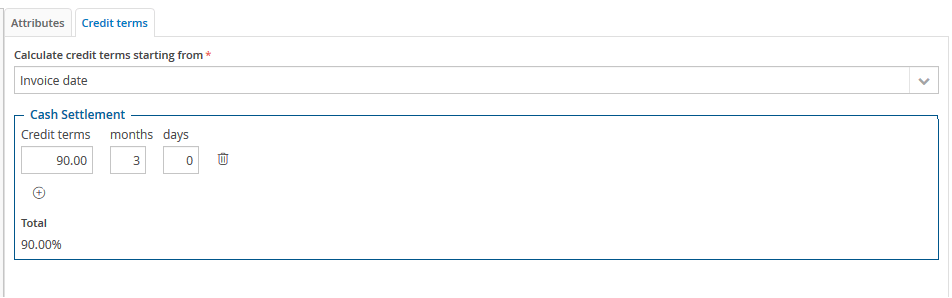
Example 1. 90% collection / payment at 3 months with 10% not paid
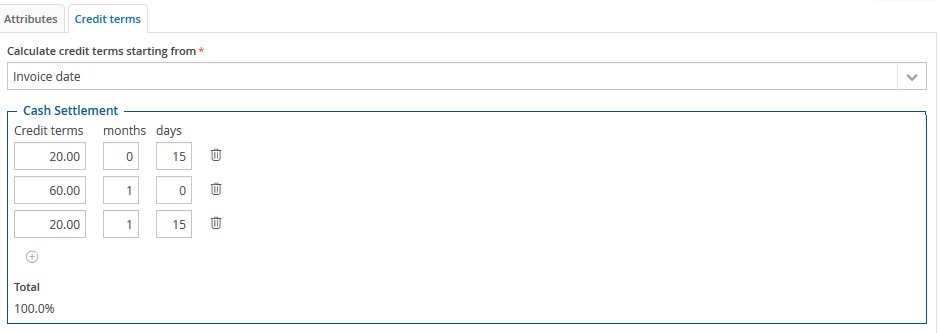
Example 2. Payment of payables at 15 / 30 / 45 days
Credit terms: “Advanced with management of outstanding amounts”
These credit terms allow the user to define two types of collection, cash settlements and bills, to be divided with percentages; for each of these, up to 12 due dates can be defined and further divided using percentages, and it is possible to apply an outstanding percentage (or percentage of payments not made), separately for cash settlements and bills; the user can also declare the delays after which outstanding payments are settled.
The user must specify:
- the percentage of the amount to be collected via cash settlement (% R.D.)
- the percentage of the amount to be collected via cash settlement at due date n (n=1 ... 12) and the relative due date. The due date can be expressed in months / days deferred if, for the credit terms rule, the “calculate credit terms from” option is set to “Month end from bill”, or only in days deferred
- the percentage outstanding on the cash settlement (Outstanding %)
- the percentage outstanding on the cash settlement to be collected at due date n (n=1 ... 12) for the recovery of outstanding amounts and the relative due date. The due date can be expressed in months / days deferred if, for the credit terms rule, the “calculate credit terms from” option is set to “Month end from bill”, or only in days deferred
- any unpaid portion of the amounts outstanding on the cash settlement (expressed in percentage terms) and the relative due date. The due date can be expressed in months / days deferred if, for the credit terms rule, the “calculate credit terms from” option is set to “Month end from bill”, or only in days deferred. On that date, the unpaid receivable is reclassified within “disputed receivables”
- the percentage of the amount to be collected via bills
- the percentage of the amount to be collected using bills at due date n (n=1 ... 12) and the relative due date. The due date can be expressed in months / days deferred if, for the credit terms rule, the “calculate credit terms from” option is set to “Month end from bill”, or only in days deferred
- the percentage outstanding on the bills
- the percentage outstanding on the bills to be collected at due date n (n=1 ... 12) for the recovery of outstanding amounts and the relative due date. The due date can be expressed in months / days deferred if, for the credit terms rule, the “calculate credit terms from” option is set to “Month end from bill”, or only in days deferred
- any unpaid portion of the amounts outstanding on the bills (expressed in percentage terms) and the relative due date. The due date can be expressed in months / days deferred if, for the credit terms rule, the “calculate credit terms from” option is set to “Month end from bill”, or only in days deferred. On that date, the unpaid receivable is reclassified within “disputed receivables”
- The total “cash settlement percentage” and “bills percentage” must be equal to 100%
- If the “cash settlement percentage” is anything other than 0, the total of the “cash settlement percentages” must be equal to 100, otherwise they must all be zero
- If the “bills percentage” is anything other than 0, the total of the “bills percentages” must be equal to 100, otherwise they must all be zero
- If the “outstanding percentage” is anything other than 0 (whether for cash settlement or bills), the total of the “outstanding percentages” plus the portion “not paid” must be equal to 100, otherwise they must all be zero
“Outstanding on Tickler” credit terms
These credit terms allow the user to manage the outstanding amounts to be applied to the cash schedule of actual entries.
The user must specify:
- the outstanding percentage (Outstanding %)
- the outstanding percentage to be collected at due date n (n=1 ... 12) for the recovery of outstanding amounts and the relative due date. The due date can be expressed in months / days deferred if, for the credit terms rule, the “calculate credit terms from” option is set to “Month end from bill”, or only in days deferred
- any unpaid portion of the amounts outstanding (expressed in percentage terms) and the relative due date. The due date can be expressed in months / days deferred if, for the credit terms rule, the “calculate credit terms from” option is set to “Month end from bill”, or only in days deferred. On that date, the unpaid receivable is reclassified within “disputed receivables”
The total of the percentages (percentage 1 + ... + percentage 12 + percentage not paid) must be equal to 100
Generally, the most frequently used type of credit terms are generic credit terms, for both purchases and sales, where the user does not want to manage any particular kind of outstanding amounts, and also for collections/payments of actual balance sheet items via credit terms.
 When saving, the system translates the information entered into a list of events and indicates, for each of them, the delay in days and months to be applied to the date on which the event to which the credit terms are associated occurred and a percentage (of the total amount) representing the percentage of the amount attributable to the event. This list can accessed directly from the administrator-user’s web interface, following the path Setup & Admin > Data processing tile > Cash Flow Planning >Financial rules > Credit terms > Actions (
 ) > Detail.
Navbar > Data processing > Cash Flow Planning >Financial rules > Credit terms > Actions () > Detail.