Analytical Workspaces - Page structure
 Admin
Admin
 Application database > Analytical Workspaces tile
Application database > Navbar > Analytic Information Hub
Introduction
Analytical Workspace pages have a similar structure and allow you to configure the following elements:
- individual workspaces
- Advanced Analytics Models libraries
What it looks like
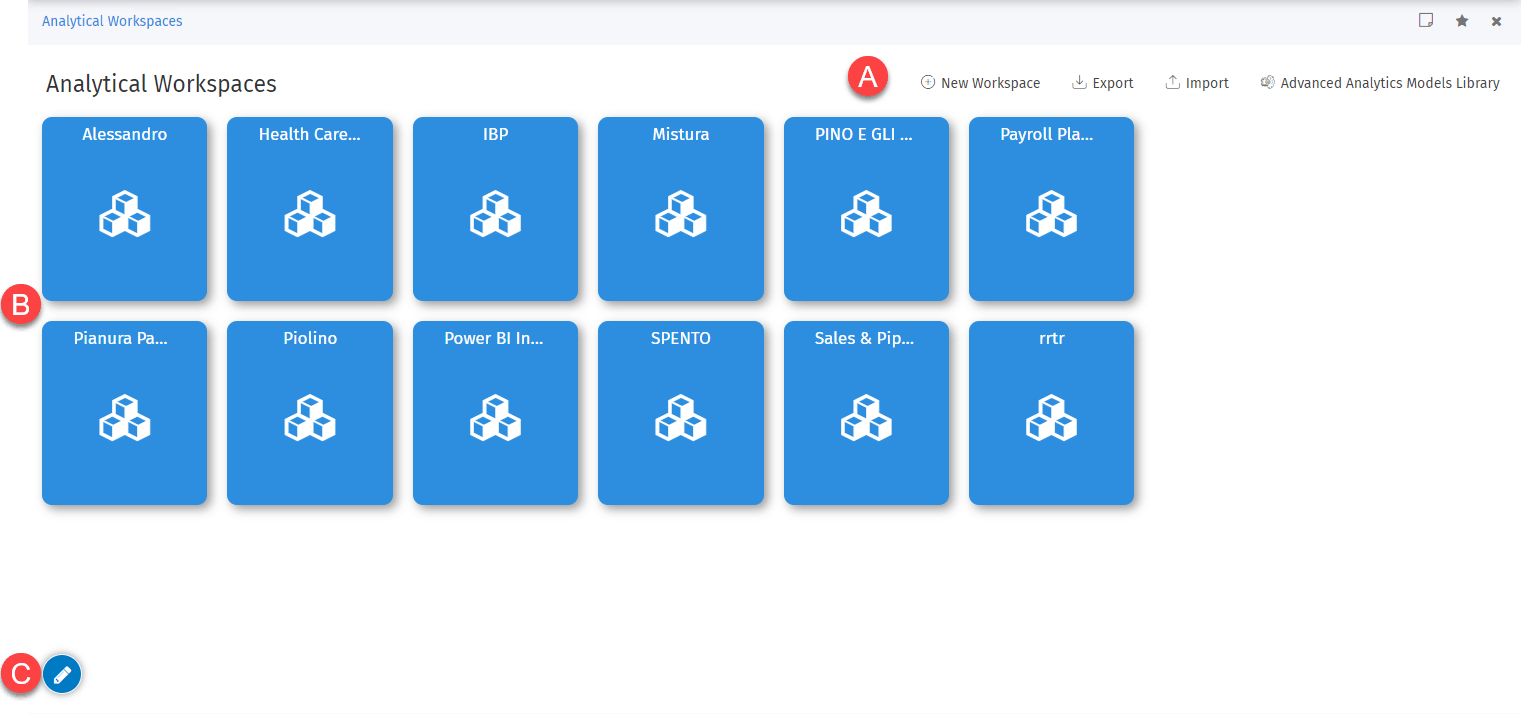
| Part | Element | Description |
|---|---|---|
| A | Workspace element management buttons | These allow you to create and manage new elements. |
| B | Layout management buttons | These allow you to customise the page layout. |
| C | Specific tiles of individual workspaces | These allow you to access the content of the relative element. By default they are sorted by description. |
Layout management buttons
The following buttons are accessible from the  menu.
menu.
| Element | Description |
|---|---|
| Adds the tile of an element chosen from among those not yet present on the homepage. | |
| Saves the tile's current layout. | |
| Cancels unsaved changes to the layout. |
The following buttons are only accessible in the tile in the edit layout step.
| Element | Description |
|---|---|
| Opens a window to set the tile colour and/or select an image for the tile from the system files. Note: it is not possible to set an image for individual workspace tiles. | |
| If selected, it becomes and prohibits the tile from being dragged elsewhere in edit mode. | |
| Deletes the layout tile. |