Enrichment with Reference dataset
Function and purpose of the operation
The Enrichment with Reference dataset operation allows you to enrich a target dataset using a reference dataset. In particular, the enrichment operation transfers the values of the attribute fields of a reference dataset, which acts as the source, to the columns of a target dataset. This is only possible when the datasets contain columns with the same field code and the same values.
It is possible to set the fields of the reference dataset as condition fields. If a condition field of the reference dataset is not specified, every value in the fields of the source dataset which corresponds to the target dataset makes the condition true.
Enrichment operations on ranges of values
On non-Advanced settings reference datasets (see Reference dataset), it is possible to define advanced settings for enrichment operations. These allow you to enrich the data, considering ranges of records in relation to a reference value. To do this, the following elements must be defined in the DTP operation settings:
- Target dataset field on which the enrichment operations will be performed
- A operator detects whether another field of the same target dataset is less than, less than or equal to, greater than, or greater than or equal to limit values indicated in the source field of the reference dataset.
- Source field of the reference dataset indicated with the code of the field or an SQL formula to calculate its value.
Open ranges can only be defined for data or number fields. For string fields, however, it is necessary to insert one condition to indicate the lower limit and one condition to indicate the upper limit of the range.
The system considers such advanced settings to be exceptions to the standard functioning of the enrichment operation, which is applied to all the other dataset fields.
Note: the % character has no specific function in advanced conditions and is treated as any other character.
These advanced settings are valid as exceptions to the standard functioning of the enrichment operation.
Note: If both reference and target have a null value for a column used as a condition, the system treats them as two different rows. Therefore, the condition is not satisfied.
Conditions with special characters
Special conditions can be used on the fields of the reference dataset by inserting values followed by the % character. For example, A% corresponds to all the elements that start with A. In this case, instead of correspondence between the values, the system uses the condition defined by the SQL operator 'like'. It is also possible for the system to check several conditions on the same row, generating new rows and enriching the existing rows. When the operation generates rows, the system shows a row duplication error message and details of the first 10 excess rows in the audit.
Example of how the operation works
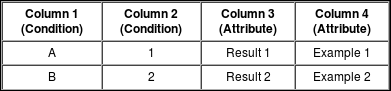
This example shows how an operation to enrich a target dataset using a reference dataset works.
The target dataset will show the following details.
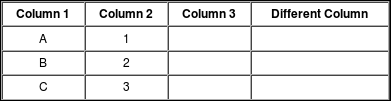
The reference dataset will show the following details.
At the end of the enrichment operation, the target dataset will show the following details.
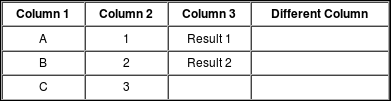
Note: if the reference dataset had "%" reported in the condition column Column 1 for the first row, this would check the condition for all the values of that column on the target dataset, and therefore both the A values and the B values, bringing the total number of rows generated from two to three. Two of the generated rows would therefore be generated by checking the first condition, and one would be generated by checking the second condition. This causes an error on the operation that uses it, due to the duplicate rows generated by a condition. However, no problem would be detected for deploy type datasets (see Reference dataset - Deploy).
Exceptions management (Level type field)
A reference dataset field can be configured as a Level. This type is useful for having a column of the dataset in which a level of exception to a behaviour defined in the reference dataset is specified.
Note: The column of type LEVEL (if present) cannot have null values.
Example of how a level type field works
This example shows how an operation to enrich a target dataset using a reference dataset works, in the presence of a level type field on the reference dataset.
The reference dataset will show the following details.
| COND_1 | COND_2 | ATTRIBUTE | LEVEL |
|---|---|---|---|
| AA | % | default A | 0 |
| AA | X | new value | 1 |
| B | W | default B | 0 |
The target dataset will show the following details.
| COND_1 | COND_2 | ATTRIBUTE |
|---|---|---|
| AA | X | |
| AA | Y | |
| AA | Z | |
| B | W | |
| C | W |
At the end of the enrichment operation, the target dataset will show the following details.
| COND_1 | COND_2 | ATTRIBUTE |
|---|---|---|
| AA | X | new value |
| AA | Y | default A |
| AA | Z | default A |
| B | W | default B |
| C | W |
Note: the condition to be applied on which the higher level is set overwrites the condition defined with the previous level.
Filters management (Filters type field)
A reference dataset field can be configured as a Filter. This type is useful for having a dataset column in which a filter to be applied to the target dataset in the run update step due to the same row is specified.
Note: The FILTER type column (if present) may also have null values, in which case the enrichment is not filtered.
Example of how a filter type field works
This example shows how an operation to enrich a target dataset using a reference dataset works, in the presence of a filter type field on the reference dataset.
The reference dataset will show the following details.
| COND_1 | COND_2 | ATTRIBUTE | FILTER |
|---|---|---|---|
| AA | % | default A | CAMPO_INFO = '1' |
| AA | X | new value | CAMPO_INFO = '0' |
| B | W | default B | COND_1 = 'B' |
The target dataset will show the following details.
| COND_1 | COND_2 | CAMPO_INFO |
|---|---|---|
| AA | X | 1 |
| AA | Y | 0 |
| AA | Z | 0 |
| B | X | AA |
| B | W | B |
At the end of the enrichment operation, the target dataset will show the following details.
| COND_1 | COND_2 | ATTRIBUTE |
|---|---|---|
| AA | X | default A |
| AA | Y | |
| AA | Z | |
| B | W | default B |
| C | W |