Virtual dataset fields tab
 Application database > Analytical Workspaces tile > workspace tile > Virtual Datasets and Datasources tab > virtual dataset tile > Fields tab
Application database > Navbar > Analytic Information hub > workspace tile > Virtual Datasets and Datasources tab > virtual dataset tile > Fields tab
Purpose of the tab
This tab allows you to define the fields of the virtual dataset and the relative properties. These fields can be fields of other physical datasets or calculated fields.
Note: the fields of a physical dataset can only be added to the virtual dataset once.
What it looks like
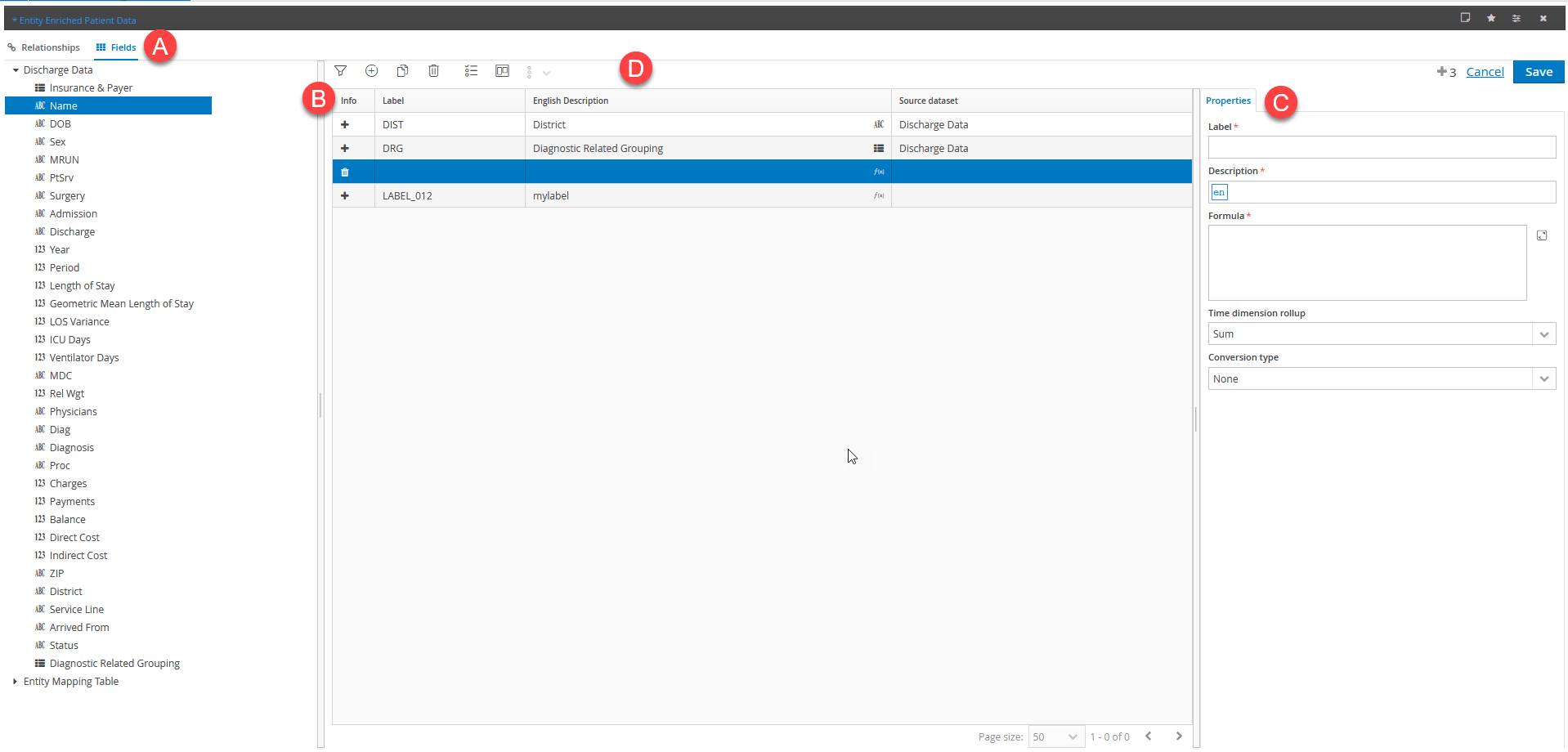
| Part | Description |
|---|---|
| A | Dimensions tree |
| B | Fields table |
| C | Field properties panel |
| D | Action buttons |
Page sections
| Element | Description |
|---|---|
| Dimensions tree | Shows the fields of the physical datasets that have been related and allows you to add them, by dragging, as fields returned by the virtual dataset. |
| Fields table | Lists all the fields that define the virtual dataset and allows you to reorder them by dragging. Note: the fields cannot be reordered if any values have been edited but not yet saved. |
| Field properties panel | Shows the properties of the selected field in the fields table. Note: if the source physical dataset is associated with a dictionary, the dictionary settings will be displayed. |
Dimensions tree details
| Element | Description |
|---|---|
| Dimensional element that can be added to the fields table by dragging. |
Buttons in the fields table
| Element | Description |
|---|---|
| Adds a formula field (or a calculated field). | |
| Opens a page to run the mapping between the fields of the virtual dataset and the CCH Tagetik dimensions. This allows you to align the Financial Workspace layer with the Analytical Workspace layer using the Quick Data Loader. See | |
| Delete a field from the virtual dataset. IMPORTANT: when a virtual dataset field is deleted, any forms with references to the deleted field will become invalid and must be edited manually. |
Field properties panel
| Element | Description |
|---|---|
| Label | Field ID. Alphanumeric codes are permitted (maximum 30 characters). Only ISO Latin characters are permitted, and reserved keywords are not accepted. When a field originating from physical datasets is added, the identifier is automatically completed with the code of the physical dataset field, which can be edited. |
| Description | Description of the field in all languages managed in the environment. When the field originates from physical datasets, the description is completed automatically with the description of the original field, but can be edited. |
| Calculated fields | |
| Formula | Allows you to insert a formula the value of which is calculated at runtime. The correct syntax will depend on the type of database used. Non-calculated fields of the virtual dataset can be called up in the formula using the Label of the field to which you want to refer, between braces preceded by the $ symbol (e.g. ${label}). |
| Time dimension rollup | Only used for numerical calculated fields. Allows you to define the roll-up logic on the time dimension, or the data aggregation method on the scenario/period dimension used by the reporting engine in multidimensional matrices. - Sum: (default) the data related to the scenarios/periods identified by the chosen period length are added together. - Last: only the data related to the chosen scenario/period are considered, regardless of the defined period length. In reporting, if the virtual dataset contains the Account dimension, the applied roll-up logic is deducted from the Nature and the Type of the account, rather than from the measure. Note: the roll-up logic is calculated after the formula. |
| Conversion type | Allows you to define the type of conversion to be applied. - Average FX rate: the cumulated amount is the result of the conversion at the "average FX rate" defined in the FX rates table. - Period average FX rate: the amount is the result of the conversion of the period at the period average FX rate defined in the FX rates table. - Final FX rate: the amounts are the result of the conversion at the "final FX rate" defined in the FX rates table. It is typically used for the Balance Sheet, Other stocks and details accounts, but not for the Net Equity accounts which are normally converted at the historical FX rate, not available on Analytical Workspaces. - None: the default value is used for accounts not subject to the currency conversion process (e.g. number of employees, volume of sales, etc., as they are numbers not amounts of currency). It can be used for Other Variations/Stock accounts and initial balance variation accounts. Note: this is read only for numeric fields and inherited from the value of the source dataset. |
| Physical dataset fields | |
| Source dataset | Indicates the field's source dataset. |
| Field values | Allows you to select the dictionary that defines the list of valid values for the field in data entry mode. You can choose from the dictionaries of the current workspace. For dimensional fields, by default the system proposes a standard dictionary composed of table elements of the field itself. |
| Query field code | In case of an SQL dictionary, it allows the user to select the field of the query that identifies the code of the dictionary elements. |
| Query field description | In case of a SQL type dictionary, it allows the user to select the field of the query that identifies the description of the dictionary elements. If the value of the description field does not match the name of the field in the query, then the system will use, if available, the field whose name is obtained by concatenating the value supplied with the numeric identifier of language, 0...3 for the languages that are available at level of the whole application, namely 0...24 for specific languages of the reporting module, if they are enabled. |
| Out of dictionary values allowed | Enables the manual insertion of values not present in the dictionary. |
| Display mode | Displayed content that identifies the field in the columns of forms in navigation or data entry mode. - Code - Description - Code and Description The preset display is the same as that of the physical dataset in the relationships tab (see Relationships tab) and is editable. |
Links on the page
Accessible via the  button in the fields table.
| Element | Description |
|---|---|
| Financial workspace mapping | Mapping between the virtual dataset fields and the logical dimensions of CCH Tagetik data to allow the Quick Data Loader to automatically align the Financial Workspace layer with the Analytical Workspace layer. |