Tuple management
Some taxonomies include the report of tuples.
A tuple is a fact containing several values. Specifically, a tuple is made up of several nested items, each one containing its own value.
Two types of typle are available:
- the same tuple appears in more occurrences, with a dimension which serves as discriminating factor. In Example 1, the tuple 1 has three occurrences in which the discriminating factor is the geographic area, represented by the item 0:
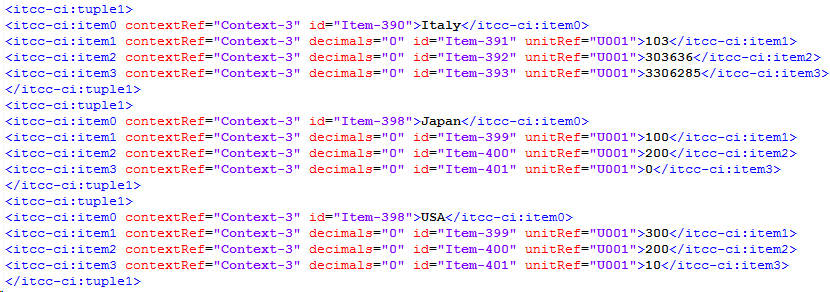
Example 1
- if the tuple needs one occurrence only: for example, it contains information such as the address of the reporting company. In this case, the file will contain one single tuple, like in Example 2:

Example 2
The system allows the management of both cases. Below we describe how to manage them.
The tuples are defined manually within the system. After importing the items that compose the taxonomy, the list of tuples can be found by setting the filter "substitution group" to "tuple" in the "Data Entry & Reporting - XBRL - Taxonomy- Item" window menu.
From the usual menu, the "Link definition" tab allows you to define the items that compose each tuple and their sorting (sorting according to which the system will insert the items into the tuple when generating the file).
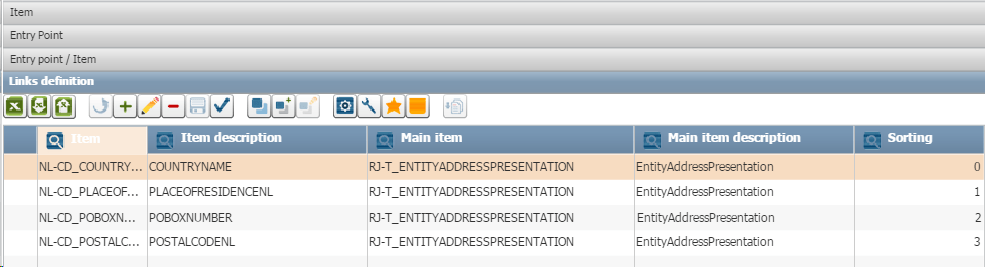
After defining the items that compose the tuple, it is necessary to prepare data that will fill the XBRL_DATA table.
This table includes the PARAM_TUPLA field.
If the tuple has only one occurrence (without discriminating factor), this field won't have to be defined. Just insert the value of all items that compose the tuple.
On the contrary, if the tuple has more than one occurrence, then it will be necessary to define the PARAM_TUPLA field with the discriminating value of each occurrence, for each item of the tuple, except the item with sorting 0 (this item represents the information that distinguishes the occurrence of the tuple). The system will find the item with sorting 0 of the tuple and will assign it the value shown in the field PARAM_TUPLA, for each occurrence. So, in the case of Example 1, it is necessary to insert into the XBRL_DATA table the Item1, item2 and item3 with their values for the Italy occurrence and in the PARAM_TUPLA field the "Italy" value for each one.
For the second and third occurrence, it is necessary to proceed in the same way, by setting to PARAM_TUPLA, the values "Japan" and "USA".