The grouping function
Description
Grouping is one of the functionalities included in web forms. It supports the following formulas:
- SUBTOTAL
- Algebraic sum of cells (does not support the native SUM function)
Grouping is performed when:
-
The items involved in a formula are adjacent and belong to the same level.
-
a. Items that end up adjacent after the lower-level grouping has been run should also considered adjacent.
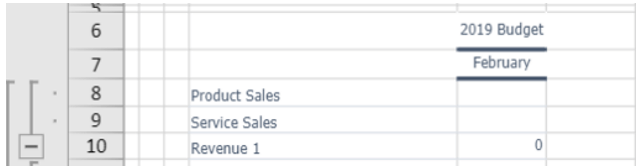
Adjacency between items involved in a formula: "Product Sales" and "Service Sales" are adjacent and both involved in the formula that determines "Revenue 1"
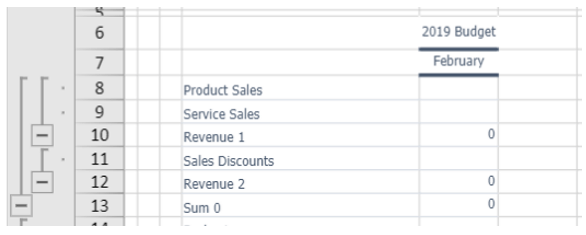
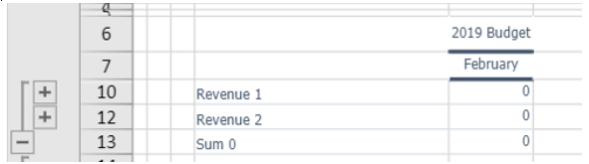
Adjacency between items after the "Revenue 1" and "Revenue 2” lower-level groupings have been run
- The items involved in a formula and the formula itself are adjacent

Adjacency between items and formulas. Sum 1 is the sum of "Revenue 4" and "Revenue 5"
- The formula contains a single item and this is adjacent to the formula
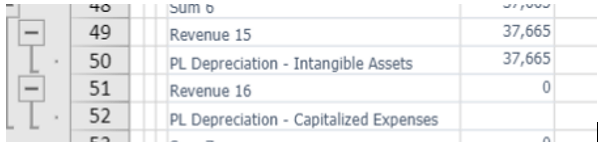
Grouping of a single element adjacent to the formula
The grouping’s orientation is determined by the "subtotal before the detail" flag".
- If the flag is not selected, the grouping’s orientation is standard and only formulas which have adjacent items (and items that end up adjacent after lower-level groupings have been completed) above the formula will be grouped.
- If the flag is selected, the grouping’s orientation is the opposite of standard and only formulas which have adjacent items (and items that end up adjacent after lower-level groupings have been completed) below the formula will be grouped.
EXAMPLE 1 - "subtotal before the detail" not selected
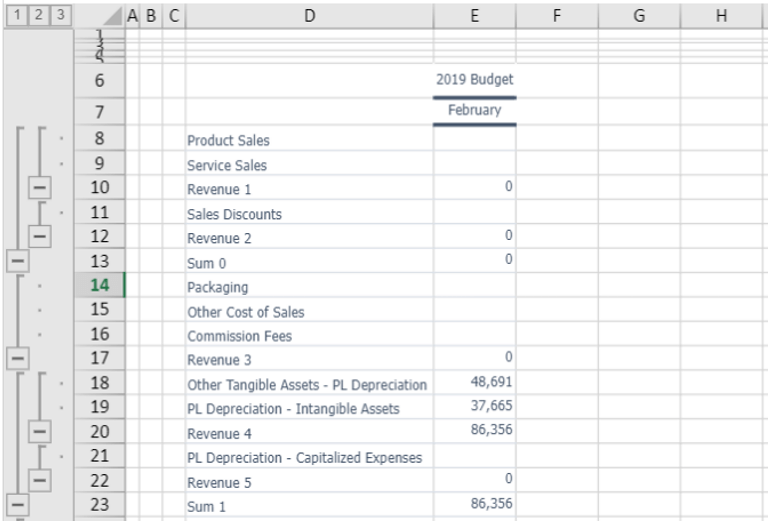
View of an FST, in analytical mode, with standard grouping orientation involving all rows with formulas having adjacent items and items above the cell containing the formula
EXAMPLE 2 - "subtotal before the detail" selected
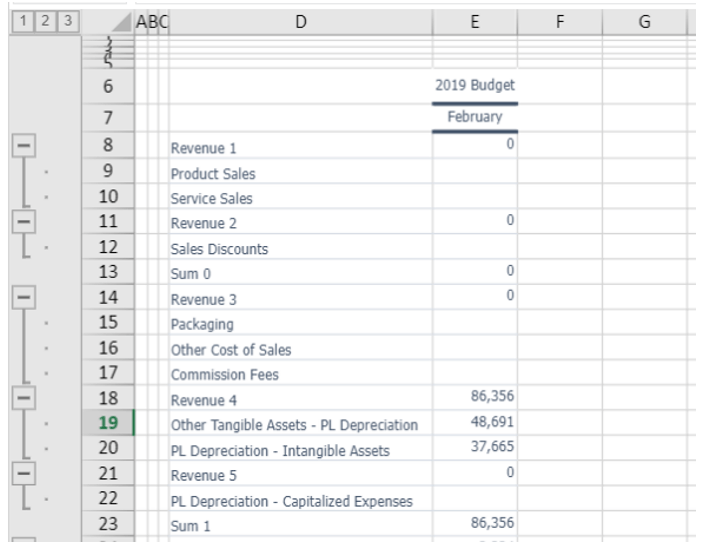
View of an FST, in analytical mode, with grouping orientation opposite to the standard, involving all rows with formulas having adjacent items and items below the cell containing the formula
 EXCEPTION There is an exception to this behaviour for Synthetic-type FSTs. In this case, the grouping’s orientation is determined by the first formula to be used
- If the formula refers to items positioned above, the grouping’s orientation is standard and only formulas that use adjacent items above the formula will be grouped.
- If the formula refers to items positioned below, the grouping’s orientation is opposite to the standard and only formulas that use adjacent items below the formula will be grouped.
Example 1 - synthetic FST with items above the formula

Configuration of an FST with formulas adjacent to the items involved in the formula and positioned above. Code 030 is the sum of codes 001 and 002, which are adjacent and positioned above, while Code 070 is the sum of codes 050 and 060, adjacent and positioned above
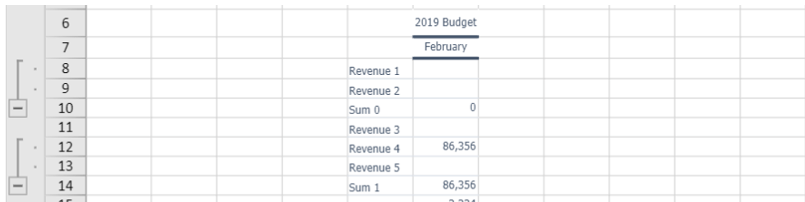
View of the FST from Figure 5, in synthetic mode, with standard grouping orientation visible on row 10 (Sum 0 with FST Code 030) and row 14 (Sum 1 with FST Code 070)
Example 2: synthetic FST with item below the formula

Configuration of an FST with formulas adjacent to the items involved in the formula and positioned below. Code 030 is the sum of codes 010 and 020, which are adjacent and positioned below, while Code 070 is the sum of codes 040 and 050, adjacent and positioned below
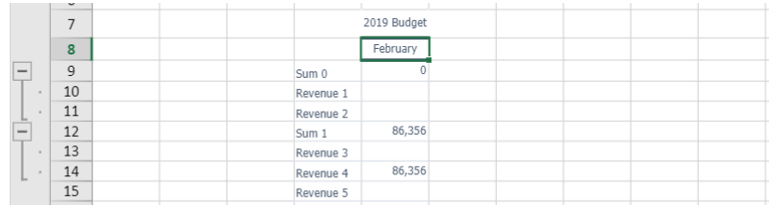
View of the FST from Figure 7, in synthetic mode, with grouping opposite to the standard orientation visible on row 9 (Sum 0 with FST Code 030) and row 12 (Sum 1 with FST Code 070)