Variable Scope
A variable declared inside a node definition is visible only to other statements inside the same definition. This property lets you use the same variable name inside of more than one definition without worrying about the names conflicting.
For example, the following definitions both use a variable named y. However, since the variables are declared inside of separate node definitions, they are unrelated. You can change the value of one instance of y without affecting the other.
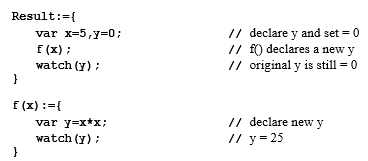
To be more precise, it is not the fact that the variables are declared inside definitions that makes them local to that definition. It is because they are declared inside braces { }. By using braces inside of a single definition as follows, you can accomplish the same function as the two definitions above:
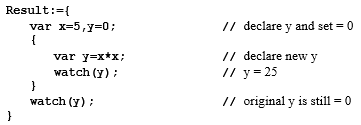
Note that y is declared in two places inside the same definition. However, since the second declaration is enclosed in braces, it is separate from the first. Note that even though x is declared outside the inner set of braces, it is still visible inside the inner braces.
The rules for variable scope are simple. Any variable declared inside of braces is visible only inside of those braces. In addition, any variable declared inside of braces is visible everywhere inside of those braces, including inside of nested braces. Following is an example:
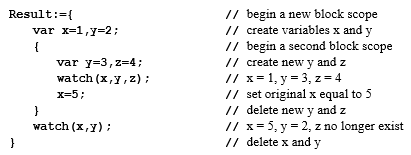
The first var statement creates the variables x and y and initializes their values to 1 and 2 respectively. The second var statement creates a new instance of y that is distinct from the original y. Even though the second var statement sets the value of y to 3, the original y still has a value of 2. However, you cannot access the original y because it has been declared as a new variable with the same name that shadows the original. Note that this is not true for x.
Inside of the second set of braces, the variable x is still accessible. Therefore, you can change the value of x. When you exit the nested braces, the change you made to the value of x persists. However, the change you made to y does not persist because the change was made to a different instance of y, and the changed y no longer exists. Similarly, the variable z that was defined inside of the nested braces no longer exists.
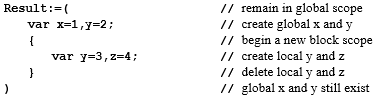
Instead of using braces to enclose a set of statements, you can use parentheses ( ). Parentheses and braces function in almost the same way. The difference is that parentheses do not create a new block scope. For example, if you change the inner set of braces to parentheses, the new declaration for y replaces the original declaration:
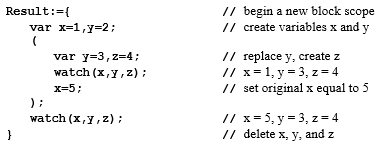
You can replace the outer set of braces with parentheses as well. If you do this, the variables x and y are declared as global variables. This means they continue to exist after execution of the node Result has finished and they can be accessed by other functions.