Report List Wizard window: second tab
Excel > CCH® Tagetik >  Report list
Excel > CCH® Tagetik >  Design > (Left-hand panel) select form >
  > Report list
Purpose of the second step
This step allows you to define the forms/ad hoc forms/Excel sheets to be excluded from the Report list.
What it looks like
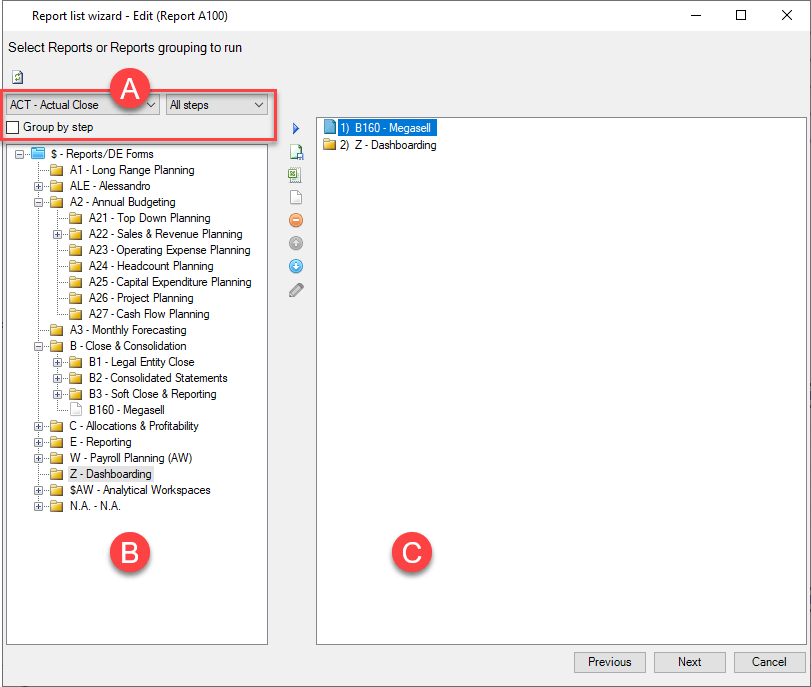
| Element | Description |
|---|---|
| A | Form search filters by process and step to which they belong. Group by step: groups forms by step if the process includes several steps. |
| B | List of grouped forms based on the form grouping nodes |
| C | Forms in the Report list |
Buttons
| Element | Description |
|---|---|
| Refreshes the list of forms. | |
| Adds the form selected in the list to the Report list. | |
| Adds an ad hoc form to the Report list. | |
| Adds an Excel file to the Report list. | |
| Adds an empty sheet to the Report list. | |
| Removes the selected element from the Report list. | |
| / | Moves the element selected in the Report list up or down the list. |
| Renames the element selected in the Report list. |