Quick Data Loader - Datasource mapping page
 Admin
Admin
 Application database > Analytical Workspaces tile > workspace tile > (Dataset tab) dataset tile >
  > Datasource Mapping
Application database > Navbar > Analytical Information Hub > workspace tile > (Dataset tab) dataset tile > > Datasource Mapping
Purpose of the page
This page allows you to configure and save the mapping between the dimensions of an external source, called a datasource, and the fields of the Analytical Workspace dataset from which the page was opened.
This mapping is reused automatically by the Quick Data Loader when, during the data loading step, it detects the specific relationship between the datasource and the dataset of which the mapping preferences set was saved.It is typically used when the Quick Data Loader is used from the contributor cockpit, or when running Data Transformation Packages.
It can also be launched from the datasource mapping button on the Home tab of the data entry interface of the Reporting Data Entry web forms.
What it looks like
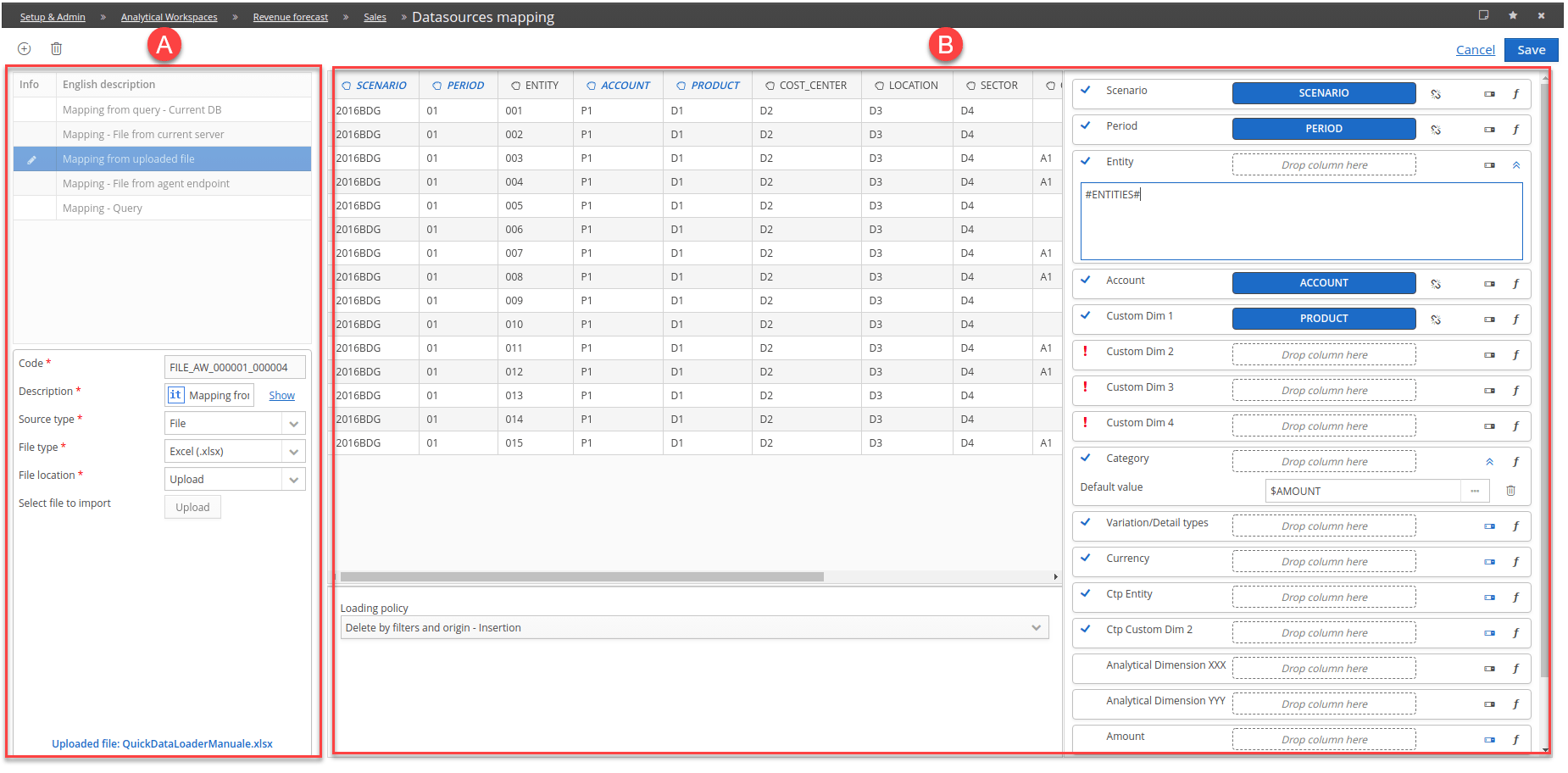
| Element | Description |
|---|---|
| A | Datasource management section |
| B | Section for mapping datasource dimensions to the current dataset dimensions. |
Buttons and icons on the page
| Element | Description |
|---|---|
| Allows you to add a datasource. | |
| Allows you to remove a datasource. | |
| Automatic Mapping | Automatically maps the datasource dimensions to the current dataset dimensions. |
| Reset mapping | Eliminates the relationships already made for the selected datasource. |
| Cancel | Cancels the changes made on the selected datasource. |
| Save | Saves the changes made on the selected datasource. |
| Datasource rows | |
| Allows you to change the mapping of the datasource dimensions | |
| Datasource added. | |
| Datasource removed. | |
| Datasource management | |
| Upload | (Only with File source type) Uploads data from the source file into the mapping management section. |
| Load data | Uploads data from the source file into the mapping management section. |
Icons in the datasource rows
| Element | Description |
|---|---|
| Datasource added. | |
| Datasource removed. |
Fields in Datasource Management
Only the fields specific to this page are described in the following table.For more details on the source criteria definition fields, see Quick Data Loader - source/target definition window.
| Element | Description |
|---|---|
| Code | Code of the mapping preferences set. |
| Description | Description of the mapping preferences set. |
Mapping management section