Intelligent Data Loader - Import criteria definition window
 User|
User| 
 Navigation Panel > Processes > select process > User Tools > Data Integration > Intelligent Data Loader
Purpose of window
This modal window allows the Intelligent Data Loader to run in a multi-organisation process. It is only possible to run the Intelligent Data Loader if beta functionality is enabled and if you adre in a multi-organisational process in an Entity or Custom dimension step.
This window allows you to perform the following tasks
- Select the data from the source to be imported into the target.
- Select the target.
- Define the mappings between source and target
- Define criteria for overwriting or deleting data present prior to import.
What it looks like
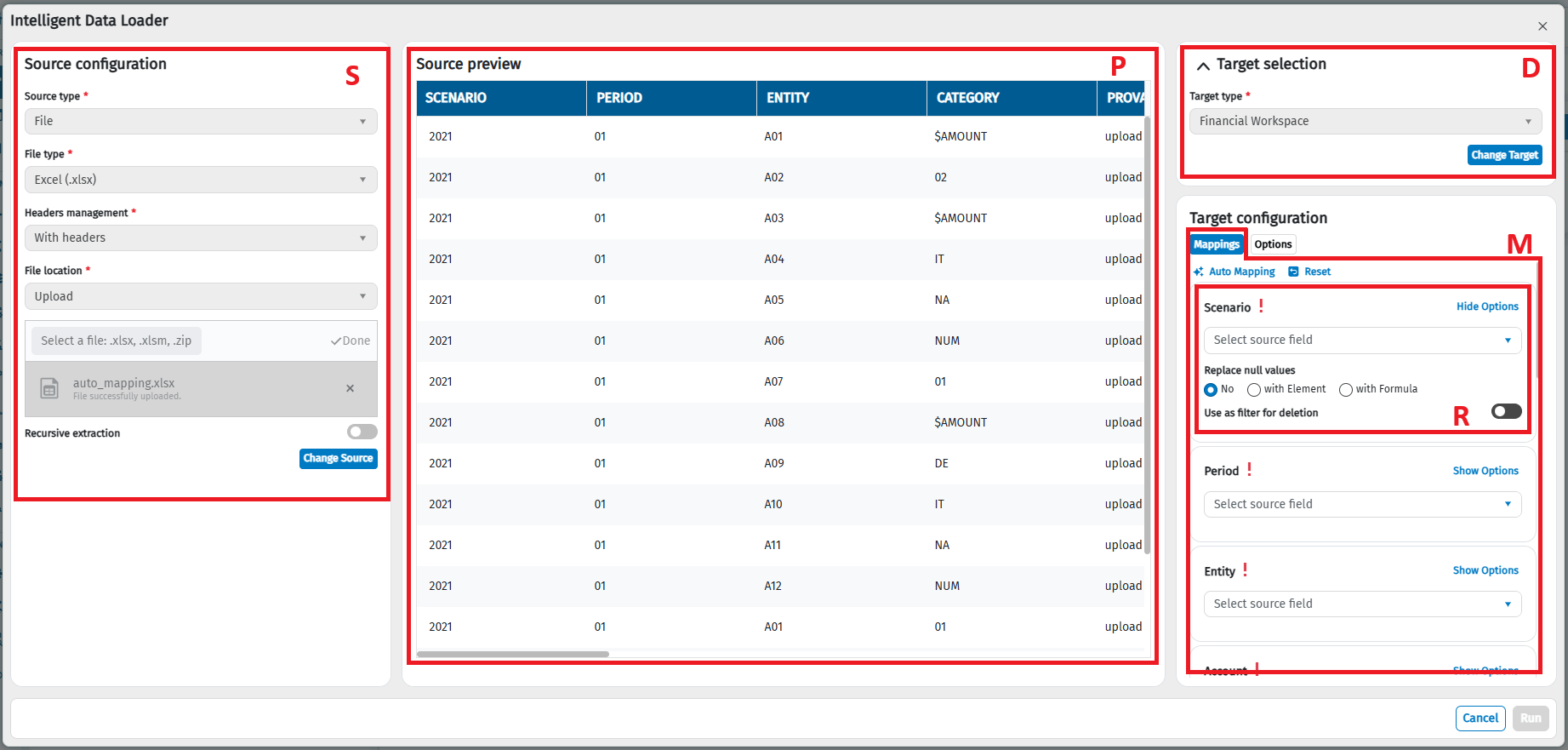
| Element | Description |
|---|---|
| P | Source selection |
| P | Target selection |
| M | Dimensions mapping management section |
| R | Dimension relationship row |
| O | Calculation and data management options: - Only with Financial Workspace target. Options for managing the type of amount calculation without counterparty. - Options for deleting data already present in databases before the data import. - Only for processes with scenario/period submission and a Financial Workspace type target. Options for restoring data from the previous period. |
Source data section
| Element | Description |
|---|---|
| Data columns | Every column shows the values present on the data source, every column will have as its header: - the header that it has in the data source, if present. - the progressive numeric code of the rows in the column if the source does not generate tables with headers: - the column header, if available (only for spreadsheet or query type sources). - the dataset field header (only for Analytical Workspace type sources). Note: If the data source consists of files with different headers and the header view is selected, the headers of all files will be displayed, without duplication. A maximum of 15 rows are displayed per column. |
Dimension mapping section
| Element | Description |
|---|---|
| Auto Mapping | Automatically maps source columns with target columns based on name matching. |
| Reset | Cancel mappings performed |
| Dimension relationship rows | Every row shows the following: - Only with Financial Workspace type target. The logical dimensions of the Financial Workspaces of CCH Tagetik. |
Buttons and icons in the dimension relationship row
| Element | Description |
|---|---|
| Obligatoriness indicator | - : mandatory dimension already managed, management can be done via relating the columns, with default values (see Default value) or both - : mandatory dimension not managed. The import cannot continue if this is not managed. - empty: optional dimension. It can be handled either via mapping or by default. |
| dropdown menu | This allows you to relate a source column to a target dimension. |
| Use Delete Filter (Toggle) | If active, it includes the dimension as a filter when deleting (see Data calculation and management options section). |
| Show Options / Hide Options | Shows and hides advanced options to define the replacement of null values and the use of the deletion filter |
| Replace null values | Allows you to select the type of replacement for null values: - No: do not replace any null values - with Value: replaces null values with the default value entered in the field below null source values with the default value. |
| Date | Only with File or OData source types and data dimension types, it allows you to enter the date format with which to interpret the text originating from the external source. The entered format must match the data format of the source file and respect the java Oracle SimpleDateFormat class standard. |
Data calculation and management options section
| Element | Description |
|---|---|
| Amounts type without Counterparty | Only with target: Data (Amounts, Intercompany). Allows you to define the data management policy when the amount type has no counterparty. - Gross: the system considers all amounts without a counterparty as gross amounts and amounts with a counterparty as intercompany - 3rd party: the system considers both amounts without a counterparty and amounts with a counterparty as intercompany Note: amounts with a counterparty are always also loaded as intercompany in any case. |
| Deletion policy | This allows you to define the deletion policy for the data existing before the import with Quick Data Loader. - Delete by execution context, origin and for the dimensions with toggle enabled: for data originating from Quick Data Loader, the old data value will be deleted when new data with the same identification criteria are entered (e.g. in a context with scenario, period, entity and amount, when a new amount datum is entered on the same scenario, period, entity combination, the old amount is replaced). It also deletes dimensions with active in the dimension relationship row. - No deletion - Delete by execution context and dimensions with toggle enabled: deletes the old data when new data with the same identification criteria is entered (e.g. in a context with scenario, period, entity and amount, when a new amount datum is entered on the same scenario, period, entity combination, the old amount is replaced). It also deletes dimensions with active in the dimension relationship row. |
| Carry forward policy | Only for submission processes by scenario/period and with Data (Amounts, Intercompany) type target. Allows you to define how to reopen data from the previous period when the period length dimension is set to a periodic value and the imported data is not already progressive. - Driven by imported data: the data from the previous period will be carried forward, based on the value that the imported data has over the previous period, for the same dimensions, and will be made cumulative (without considering the origin) - Driven by filters applied by the Deletion policy: the data from the previous period will be carried forward, based on the value of the dimensions used as filters in the Deletion policy and will be made cumulative. |
| Period Length | This allows you to indicate whether the period over which the source amounts are calculated is cumulative (adding amounts), or periodic (monthly, bimonthly, etc.). |
Buttons in the modal window
| Element | Description |
|---|---|
| Reverse | Closes the current window without processing the data. |
| Run | Runs data processing. |
Table of Sources and Targets enabled in the Intelligent Data Loader
| Source | Target | Status |
|---|---|---|
| File | Financial Workspace | Enabled on Custom dimension and Entity if beta functionality is enabled. |