Lookup tables window
 User |
ETL tile > ETL Domains > Lookup Tables link >
Note: if the ETL domain is locked, the window will open in read-only mode.
Purpose of window
What it looks like
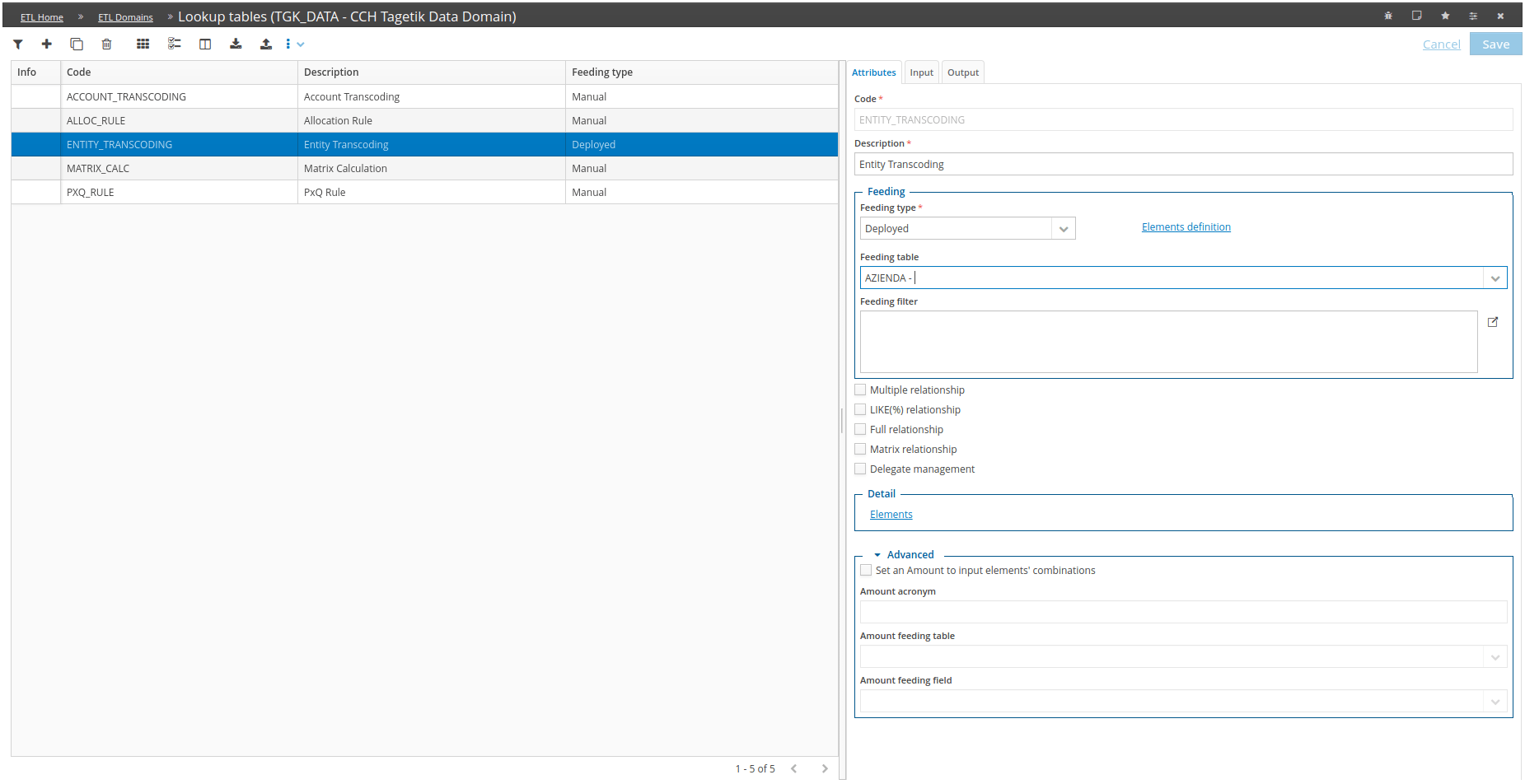
| Element | Description |
|---|---|
| A | Action buttons/Tool bar |
| B | List of lookup tables |
| C | Configuration tab |
Attributes tab
| Element | Description |
|---|---|
| Code | Code of the lookup table to be used in transformation tasks |
| Description | Lookup table description |
| Feeding type | Indicates the method with which the lookup table elements must be created. The following types are available: Manual: elements defined manually by the user through the relative management From Tagetik: elements generated automatically by the system via the Automatic feeding data processing based on what is defined in the lookup table. It is possible to subsequently edit automatically created elements, for specific needs, through element management Deployed: the elements will be generated automatically by the system through the Automatic feeding data processing based on the lookup table definition and the definition of the lookup table elements (which synthetically define the rules for creating elements). You can subsequently edit automatically created elements, for specific needs, through element management. |
| Elements definition | Link only active with Feeding type: Deployed: allows you to define, synthetically or otherwise (see LIKE(%) relationship in options), the rules for creating elements that will be generated by the Automatic feeding data processing |
| Feeding table | Active if the Feeding type is From Tagetik or Deployed; indicates the CCH Tagetik database table from which to generate, through the Automatic feeding data processing, the elements of the lookup table based on how the input and output dimensions have been defined |
| Feeding filter | Active with Feeding type set to From Tagetik or Deployed: filter used applicable to the lookup table elements generated through the Automatic feeding data processing |
| Options | |
| Multiple relationship | The same combination of input elements can be associated with different combinations of output elements |
| LIKE(%) relationship | Each input element can be defined synthetically using the % notation Note: the Multiple relationship and LIKE(%) relationship options can be activated simultaneously within the same lookup table. |
| Full relationship | If active, this allows you to specify that the data present in the staging table when the lookup table is applied through an Enrichment: lookup table type transformation task must be registered in the input combinations in the lookup table elements. This is to verify that every data record is actually processed. This check is performed by a Lookup table diagnostic type transformation task |
| Matrix relationship | - If active, this allows you to manage additional information for every combination of input elements/output elements. This information is necessary if an Enrichment: matrix calculation type task is included in the transformation step of a routine. |
| Delegate management | If active, this allows the Administrator user, who usually manages lookup tables and their elements independently, to delegate the management of the elements to the contributor user |
| Elements | This allows you to access the management of lookup table elements. It is active for all types allowed by the Feeding type |
Note: if the defined transformation tasks of a routine do not include one whose type is Lookup table diagnostic, the system will check that the defined elements are consistent with the activated options.
Advanced lookup tables section
This section allows you to define a particular type of lookup table that relates an amount to each combination of input elements, instead of relating a combination of output elements to it. These rules are used in the Transfer Price from the rule and Allocation transformation tasks. Tasks which use these types of rule produce a result using the amount defined in the elements, always with the same input element values present in the fields of the staging table related to the input dimensions. Normal Enrichment: lookup table tasks, however, define the fields of the staging table related to the output dimensions with the output element values with the same values as the input elements present in the fields of the staging table related to the input dimensions.
| Element | Description |
|---|---|
| Assign an amount to the combinations of input elements | enables the rule method detailed above |
| Amount acronym | allows you to define the name of the column related to the amount that will be shown in the elements of the lookup table instead of the output elements |
| Amount feeding table | indicates the CCH Tagetik database table from which to generate the amount in the lookup table elements. The behaviour of this field varies based on the value of the Feeding type field if it is Deployed, the field is visible and takes the value of the Feeding table field as its default value if it is From Tagetik, the field is not visible and its value will be overridden with that of the Feeding table field if it is Manual, the field is not visible. |
| Amount feeding field | indicates the field related to the Amount feeding table from which to generate the amount in the lookup table elements. As for the previous field, the behaviour of this field varies based on the value of the Feeding type field if it is Deployed or From Tagetik, the field is visible and allows you to select a field of the table defined on Amount feeding table if it is Manual, the field is not visible. |
Input tab
| Element | Description |
|---|---|
| Input dimension | ETL domain dimension related to a field of the staging table and input element n IMPORTANT: it is mandatory to define at least one input dimension; if more than one are defined, they must be sequential. |
| Input table | CCH Tagetik database table from which to generate input element n. The behaviour of this field varies based on the value of the Feeding type field. if it is Deployed, the field is visible and takes the value of the Feeding table field as its default value if it is From Tagetik, the field is not visible and its value will be overridden with that of the Feeding table field if it is Manual, the field is not visible. |
| Input field | related to the Input table from which to generate input element n. Varies based on the value of the Feeding type field. if it is Deployed or From Tagetik, the field is visible and allows you to select a field of the table defined on Input table if it is Manual, the field is not visible. |
Output tab
| Element | Description |
|---|---|
| Output Dimension | ETL domain dimension related to a field of the staging table and output element n IMPORTANT: if the Assign an amount to the combinations of input elements option is not active, it is mandatory to define at least one output dimension; if more than one are defined, they must be sequential. |
| Output table | CCH Tagetik database table from which to generate output element n. The behaviour of this field varies based on the value of the Feeding type field. if it is Deployed, the field is visible and takes the value of the Feeding table field as its default value if it is From Tagetik, the field is not visible and its value will be overridden with that of the Feeding table field if it is Manual, the field is not visible. |
| Output field | related to the Output table from which to generate output element n. Varies based on the value of the Feeding type field. if it is Deployed or From Tagetik, the field is visible and allows you to select a field of the table defined on Input table if it is Manual, the field is not visible. |
Automatic feeding
The window’s actions menu includes the Automatic feeding item, which allows you to run the data processing that automatically generates the Lookup Table elements. The menu is only enabled if a single record is selected and if the value of the Feeding type field is From Tagetik or Deployed.
Lookup Table Elements definition
This window can be accessed from the Elements definition link in the Lookup Tables window. The link is only enabled if the lookup table’sFeeding type is Deployed.
If the ETL domain is locked, the window will be read-only.
The number of fields shown (Input 1....20 / Output 1....9) will depend on the number of input/output dimensions that have been defined on the rule.
The suffix of each field’s name will be the value of the relative dimension’s Acronym field.
This window allows you to define, synthetically or otherwise, the rules for the creation of the actual elements that will be generated by the Automatic feeding data processing.
Lookup Table elements
This window can be accessed from:
- Elements link in the Lookup Table window.
-
Lookup table workflow task belonging to the Data Integration group
-
Lookup Table - elements tile located in the ETL homepage, accessible from the end user’s homepage by selecting an ETL domain and a lookup table.
If the ETL domain is locked, the window will open in read-only mode.
The number of fields shown (Input 1....20 / Output 1....9) will depend on the number of input/output dimensions that have been defined on the rule.
The suffix of each field’s name will be the value of the relative dimension’s Acronym field.
This window allows you to manage records on which combinations between the input elements and output elements of the lookup table are defined.
If the lookup table’s Feeding type is Manual, the elements must be defined manually by the user.
However, if the lookup table’s Feeding type is From Tagetik or Deployed, the Automatic feeding data processing will pre-populate the lookup table elements depending on how the lookup table has been defined. The user will be able to access and edit the records generated automatically by the data processing in any case.