Asset depreciation
The purpose of this data processing is to calculate the depreciation plan of new investments by tax category (asset class).
Description
An important role in budget projects is played by the planning of new investments. In general, when we talk about the purchase of new assets and their depreciation, we talk about "Capital Expenditure" or simply "CAPEX" (CAPital EXpenditure). CCH Tagetik has a built-in functionality to handle this issue.
The goal is to calculate for each new purchase:
- the variation account of the asset account;
- the variation account of the depreciation fund account;
- the depreciation account.
For example, suppose you plan to purchase €5,000 worth of laptops in June 2013. Furthermore, assume that this type of asset is fully depreciated over 24 months and the depreciation rate is constant. So each month has the usual depreciation percentage of approximately 1/12*100 = 4.16%.
The asset depreciation data processing works as follows:
- in the month in which the purchase takes place, it records an entry, on the first day of the month, on the variation account of the asset account equal to the value of the investment;
- adjusts the depreciation account by a value equal to the value of the investment multiplied by the depreciation percentage for that month (5,000*4.16% = 208);
- complete the double-entry journal with an entry of the same amount but opposite sign on the variation account of the depreciation fund account (-208).
The last two entries are repeated for each month until the asset is fully depreciated, provided that the life of the asset is less than the time horizon of the budget process.
 The system operates on two distinct tables: a table containing the details of all the entries by date generated by the data processing and the table of the gross balances where the system reports the details of the entries by calculating the amounts as year-to-date and grouping the various entries by period.
 The data processing:
- generates gross amounts with PROC_BDG_DEPRECIATION origin;
- processes one depreciation method at a time;
- does not apply any policy for the bank exit at the time of purchase and usually this part is covered by ad-hoc calculations;
- does not calculate the depreciation of existing assets.
Setup
The data processing of assets depreciation is based on the parameterization of the assets depreciation rules which allow entering the information needed by the system to know which data to process, which accounts to use, etc.
Preliminary activities
Before proceeding to specify these rules, it is necessary to perform a series of preliminary activities in order to guarantee the correct execution of the data processing.
In detail, these activities are:
- enable the custom dimension 3 and manage the assets on it (for example buildings, land, laptops, etc.);
- check that the periods of the scenarios related to the budget process have the correct period length as the depreciation calculation needs the monthly value;
- check that the budget scenarios present in the process have defined the previous scenario in order to create a temporal link between the various scenarios.
Asset depreciation rules
The management of the asset depreciation rules can be accessed from the web interface of the administrator user by following the Setup&Admin > Data processing tile > Asset depreciation path
The system opens the Asset depreciation window containing three sections :
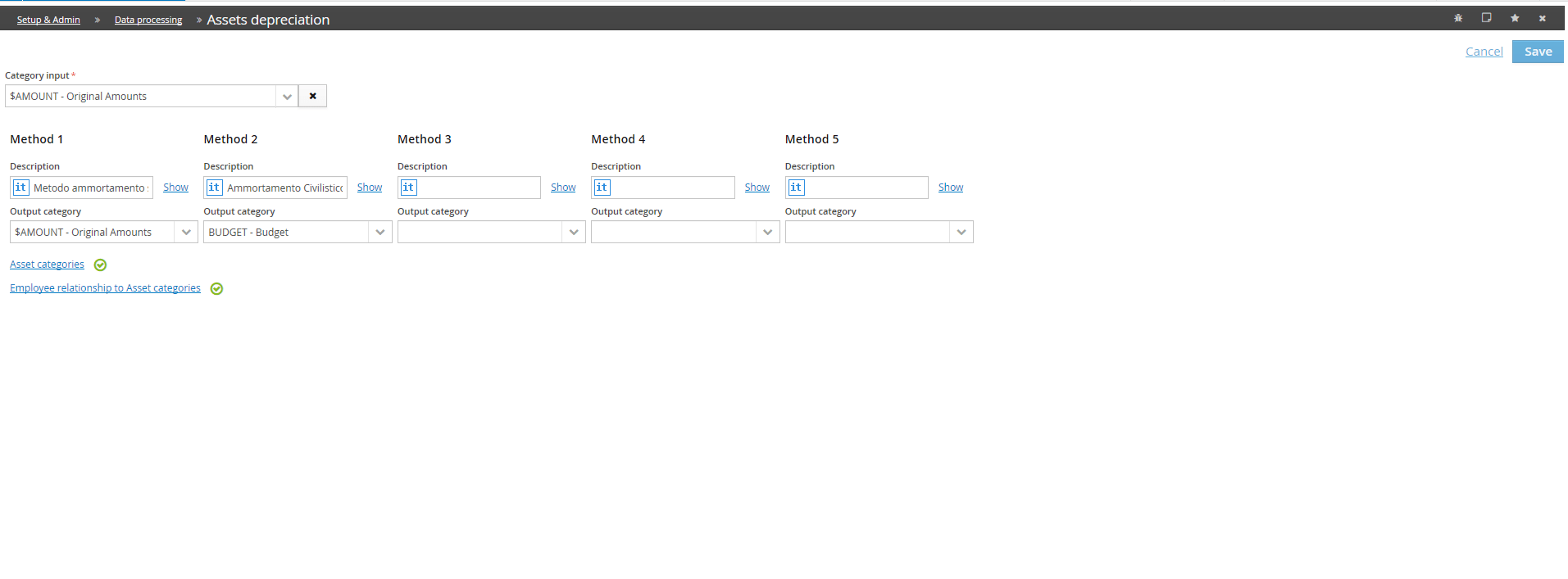
Depreciation methods
In this section, you can manage:
| Field | Description |
|---|---|
| Input category* | identifies where the amounts entered by the user relating to new purchases are stored. - The input category can be specified via a single category or via a category grouping node. In the latter case, the system considers all the categories related to the selected node as categories to be processed. However specified, the input category must be of "Amount" type ; |
| Depreciation method* | It is possible to manage up to 5 different depreciation methods. Each method is identified by a Name and an Output category |
| Output category | - Represents the amount category where the system writes the values generated by the data processing. It can be managed separately for each depreciation method |
The use of multiple depreciation methods is required when you want to manage financial statements drawn up with different accounting standards. For example, you may want to manage two depreciation plans:
- one suitable for a financial statement drawn up with statutory accounting principles (it may be that even a budget must be drawn up on the basis of the civil code / international accounting principles, since, for example, listed Entities can often be asked for a budget to then be compared with the actual data and since the actual data are drawn up with certain accounting principles, they must also be used for the budget);
- one suitable for management accounting principles, for example internal and used in the group
If you decide to manage different depreciation methods, then in the asset categories management we will have 2 depreciation periods to be defined, and the system will develop two different depreciation plans separately. Also, to track both plans, depreciation data will be generated on different output categories.
You cannot use the same output category for different depreciation methods.
Asset categories
Through the link it is possible to access the window where to define the various asset categoriesand for each of them to set the accounts on which the data processing must operate and the duration of the various depreciation methods enabled.
Each asset category is identified by:
| Field | Description |
|---|---|
| Code* | It is mandatory that the asset category code begins with the character $;; |
| Description* | Multilanguage (to see languages other than the main one, press the Show link) |
| Useful life (months) | - Expressed in months for each enabled depreciation method. It represents the number of months after which all assets belonging to that asset category are depreciated. It is defined for each Depreciation method |
| Assets account | Represents the input account on which the user enters the amounts relating to a new purchase of an asset belonging to that asset category. The amount entered on this account is used by the system to generate the output accounts. The depreciation data processing does run any year-to-date calculation of the input data, so it is expected that the values related to the assets account are already calculated year-to-date. If, for example, the values related to the asset account are entered from the form, this account must be of "Other variation" nature (Year-to-date calculation is in fact run when the form is saved). If, on the other hand, the values of the asset account are entered via ETL, this account can either be of "Other variation" or "Other stock" nature, but the related values must be calculated year-to-date when loading the ETL; |
| Asset variation account | Variation account of balance sheet or Other stocks nature on which the data processing, for each month of the depreciation period, records the value of the investment |
| Depreciation fund variation account | Variation account of balance sheet or Other stocks nature on which the data processing writes the depreciation rate |
| Depreciation | Normal account of P&L or Other variations nature on which the system completes the double-entry accounting, i.e. on which it writes the depreciation rate with a change of sign. |
Once all the attributes of an asset category have been defined and saved, it is necessary to define for each depreciation method the depreciation percentage to be applied for each month of the duration of that method.
To access this definition it is necessary to use the Definition link next to the Useful life field of each depreciation method. The system opens a window where you can specify the Number of months and depreciation %.
For each month, it is necessary to specify the depreciation percentage. When saving, the system make sure that the sum of the percentages of all months of a method does not exceed 100%.
Allocation of Asset / Asset category
Once all the asset categories have been created, it is necessary, for each Entity, to associate the elements of the custom dimension 3 (the assets) with an asset category. In this way, it is possible to manage cases in which the same asset is depreciated for different entities.
Each relationship is characterized by:
- the code of the element of the custom dimension 3;
- the Entity. The Entity can be specified as a single entity or via a node in an Entity hierarchy. In the latter case, the system considers all the entities related to the selected node as entities to be related to the current asset. It is possible to add or remove lower level nodes or individual entities to the nodes
- the asset category;
Once the definition of the matches has been completed, the system, when saving data, generates a deployed table containing the triads custom dimension 3 / entity / asset category.
Enable the execution of Asset depreciation
Once the parameterization of the asset depreciation rules has been completed, in order to run them, it is necessary to specify in which processes the depreciation calculation for the new investments must be enabled. To do this, you need to:
- Click on the Processes tile, select the process to be parameterized, using the Actions (
 ) > Process definition window menu. Navbar > Processes & Workflows > Process > select the process to be parameterized, using the Actions ( ) > Process definition
 - go to Data Processingsection on the right side of the window;
- enable the Other option, or open the dropdown and select one Asset depreciation data processing;
- save.
Enabling the Asset Depreciation option enables the calculation of depreciation for new investments. This data processing is used in Planning projects and ONLY takes into consideration new investments, not the depreciation of existing investments. By enabling the Enable override option, it is possible to override some settings of the generic rule and therefore make the system use the overridden rule for the current process, rather than the generic one
Run “Asset depreciation” data processing
The calculation of depreciation for new investments is an Entity data processing and as such can be performed together with all the other data processes enabled on the process for that group or individually.
The depreciation calculation for new investments can be performed:
- from the process cockpit of the contributor present on the end user's web interface using the Entity data processing button after selecting the Entities to process. Specify the original scenarios on which you want to launch the data processing before pressing the Next key > select Depreciation from the data processing. Obviously, the process whose cockpit you are viewing must have this data processing enabled;
- from a data entry form;
- from a task of a workflow;
- from a task of a job