Home page - Administrator
 Admin |

IMPORTANT: the functions displayed will depend on the user's role and the activated licence.
What it looks like
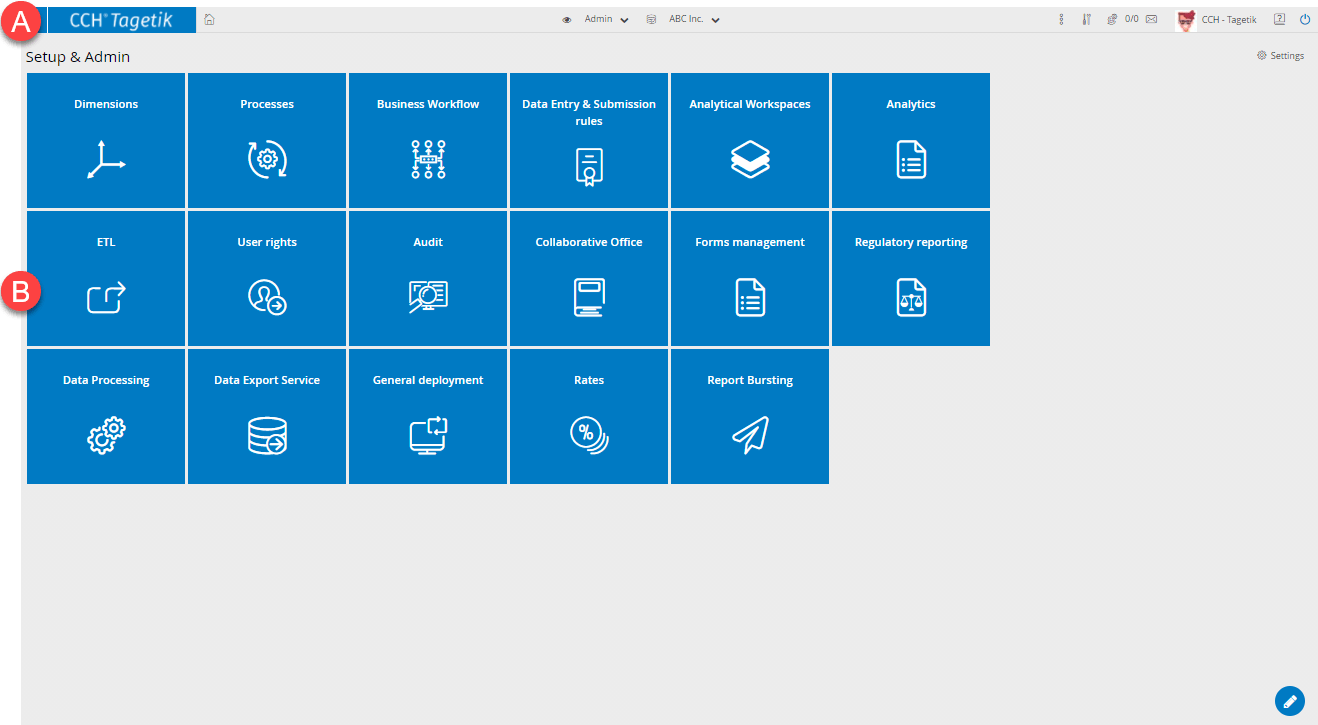
| Element | Description |
|---|---|
| A | Main tool bar |
| B | Tiles of the functions available to the user |
Available functions
| Function | Description |
|---|---|
| Dimensions | Opens the Dimensions page. |
| Analytical Workspaces | Opens the Analytical Workspaces page. |
| Processes | Opens the Processes page. |
| Business Workflow | Opens the Business Workflow page. |
| Data Entry & Submission rules | Displays a list of pages for data entry and submission rules configuration. |
| Data Processing | Opens the Data Processing page. |
| Interest rates and tax rates | Displays a list of pages for exchange rates and interest rates configuration. |
| ETL | Opens the ETL management page. |
| Forms management | Displays a list of pages for managing forms. |
| Collaborative Office | Opens the Collaborative Office page. |
| User rights | Opens the User rights page. |
| Audit | Opens the Audit page. |
| Data Export Service | Opens the Data Export service - Configuration page for SAP, Qlik Sense and Microsoft Analysis Services configuration. |
| General deployment | Opens a window to start the process of populating the database tables and updating the data in the databases, according to the data entered or edited. |
| Report Bursting | Opens the page Report Bursting. |
| Supervisory | Opens the page Supervisory. |
| Analytics | Displays a list of pages to generate data models. |