Tagetik Data Loader - Registration and monitoring on CCH Tagetik
CCH Tagetik provides the admin users with a window to:
- register new TDLs so that CCH Tagetik enables communication with them
- remove TDLs no longer active and not used in any parametrization (Endpoint)
- display the information and the status of the configured TDLs in real time
- display the last or current TDL operation performed
- request the manual update of a TDL if the automatic update fails
- request to download TDL logs
- request the updating of the list of datasources configured on the TDL and their verification
- request the updating of the list of paths configured on the TDL and their verification
This monitor functionality is accessible from the tile of the same name available on the Repository home page.
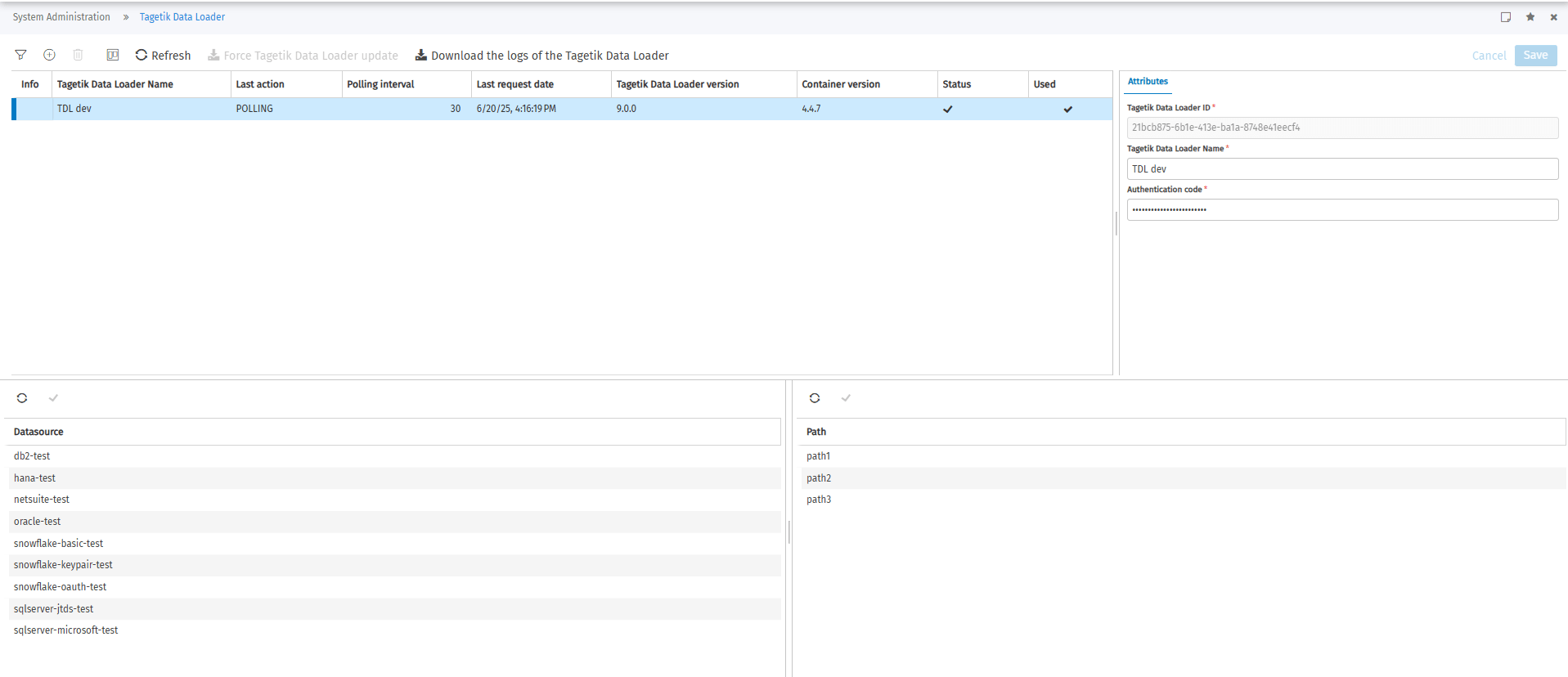
The configured TDLs are displayed at the top of the window, and for each one is shown:
- Tagetik Data Loader Name: TDL description defined by the user
- Last action: last command executed by the TDL or in progress
- Polling interval: specifies at what intervals (in seconds) the TDL checks for operations to be taken over
- Last requested date: date of the last 'heart beat' made by the TDL
- Tagetik Data Loader version: TDL version installed on Karaf
- Container version: Karaf container version
- Status: displays the status of the TDL via an indicator:
 : on-line
 : off-line
 : on-line but locked
- Authentication failed
- Waiting for automatic update
- Automatic update in progress
- Automatic update failed
- Manual upgrade required
- Used: indicates whether the TDL is used in one of the configured Endpoints.
There are two different sections at the bottom of the window:
- Datasource: where the system displays the Datasources' logical names,
- Path: where the system displays the logical names of Paths
both configured on Karaf for the current TDL. For both sections there are the following buttons:
-
 : allows updating data in the section by retrieving the information from the configuration files of the current TDL. This button is only enabled if the selected TDL is online
 -
 : verifies the validity of the selected Datasource/Path. The result of the verification, whether positive or negative, is notified at the end of the operation by an alert containing an appropriate message.
Registration of a new TDL
CCH Tagetik only enables communication with a TDL if it has been previously registered.
A new TDL can be registered via the button  . The system enables the Attributes panel where you must specify:
- Tagetik Data Loader ID: unique identifier of the TDL. The field must be filled with the ID automatically generated by Karaf when the TDL is first started in the tgk.agent.cfg file in the Karaf configuration directory.
- Tagetik Data Loader Name: TDL description defined by the user
- Authentication code: identifies the authentication code associated with the TDL; it must match the one specified in the tgk.agent.cfg file in the Karaf configuration directory.
TDL management
Once a TDL has been registered, you can:
- edit the Tagetik Data Loader Name and Authentication Code via management in detail,
- refresh the displayed information (e.g. Status) via the button

- remove the configuration of a TDL via the
 button.
Editing and deletion are only possible if the TDL is not used in a parametrization of an Endpoint.
TDL update
The version of a TDL (e.g. 6.0.1) consists of three pieces of information:
- Major: used to identify 'breaking-change' such as changing the Karaf container or changing the communication protocol,
- Minor: used to identify the addition of new features that do not compromise the use of existing ones,
- Patch: used to identify corrections to existing functionalities.
How it is updated depends on the difference between the version of the reference TDL on CCH Tagetik and the version of the TDL on Karaf :
- If the two majors are different, the Status of the Tagetik Data Loader will be changed to (warning) and TO_UPGRADE will be displayed as Last Action. This means that a manual update of the Karaf/TDL container will have to be carried out.
- if the Minor.Path of the TDL on CCH Tagetik is smaller than that of the TDL on Karaf, no update is necessary.
- if the Minor.Path of the TDL on CCH Tagetik is greater than that of the TDL on Karaf, an automatic update will be performed. In the Last Action field the commands TO_UPDATE, UPDATING and, if the update was successful, the POLLING command (which certifies that communication is active again) will be performed, otherwise the UPDATE_FAILED command will be displayed. In this case, a manual update can be retried via the
 button.
Download Tagetik Data Loader Logs
Starting with version 9.0.0 of Tagetik Data Loader, it is possible to download the logs generated by the TDL directly from CCH Tagetik, from the Agent configuration window via the  button, generating a zip file containing all the files in the log folder configured on Karaf. This feature is only enabled for TDL with version greater than or equal to 9.0.0 and On-line status.
Configuration on CCH Tagetik
In the configuration of the CCH Tagetik Repository, there are settings relating to the use of TDL:
Data write: data packet size (Kbytes): Indicates the maximum size in KBytes into which data extracted from CCH Tagetik to be transmitted to Tagetik Data Loader must be divided and sent.
Read Data : Data Packet Size (Kbytes): Indicates the maximum size in KBytes into which data extracted from Tagetik Data Loader is to be divided and sent to CCH Tagetik.
Time out (min): Indicates the minutes CCH Tagetik waits for the Tagetik Data Loader to respond to a command. After this time has passed, a 'Timeout' error is returned by the application. The default time is 30 minutes.
 Important: As of Tagetik Data Loader version 9.0.0, this time out will also be applied on the TDL on premise, also interrupting the current thread.
Endpoint
to conclude the configuration of the TDL, it is necessary to specify an agent-type endpoint to be used with ETL and Quick Data Loader (see Endpoint)