Cell editability
Introduction
To configure data entry on the form, the user must define editable cells, i.e. cells in which the user can enter data that will be written in the database when saved. To do this, the Editability property on row/column filters can be configured in the Matrix Wizard. For details of the property values, see Editability.
The effective editability of a cell depends both on the filter properties and on the rights that the user has in their own role (see Roles) and the user’s data restrictions. The editability rule on a cell can be overridden using the Override editability button on the design toolbar (see Design toolbar).
The cells of data entry forms are differentiated by colour:
| Color | Cell status |
|---|---|
| White | Not editable |
| Yellow | Editable, but does not allow intercompany data |
| Green | Editable, and allows intercompany data |
| Blue | Protected |
These colours can be changed for the individual form, via the Form options window (see Layout options details).
Editability in intersection cells
On the intersection cell between, for example, an editable row and a non-editable column, the system calculates the intersection between the row editability rules and the column editability rules and makes the cell editable or non-editable based on the rules shown in the table below.
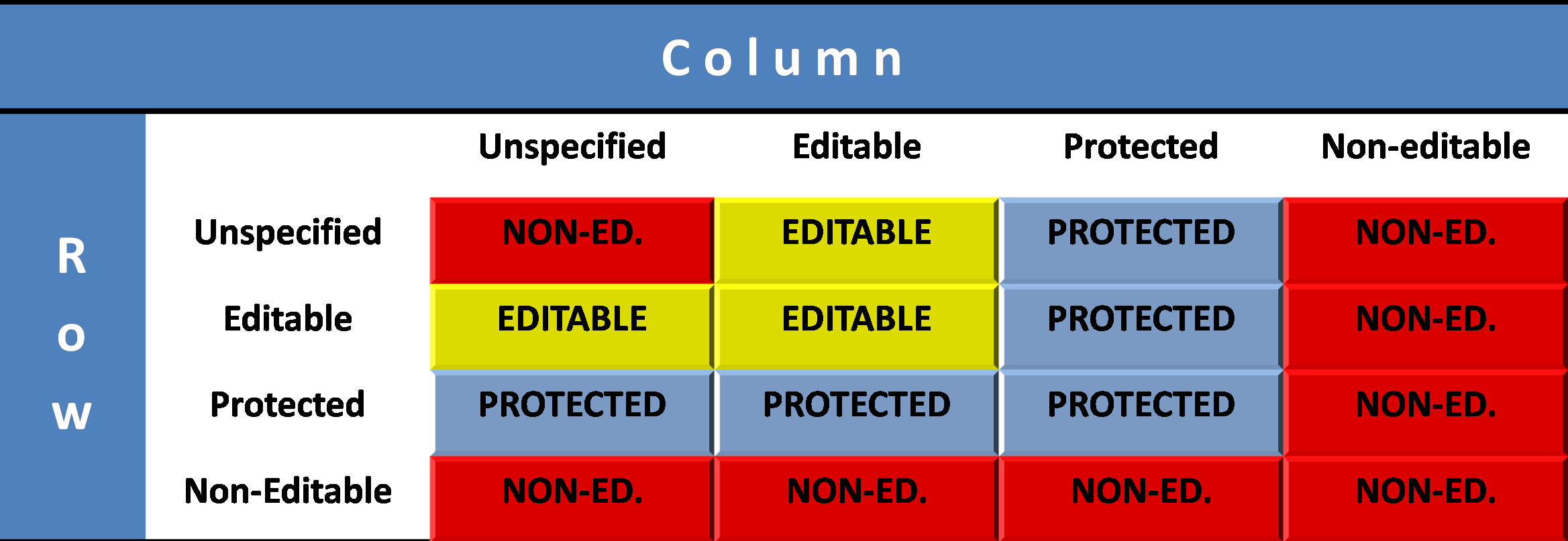
Placeholder element editability
For placeholder elements on the rows/columns, editable status is replaced with "unlocked". A placeholder for which editability has not been specify will be non-editable by default (see Placeholder elements).
Conditional editability
Conditional editability expressions allow you to subordinate the editability of a row/column filter to the occurrence of a condition on other rows/columns of the matrix. Thus, it is possible to unlock the editability of cells set as editable until the occurrence of a certain condition on another cell.
When the form is run in data entry mode, every time the content of the cells to which the expression refers is edited, the system runs a check on the condition.
When a row/column included in the conditional expression is the outcome of a formula, the system only considers the formulas contained in the same sheet that do not use the INDIRECT function.
In general, conditional editability allows you to edit the content of a cell, but not insert comments or attachments. Comments and attachments can only be inserted on multidimensional forms, see Comments on matrices with conditional editability.
Conditional editability and spreading in web forms
When a conditional editability expression contains one or several cell operands the value of which is changed by the running of spreading, a check is run on the expression’s conditions after spreading or only after any changes have been made to the spreading method.
The interaction between conditional editability and spreading is only managed in web forms (see Spreading).