Authentication - Cloud
In some regions of Tagetik Cloud, a new API access service is available, allowing for different authentication strategies, called API Gateway. Please, refer to the release notes to know which regions this service is available in.
To perform an API request via this service, log in to the application, navigate to the 'Authentication Credentials' page, click on your user name, then click on the 'Authentication Credentials' item in the drop-down menu.
To generate credentials, specify the type required from the Type drop-down menu and complete the mandatory fields (which may vary depending on the type selected).
By clicking on the 'Generate' button, a window containing a JSON is displayed. The JSON represents the generated credential with some additional information; you can copy the contents of the JSON by clicking on the copy button on the right or the 'copy and close' button at the bottom left.
 IMPORTANT: It is also possible for an administrator to generate credentials for a specific local user.
The administrator must have the functions 0000016 and R000024 enabled.
By visiting the user management page from the repository, one can select a local user and click on the'Authentication Credentials' menu item available from the action menu  , in this way
the administrator is redirected to the'Authentication Credentials' page for the selected user.
Examples of use
After deciding which public APIs to invoke (e.g. SCIM API), open the desired REST client (e.g. Postman).
The URL to be invoked must be a concatenation of 'url endpoint' from JSON and API URL.

API key
Generating an API key credential will result in a JSON like the following:
{
"secret key": "YOUR_SECRET",
"endpoint url": "
}
In the Postman authorisation area, specify the 'API key' type, then populate the following fields:
- Key: apiKey (this value is mandatory and must be written like this)
- Value: YOUR_SECRET from JSON
- Add to: Header
To invoke the SCIM API, the URL becomes:
Basic
Generating a Basic credential will result in a JSON like the following:
{
"username": "COD_MT-YOUR_USERNAME",
"password": "YOUR_PASSWORD",
"endpoint url": "
}
In the Postman' authorisation area, indicate the 'Basic Auth' type, then populate the required fields:
- Username: COD_MT-YOUR_USERNAME
- Password: YOUR_PASSWORD
To invoke the SCIM API, the URL becomes:
OAuth 2.0
Generating an OAuth 2.0 credential will result in a JSON like the following:
{
"client id": "YOUR_CLIENT_ID",
"client secret": "YOUR_CLIENT_SECRET",
"access token url": "
"endpoint url": "
}
In the Postman' authorisation area, indicate the 'OAuth 2.0' type .A token can be obtained by using Postman's 'Configure New Token' functionality:
- Grant type: Client credentials
- Access Token URL: access token url from JSON
- Client ID: YOUR_CLIENT_ID
- Client Secret: YOUR_CLIENT_SECRET
- Client Authentication: Send as Auth Basic Header
To invoke the SCIM API, the URL becomes:
JWT
Generating a JWT credential will result in a JSON like the following:
{
"algorithm": "HS256",
"key": "YOUR_KEY",
"secret": "YOUR_SECRET",
"endpoint url": "
}
A valid JWT token can be obtained using https://jwt.io/:
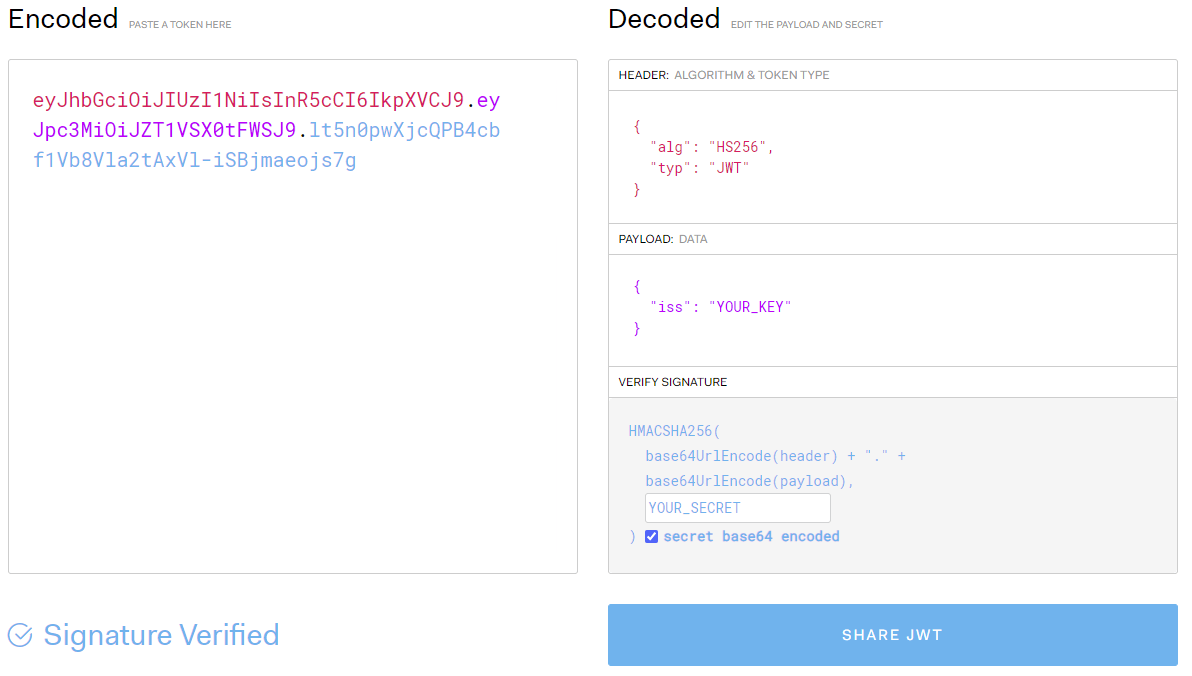
in the header section specify the HS256 algorithm (can be selected from the drop-down menu), in the payload section specify a JSON consisting of an "iss" key and the value YOUR_KEY, in the Verify Signature section fill in the empty secret space with YOUR_SECRET(tick "secret base64 encoded").
The generated secret is visible in the left section (encoded).
In the authorisation area of Postman', indicate the type 'Bearer Token', then fill in the mandatory field:
- Token: eyJhbGciOiJIUzI1NiIsInR5cCI6IkpXVCJ9.eyJpc3MiOiJZT1VSX0tFWSJ9.lt5n0pwXjcQPB4cbf1Vb8Vla2tAxVl-iSBjmaeojs7g
To invoke the SCIM API, the URL becomes: