Advanced rules
The advanced rules define the "basic elements" the system needs to:
- optimize the "Allocation & Closing" data processing. Indeed this data processing can generate a very variable number of rows; the flexibility in the parametrization, in terms of dimensions to allocate and on which to allocate, may require the management of millions of records by Period
- manage the generation of the entries, according to the user's needs
The management of such rules can be accessed from the administrator user web interface by following the path .Setup & Admin > Date processing > Allocations & Closing > Advanced rules
Navigation panel> Date processing > Allocations & Closing > Advanced rules
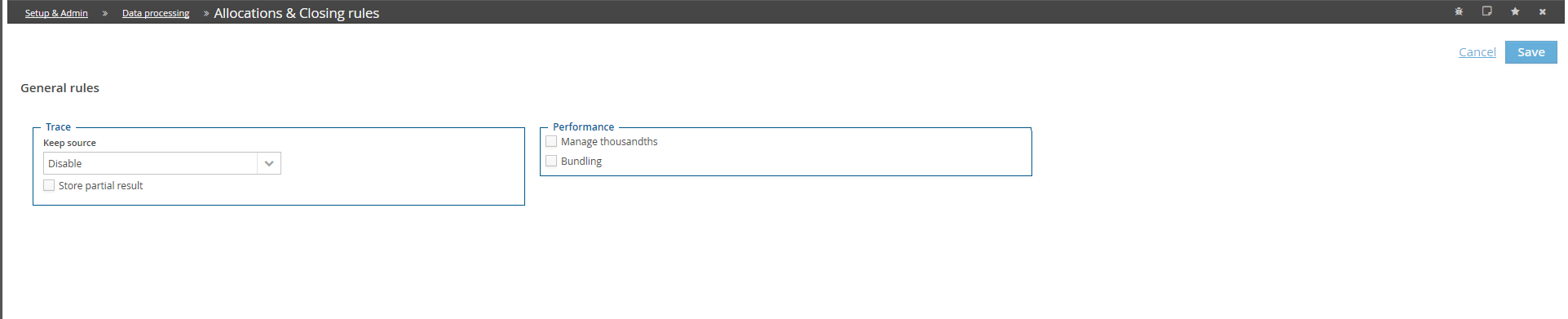
The available options are:
- Trace. Specifies the detail to be traced in the journals generated by the system. Possible values:
- Disable. The system does not keep track of the various steps performed to generate data
-
Last source. The system traces and displays only the last performed step. For example, if the rule 001 provides that the cost centre C01 is allocated on the cost centres C02 and C03 and that C02 is allocated on the cost centre C04. The system displays, for allocated data C04, the last data by which it has been generated, namely C02
-
Detail. The system traces and displays all the steps performed to generate data. In this case, the concatenation of the last sources is shown for the allocated data.
-
From rule. It shows all the allocation steps which have generated the result, except the rules not included in the execution.
 The last two options are highly inadvisable since they generate a high number of entries which slow down the data processing. Moreover, in some cases the trace would be so long that it could not be contained in the field.
-
Store partial results. When this option is enabled, it indicates that the history of the data processing must be stored with the detail of the involved elements, namely the collections of data to allocate, target, the drivers, etc. Then those details will be displayed in the Intermediate results report (currently not available from HTML5 interface)
-
Manage thousandths. When this option is enabled, it means that the system must generate the allocations even with very small amounts (thousands) that, otherwise, would be excluded from the calculation. Consider that 3 decimals at most are brought in the journals; therefore, even if this option is enabled, the resulting amounts in thousands would not be excluded, but would be considered in the data to allocate. The activation of this option might heavily affect the performance, therefore its activation is not recommended.
- Bundling. When this option is enabled, if the routine is run on a whole scenario, the system runs it only once instead of as many times as there are scenario's periods.