Appendix - Primitive, Operator, and Unit References
All Primitives, Operators, and Units in Alphabetical Order
abs
Absolute value (magnitude for complex numbers)
| Category | Explanation |
|---|---|
| Format | abs(z) |
| Arguments | {num} z Any real or complex number |
| Returns | {unit} The absolute or positive value of z |
| Note | If z is complex with a real component of zx and an imaginary component of zy, abs returns the magnitude of z calculated using the equation |
| Examples | |
| See also | arg, real, imag, I |
Accumulate
Operator x->y, adds a value to the global accumulator
| Category | Explanation |
|---|---|
| Format | x -> y |
| Arguments | (real) x Any real value to add to the global accumulator [any] y Any valid expression |
| Returns | [any] y or value of the global accumulator |
| Description | This operator is used exclusively for building expected value decision trees. It lets you enter incremental value or cost numbers in tree nodes and then calculate the total accumulated cost in end nodes. The operator works by first evaluating x and adding its value to a global accumulator variable. It then evaluates y, resets the accumulator to its original value, and returns the value of y. Other nodes referenced in y most likely use the Accumulate operator and add more to the accumulator variable. In end nodes, the expression for y is omitted to cause the Accumulate operator to return the value in the accumulator variable. |
| Examples | |
| See Also | emv, max |
acos
Arc cosine
| Category | Explanation |
|---|---|
| Format | acos(x) |
| Arguments | {comp} x Any real or complex number |
| Returns | {comp} The arc cosine of x in radians |
| Description | The arc cosine of x is defined as the angle (in radians) whose cosine is x. |
| Examples | |
| See Also | asin, atan, atan2, sin, cos, tan, PI |
acre
Acre, area unit of measure
| Category | Explanation |
|---|---|
| Format | acre |
| Defined as | acre=43560*ft^2 |
| See also | ft, Predefined Units, Base Units |
activenode
Name of the node that is currently executing
| Category | Explanation |
|---|---|
| Format | activenode |
| Arguments | None |
| Returns | (text) Name of the currently executing node |
| See Also | this |
Add
Operator x+y, numeric or matrix addition
| Category | Explanation |
|---|---|
| Format | A + B |
| Arguments | [any] A, B Any real numbers, complex numbers, vectors, or matrices to add or text strings to concatenate |
| Returns | [num] Sum of A and B if both are numbers, vectors, or matrices (text) A string including A and B concatenated together if either is a text string |
| Description | This operator serves two purposes: numeric addition if both arguments are numbers, vectors, or matrices, and text concatenation if either of the arguments is a string. When a string is concatenated to a number, the number is first converted into a string using the default number format. Addition is carried out using one of the following methods as is appropriate for the input data: If A is an array and B is a number, B is added to every element in A: If A is a number and B is an array, A is added to every element in B: If both A and B are arrays with the same dimensions, the corresponding elements in A and B are added: In all cases, elements are added using complex addition where appropriate: |
| Examples | |
| See Also | Plus, Subtract |
alert
Displays a message
| Category | Explanation |
|---|---|
| Format | alert(query) |
| Arguments | [any] query |
| Description | Displays a message |
all
List of all node names
| Category | Explanation |
|---|---|
| Format | all(namespec) |
| Arguments | {node} namespec Optional node specification; default ="*" |
| Returns | [text] List of all nodes whose names match the namespec specification |
| Description | All returns a list of text strings containing the names of all nodes in the system whose names match the namespec specification. Wildcard characters * (any group of characters) and ? (any single character) can be used in namespec. |
| See also | treelist, rootnode, selectednode, endnodes, inputs, outputs, children |
amp
Ampere, electric current unit of measure
| Category | Explanation |
|---|---|
| Format | amp |
| Defined as | base unit |
| See also | Predefined Units, Base Units |
angstrom
Angstrom, length unit of measure
| Category | Explanation |
|---|---|
| Format | angstrom |
| Defined as | angstrom=1e-10*m |
| See also | m, Predefined Units, Base Units |
append
Appends to a text file
| Category | Explanation |
|---|---|
| Format | append(data, file) |
| Arguments | [any] data Any numeric or text value, including lists (text) fileName of the file to write |
| Returns | [any] The value of data |
| Description | The value of data is written to file. If file already exists, data is appended to the end of file. Otherwise, file is created. If data is a numeric value, it is translated into a text string as it would be displayed. If data is a list, all elements in the list are written including a comma separating each element. A new line character (\n) is not automatically inserted between append operations. If file does not contain full path information, the file is assumed to reside in the same directory as the .mdl or .dsb application file. If you include path information, remember the backslash characters must be typed twice in text literals (e.g., "c:\temp.txt" instead of "c:\temp.txt"). |
| Examples | |
| See also | appendcsv, appendtxt, write, read |
appendcsv
Appends to a comma-delimited data file
| Category | Explanation |
|---|---|
| Format | appendcsv(data, file) |
| Arguments | [any] data Matrix of numeric or text values (text) file Name of the file to write |
| Returns | [any] The value of data |
| Description | Appends the value of the matrix data to file in Comma Separated Value (CSV) format. CSV format files are text files containing a one- or two-dimensional array of values separated by commas. Each record in the file is a column vector. All text strings are enclosed in quotation marks in the output file. If file does not contain full path information, the file is assumed to reside in the same directory as the .mdl or .dsb application file. If you include path information, remember the backslash characters must be typed twice in text literals (e.g., "c:\temp.txt" instead of "c:\temp.txt"). |
| Examples | |
| See also | append, appendtxt, writecsv, readcsv |
appendtxt
Appends to a tab-delimited data file
| Category | Explanation |
|---|---|
| Format | appendtxt(data, file) |
| Arguments | [any] data Matrix of numeric or text values (text) file Name of the file to write |
| Returns | [any] The value of data |
| Description | Appends the value of the matrix data to file in tab-delimited format. Tab-delimited files are text files containing a one- or two-dimensional array of values separated by tabs. Each record in the file is a column vector. If file does not contain full path information, the file is assumed to reside in the same directory as the .mdl or .dsb application file. If you include path information, remember the backslash characters must be typed twice in text literals (e.g., "c:\temp.txt" instead of "c:\temp.txt"). |
| Examples | |
| See also | append, appendcsv, writetxt, readtxt |
appname
Displays the program name in a dialog or screen
| Category | Explanation |
|---|---|
| Format | appname |
| Returns | [text] The name of the program running the script: "Studio" or "DsRun" |
| Description | appname returns "Studio" if the script is running in CCH Tagetik Supply Chain Planning Studio or appname returns "DsRun" if the script is running as a hosted application on Vanguard server. This primitive is useful if you want to display the program name in a dialog or screen. To display a form differently when an application is run in both local and Web modes use isweb. |
| Examples | |
| See also | isweb |
arg
The argument or angle of a complex number
| Category | Explanation |
|---|---|
| Format | arg(z) |
| Arguments | {num} z Complex number |
| Returns | {real} The argument or angle of the complex number z when expressed in polar notation |
| Description | The argument of a complex number x+yi is the angle in radians between the positive x-axis and a line from the origin (0,0) to the point (x,y) in a Cartesian coordinate plane. |
| Examples | |
| See also | abs, real, imag, I, atan2 |
argdef
Retrieves the definition of a functional argument
| Category | Explanation |
|---|---|
| Format | argdef(arg) |
| Arguments | (text) arg Name of an argument to reserve |
| Returns | Null |
| Description | argdef lets you retrieve the definition of a functional argument (not local variables) |
| Examples | |
| See also | arg, arguments |
arguments
List of all argument values in the active function
| Category | Explanation |
|---|---|
| Format | arguments |
| Arguments | None |
| Returns | [any] List of all argument values in the active function |
| Description | This primitive is typically used in functions that accept an undefined number of input arguments. arguments and argval are similar except arguments return a list of all argument values while argval returns a single argument value. |
| Examples | |
| See also | argval |
argval
Value of a specific argument in the active function
| Category | Explanation |
|---|---|
| Format | argval(n) |
| Arguments | (int) n Number of the desired argument (first argument is 1, not 0) |
| Returns | [any] Value of the nth argument in the active function |
| Description | This primitive is typically used to refer to an argument value in form <%%> fields. arguments and argval are similar except arguments return a list of all argument values while argval returns a single argument value. The form filed <%argval(n)%> is executed more efficiently than <%arguments[n]%>. |
| Examples | |
| See also | arguments |
Array
Array object constructor
| Category | Explanation |
|---|---|
| Format | Array(…) |
| Arguments | [any] ... |
| Description | Array object constructor |
asc
ASCII code of a character
| Category | Explanation |
|---|---|
| Format | asc(chr) |
| Arguments | (text) chr Any single character text string |
| Returns | (int) ASCII or Extended ASCII code of the character chr |
| Examples | |
| See also | chr |
asin
Arc sine
| Category | Explanation |
|---|---|
| Format | asin(x) |
| Arguments | {comp} x Any real or complex number |
| Returns | {comp} The arc sine of x in radians |
| Description | The arc sine of x is defined as the angle (in radians) whose sine is x. |
| Examples | |
| See also | acos, atan, atan2, sin, cos, tan, PI |
askmultitext
Asks the user to enter a multi-line text string
| Category | Explanation |
|---|---|
| Format | askmultitext(message,default,title,buttons) |
| Arguments | |
| Returns | (text) Text entered by the user |
| Description | askmultitext asks the user for input by displaying a dialog box or HTML form containing message and a scrolling text box. The user's response is returned as a text string. asktext and askmultitext are similar except askmultitext displays a scrolling text box while asktext displays a single-line text box. When Logical Look-Ahead is active, this function is gated to prevent unnecessary user input in expressions using Logical And/Logical Or. |
| See also | asktext, asknumber, dialog, dialogtemplate, Logical And, [Logical Or](#logical_or "Operator x |
asknumber
Asks the user to enter a number
| Category | Explanation |
|---|---|
| Format | asknumber(message,default,title,buttons) |
| Arguments | |
| Returns | (real) Value of the response entered by the user |
| Description | asknumber prompts the user for input by displaying a screen or HTML form containing message and waiting for a response. asktext and asknumber are similar except asknumber converts the user's response to a number and asktext does not. When Logical Look-Ahead is active, this function is gated to prevent unnecessary user input in expressions using Logical And/Logical Or. |
| See also | askyesno, asktext, askmultitext, choose, dialog, dialogtemplate, Logical And, [Logical Or](#logical_or "Operator x |
asktext
Asks the user to enter a text string
| Category | Explanation |
|---|---|
| Format | asktext(message,default,title,buttons) |
| Arguments | |
| Returns | (text) Text entered by the user |
| Description | asktext asks the user for input by displaying a screen or HTML form containing message and a single-line text box. The user's response is returned as a text string. asktext and asknumber are similar except asknumber converts the user's response to a number and asktext does not. asktext and askmultitext are similar except askmultitext displays a scrolling text box while asktext displays a single-line text box. When Logical Look-Ahead is active, this function is gated to prevent unnecessary user input in expressions using Logical And/Logical Or. |
| See also | askmultitext, asknumber, askyesno, choose, dialog, dialogtemplate, Logical And, [Logical Or](#logical_or "Operator x |
askyesno
Asks the user a Yes/No question
| Category | Explanation |
|---|---|
| Format | askyesno(message,default,title) |
| Arguments | [any] message Optional message to display; default=contents of the node's Form window (dialogtemplate) (bool) default Optional initial selection state; true=Yes, false=No; default=true (text) title Optional title displayed on the dialog box frame; default="" |
| Returns | (bool) True or false |
| Description | askyesno prompts the user for input by displaying a screen or HTML form containing message and waiting for a response. The screen contains Yes and No radio buttons the user can select to indicate the proper response When Logical Look-Ahead is active, this function is gated to prevent unnecessary user input in expressions using Logical And/Logical Or. |
| See also | asknumber, asktext, choose, dialog, dialogtemplate, Logical And, [Logical Or](#logical_or "Operator x |
Assign
Operator x=y, sets variable x equal to the value y
| Category | Explanation |
|---|---|
| Format | x = y |
| Arguments | (node) x Name of an existing node, variable, object property, or list element [any] y Value to be assigned to x |
| Returns | [any] The value of y |
| Description | The assign operator is used assign a value to an existing node, variable, object property, or list element. The Define operator (:=) creates a new node named x; but, because evaluation of y is delayed, no value is immediately assigned to x. In contrast, the Assign operator (=) does not create a new node, but simply assigns a value to the existing node x while leaving its definition unchanged. |
| Examples | |
| See Also | Compound AssignmentDefine, Equal, dim |
Assumption
Shortcut notation to access the functionality of the Assumptions object
Note: This primitive can only be used in Report Writer.
See Create Custom Interfaces with Report Writer.
| Category | Explanation |
|---|---|
| Format | Assumption |
| Arguments | None |
| Returns | [any] Value of the record whose name matches the current active node. |
| Description | Shortcut notation to access the functionality of the Assumptions object; they are functionally identical, but Assumption uses the root definition. If the record name and the root definition are not the same, then use the Assumptions object. For example: SKU 100 APAC:=Assumption is equal to SKU 100 APAC:=Assumptions.SKU100 APAC Assumption is typically used in a formula, while Assumptions is used for terminal nodes. |
| Examples | SKU100 APAC:=Assumption |
| See also | Assumptions, Mixed, Rollup, RollupWhere |
atan
2-quadrant arc tangent
| Category | Explanation |
|---|---|
| Format | atan(x) |
| Arguments | {comp} x Any real or complex number |
| Returns | {comp} The arc tangent of x in radians |
| Description | The arc tangent of x is defined as the angle (in radians) whose tangent is x. |
| Examples | |
| See also | atan2, asin, acos, sin, cos, tan, PI |
atan2
4-quadrant arc tangent
| Category | Explanation |
|---|---|
| Format | atan2(x,y) |
| Arguments | (real) x, y Input values; x and y cannot both be 0 |
| Returns | (real) The 4-quadrant arc tangent of y/x in radians |
| Description | The arc tangent of y/x is defined as the angle (in radians) whose tangent is y/x. More specifically, atan2 returns the angle between the positive x-axis and a line from the origin (0,0) to the point (x,y) in a Cartesian coordinate plane. The result always lies between -PI and PI. |
| Examples | |
| See also | atan, asin, acos, sin, cos, tan, PI, arg |
atm
Atmosphere, pressure unit of measure
| Category | Explanation |
|---|---|
| Format | atm |
| Defined as | atm=1.01325e5*pa |
| See also | pa, Predefined Units, Base Units |
authorid
Returns the Author ID of the specified model file
| Category | Explanation |
|---|---|
| Format | authorid(file) |
| Arguments | (text) file Full Path to a CCH Tagetik Supply Chain Planning model file |
| Returns | (text) ID of the person who last saved the model file |
| Description | A user's unique Author ID; all files the user creates are tagged with the ID. |
| Examples |
avg
Average of all numbers in a list
| Category | Explanation |
|---|---|
| Format | avg(list) avg(x1,x2,...) |
| Arguments | [num] list Input list (num) x1, x2, ... Input numbers; may include real and complex numbers |
| Returns | (num) The numeric average (mean) of all elements in list if only one argument is supplied or the average of all arguments if more than one argument is supplied |
| Examples | |
| See also | count, sum, prod, std, variance, maxmin, med |
bar
Bar, pressure unit of measure
| Category | Explanation |
|---|---|
| Format | bar |
| Defined as | bar=1e6*dyne/cm^2 |
| See also | cm, dyne, Predefined Units, Base Units |
beep
Produces an audible tone
| Category | Explanation |
|---|---|
| Format | beep |
| Arguments | None |
| Returns | null |
| Description | beep produces and audible tone. |
| See also | say, dialog |
best
Value and name of the greatest element in a list
| Category | Explanation |
|---|---|
| Format | best(a,b,...) |
| Arguments | [any] a, b, ...Any valid expressions |
| Returns | [any] A list containing two elements where the first element is the value of the maximum, or best input expression, and the second element is the expression itself |
| Description | best is useful for finding the best of several alternatives where not only the maximum value is needed, but also the expression leading to the maximum value. |
| Examples | |
| See also | firsttrue, max |
betarand
Pseudo-random number from a beta distribution
| Category | Explanation |
|---|---|
| Format | betarand(a,b,...) |
| Arguments | (real) a, b Optional shape parameters; default = 1 |
| Returns | (real) Pseudo-random number drawn from a Beta distribution |
| Examples | |
| See also | rand, drand, trand, nrand, lrand, brand, prand, grand, wrand, crand, setrand, correlate |
bin
Sorts data into groups and counts the number of items in each group
| Category | Explanation |
|---|---|
| Format | bin(list,x1,x2,n) |
| Arguments | [unit] list List of input data (unit) x1 Lower limit (unit) x2 Upper limit (int) n Number of bins |
| Returns | [int] A list of n elements representing the number of items in the input list that fall into each of n evenly spaced ranges |
| Description | bin divides the range between x1 and x2 into n evenly spaced ranges. bin then counts the number of elements in the input list that fall into each of these ranges. You can use the information created by bin to create histograms showing the dispersion of input data. |
| Examples | |
| See also | pct |
Bitwise And
Operator x&y, AND of all bits in x and y
| Category | Explanation |
|---|---|
| Format | x & y |
| Arguments | (int) x Any integer (int) y Any integer |
| Returns | (int) Bitwise x AND y |
| Description | This operator converts x and y from floating point numbers to 32-bit integers, compares all corresponding bits in x and y, and returns a number containing a 1 in each bit where the corresponding bits in both x AND y are 1. |
| Examples | |
| See also | Logical And, [Bitwise Or](#bitwise_or "Operator x |
Bitwise Exclusive Or
Operator x~y, Exclusive OR of all bits in x and y
| Category | Explanation |
|---|---|
| Format | x ~ y |
| Arguments | (int) x Any integer (int) y Any integer |
| Returns | (int) Bitwise x Exclusive OR y |
| Description | This operator converts x and y from floating point numbers to 32-bit integers, compares all corresponding bits in x and y, and returns a number containing a 1 in each bit where the corresponding bits in x and y are different. |
| Examples | |
| See also | [Bitwise Or](#bitwise_or "Operator x |
Bitwise Not
Operator ~x, inverts all bits in x
| Category | Explanation |
|---|---|
| Format | ~ x |
| Arguments | (int) x Any integer |
| Returns | (int) Bitwise compliment of x |
| Description | This operator converts x from a floating-point number to a 32-bit integer, inverts all bits, and returns the result as a floating-point number. |
| Examples | |
| See also | Logical Not, Bitwise And, [Bitwise Or](#bitwise_or "Operator x |
Bitwise Or
Operator x|y, OR of all bits in x and y
| Category | Explanation |
|---|---|
| Format | x |
| Arguments | (int) x Any integer (int) y Any integer |
| Returns | (int) Bitwise x OR y |
| Description | This operator converts x and y from floating point numbers to 32-bit integers, compares all corresponding bits in x and y, and returns a number containing a 1 in each bit where the corresponding bit in either x OR y is 1. |
| Examples | |
| See also | [Logical Or](#logical_or "Operator x |
Boolean
Boolean object constructor
| Category | Explanation |
|---|---|
| Format | Boolean(value) |
| Arguments | [any] value |
| Description | Boolean object constructor |
both
Applies a function to groups of corresponding elements in two lists
| Category | Explanation |
|---|---|
| Format | both(f(x,y),x,y,listx,listy*,n)* |
| Arguments | [any] f(x,y) Transformation function (node) x, y Names of the input variables in f(x,y) [any] listx, listy Lists of elements to be transformed (int) n Optional number of successive elements in listx and listy to group together for each evaluation of f(x,y); default=1 |
| Returns | [any] A list of f(x,y) where x and y are equal to each successive pair of elements in listx and listy |
| Description | both creates two temporary variables named x and y then constructs a list by setting these variables equal to each pair of corresponding elements in listx and listy and repeatedly evaluating f(x,y). That is: both(f(x,y),x,y,listx,listy) = [f(listx[0],listy[0]),f(listx[1],listy[1]),f(listx[2],listy[2]), ... ] If listx and listy do not contain the same number of elements, the shorter list is padded with trailing nulls. If a node named x or y already exists, it is replaced for all evaluations of f(x,y) and is then restored to its original state. |
| Note | If the expression f(x,y) is a tree node rather than a function based on x and y, the reset primitive must be used to cause the tree to recalculate on each iteration. Constants retain their value from the first evaluation and return this value on all subsequent evaluations. To cause the constant to be reevaluated, use an expression similar to both({reset,f},x,y,listx,listy) rather than: both(f,x,y,listx,listy) |
| Examples | |
| See also | Dolist and Domatrix, each, eachn, makelist |
branch
Creates a decision tree branch node
| Category | Explanation |
|---|---|
| Format | branch(choice,branch1,branch2,...) |
| Arguments | (text,logic) choice Usually a call to choose or askyesno [any] branchN Any nodes |
| Returns | [any] Value of the selected branch |
| Description | This function is used to create an interactive decision tree node. branch first generates a list containing the comment text attached to each child of the active node and then assigns this list to the branchoptions primitive. Next, branch executes choice. Usually, choice contains a call to an input functions such as choose which uses branchoptions to construct its query. The result of this input function is then compared to the comment text list to find out which child node contains the selected text. Finally, the node whose comment matches the selected text is evaluated. |
| See also | branchoptions, choose, askyesno |
branchoptions
List of child nodes to the active branch node
| Category | Explanation |
|---|---|
| Format | branchoptions |
| Arguments | None |
| Returns | [text] List of branch comments |
| Description | branchoptions returns a list containing the comment text attached to each node that is a child of the active node. The branchoptions function exists only when the branch primitive is executing. |
| See also | branch, choose |
brand
Pseudo-random number from a binomial distribution
| Category | Explanation |
|---|---|
| Format | brand(probability,trials) |
| Arguments | (real) probability Optional probability of success per trial; default=0.5 (int) trials Optional number of trials; default=1 |
| Returns | (int) Pseudo-random number drawn from a Binomial distribution |
| Description | Numbers returned by the brand primitive represent the number of successes in an experiment given the probability of an individual success and the number of trials. For example, the number of times heads comes up when you flip a coin 10 times. The result returned by brand is always an integer between 0 and the number of trials. When trials = 1, brand returns a number form a Bernoulli distribution. |
| Examples | |
| See also | rand, drand, trand, nrand, lrand, prand, grand, wrand, betarandcrand, setrand, correlate |
break
Terminates a for or while loop
The break statement causes execution within a switch, while, do/while, for, or for/in statement to terminate immediately. Break has a very simple syntax.
break ;
The following example adds all numbers in list until it encounters the first negative value. When a negative value is encountered, the loop execution is terminated by break.
If you have nested loops, only the loop that immediately contains the break statement is terminated. For example, the break statement in the following code terminates only the innermost loop.
for(col=0; list[col]!=null; col++) {
  for(row=0; list[col][row]!=null; row++) {
    if(list[col][row]<0)
      break;
    // execute other statements
  }
}
btu
British Thermal Unit, energy unit of measure
| Category | Explanation |
|---|---|
| Format | btu |
| Defined as | btu=1055.05585262*joule |
| See also | joule, Predefined Units, Base Units |
buffer_append
Appends text to a named data storage buffer
| Category | Explanation |
|---|---|
| Format | buffer_append(name,data) |
| Arguments | (text) name Name of a data storage buffer (text) data Data to write to the storage buffer |
| Returns | (text) Data written to the data storage buffer |
| Description | Appends text to a named data storage buffer |
| Examples | |
| See also | buffer_read, buffer_write |
buffer_read
Reads the contents of a named data storage buffer
| Category | Explanation |
|---|---|
| Format | buffer_read(name) |
| Arguments | (text) name Name of the data storage buffer |
| Returns | (text) Data read from the data storage buffer |
| Description | Reads the contents of a named data storage buffer |
| Examples | |
| See also | buffer_append, buffer_write |
buffer_write
Writes text to a named data storage buffer
| Category | Explanation |
|---|---|
| Format | buffer_write(name,data) |
| Arguments | (text) name Name of the data storage buffer (text) data Data to write to the storage buffer |
| Returns | Data written to the data storage buffer |
| Description | Writes text to a named data storage buffer |
| Examples | |
| See also | buffer_append, buffer_read |
cal
Calorie, energy unit of measure
| Category | Explanation |
|---|---|
| Format | cal |
| Defined as | cal=4.1868*joule |
| See also | joule, Predefined Units, Base Units |
case
Keyword - identifies a case in a switch statement
| Category | Explanation |
|---|---|
| Format | case: code |
| Description | Keyword - identifies a case in a switch statement |
| See also | switch |
cd
Candela, luminous intensity unit of measure
| Category | Explanation |
|---|---|
| Format | cd |
| Defined as | base unit |
| See also | Predefined Units, Base Units |
ceil
Integer value of a number rounded up
| Category | Explanation |
|---|---|
| Format | ceil(x) |
| Arguments | {num} x Any real or complex number |
| Returns | {num} The value of x rounded up to the nearest integer |
| Description | ceil rounds a number up. If x is a complex number, both the real and imaginary components are rounded separately. |
| Examples | |
| See also | floor, integer, round |
cf
term/rate/pv/pmt/fv cash flow calculations
| Category | Explanation |
|---|---|
| Format | cf(term,rate,pv,pmt,fv,begin,compound) |
| Arguments | (real) term Number of periods (real) rate Periodic interest rate (real) pv Present value (real) pmt Periodic payment (real) fv Future value (bool) begin Optional flag indicating if payments are at the beginning or end of each period; default=false (end) (bool) compound Optional flag indicating if compound or simple interest should be accrued in odd first periods; default=false (simple) |
| Returns | (real) The unknown quantity corresponding to the input argument with a value of null |
| Description | Given four of the five terms defining a cash flow series (term, rate, pv, pmt, and fv) cf solves for the fifth. You specify which term to solve for by entering the value null for the corresponding input argument. The diagram below illustrates the series of cash flows the values term, pv, pmt and fv represent. All cash flows in this diagram are shown as positive; but it is common that one or more of the cash flows is negative. Be sure to use the proper sign when specifying cash flow values. By convention, cash coming in is positive and cash going out is negative. In the diagram above, all periodic payments are assumed to be at the end of each period. This means the first cash flow is pv and the last is fv + pmt. You can cause all payments to be at the end or beginning of each period using the begin argument. When begin is true, the first cash flow is pv + pmt and the last is fv. begin = true: begin = false: If term contains a fractional component, the fractional component is assumed to represent an odd first period. For example, if term is 6.50, there are 6 periods and the first period is longer than the remaining 5. In odd period calculations, interest for the odd period can be accrued using simple or compound interest. Compound interest is used if the compound argument is true, otherwise, simple interest is used |
| Examples | |
| See also | npv, irr, pv, pmt, fv, rate, term |
children
List of all nodes called directly by a node
| Category | Explanation |
|---|---|
| Format | children(namespec,all,hidden) |
| Arguments | (node) namespec Name of a node (bool) allTrue to include undefined nodes in the list, false to return just defined nodes; default = false (bool) hiddenTrue to include hidden nodes in the list, false to return just non-hidden nodes; default = false |
| Returns | [text] List of child nodes called directly by the node |
| Description | children returns a list of all nodes called directly by the node |
| Examples | Assume the following nodes have been created: |
| See also | all, treelist, branchoptions, rootnode, endnodes, inputs, outputs |
choose
Asks the user to choose an item from a list
| Category | Explanation |
|---|---|
| Format | choose(message,list,default,title,buttons) |
| Arguments | |
| Returns | (any) Item in list chosen by the user |
| Description | choose asks the user for input by displaying a dialog box or HTML form containing message and a list of radio buttons named after each item in list. choose returns the value of the item chosen by the user. When Logical Look-Ahead is active, this function is gated to prevent unnecessary user input in expressions using Logical And/Logical Or. |
| See also | asktext, asknumber, askyesno, dialog, branchbranchoptions, dialogtemplate, Logical And, [Logical Or](#logical_or "Operator x |
chr
Character value of an ASCII code
| Category | Explanation |
|---|---|
| Format | chr(code) |
| Arguments | (int) code ASCII or extended ASCII code for a single character (0-255) |
| Returns | (text) Single character whose ASCII value is code |
| Examples | |
| See also | asc |
clear
Sets the value of a node to null
| Category | Explanation |
|---|---|
| Format | clear(namespec) |
| Arguments | {node} namespec Optional list of node names; default=all |
| Returns | [text] The value of namespec if supplied, otherwise null |
| Description | Marks all constants specified in namespec as unevaluated and sets their values to null. Use reset to reset all constants without removing their values. If namespec is not provided, all nodes are reset. |
| Examples | |
| See also | reset, remove |
close
Closes the active document
| Category | Explanation |
|---|---|
| Format | close |
| Arguments | None |
| Returns | null |
| Description | This primitive closes the active document (model or script) but does not cause the main application to close. close is useful in commands received via dde. |
| See also | open, exit |
cm
Centimeter, length unit of measure
| Category | Explanation |
|---|---|
| Format | cm |
| Defined as | cm=m/100 |
| See also | m, Predefined Units, Base Units |
cnorm
Cumulative normal distribution
| Category | Explanation |
|---|---|
| Format | cnorm(x) |
| Arguments | {real} x |
| Returns | {real} probability of a value being less than x when drawn from normal distribution of mean zero and standard deviation one |
| Description | Cumulative normal distribution |
| See also | nrand |
comment
Comment text attached to a node
| Category | Explanation |
|---|---|
| Format | comment(namespec) |
| Arguments | {node} namespec Optional node name; default = activenode |
| Returns | [text] Comment text attached to each node in namespec |
| See also | activenode, dialogtemplate |
compare
Compares two lists
| Category | Explanation |
|---|---|
| Format | compare(x,y,tolerance) |
| Arguments | [any] x, y Values to compare (real) tolerance Optional maximum tolerance in numeric tests; default=0 |
| Returns | (int) 0 if both lists are equal, -1 if x<y, and 1 if x>y |
| Description | compare compares two lists containing any type of elements and returns -1, 0, or 1 indicating whether the lists are identical. If the lists are not identical, compare returns a comparison of the first two corresponding elements that do not match. When comparing numbers, two numbers whose real and imaginary components differ by less than tolerance are considered to be equal. This feature allows you to compare numbers with allowances for floating point rounding errors. When making comparisons between data types, e.g., comparing a string to a number, the following hierarchy is used: null < false = zero < true = all non-zero numbers < all strings < all lists and objects < all function pointers. |
| Examples | |
| See also | Equal, Greater than, Less Than |
component
Loads a library component
| Category | Explanation |
|---|---|
| Format | component(path,shared) |
| Arguments | (text) path Location of the desired component file (bool) shared Optional flag indicating if the component instance is unique or should be shared; default=false (not shared) |
| Returns | (any) Object representing an instance of the specified component |
| Description | component is used to load a sub-component in a component-based model. If path is an absolute address, the component is loaded only from the location specified. If path is a relative address, the system searches all libraries for the specified component and loads the first one found. The specific libraries searched are dependent on the library configuration defined in the Library.txt file. If shared is true, only one instance of the component is loaded even if the component is used in more than one location or in more than one sub-component. |
| Examples | component("C:\\My Components\\Data\\Rates") component("Data\\Rates") |
| See also | include |
componentdir
File directory where the component resides
| Category | Explanation |
|---|---|
| Format | componentdir |
| Arguments | None |
| Returns | (text) Name of the directory where the component resides |
| Examples | |
| See also | programdir, scriptdir |
Compound Assignment
Operator x??=y, arithmetic operation and assignment
| Category | Explanation |
|---|---|
| Format | x^=y x*=y x/=y x%=y x+=y x-=y x<<=y x>>=y x>>>=y x&=y x~=y x |
| Arguments | (node) x Name of an existing node, variable, object property, or list element [any] y Any valid expression |
| Returns | [any] The value of x after performing the requested operation |
| Description | Compound assignment operators are used to perform one of the basic arithmetic operations and assign the result to a node. For example, x+=y is identical to x=x+y. Similarly, x-=y is the same as x=x-y. |
| Examples | |
| See also | Power, Multiply, Divide, Remainder, Add, Subtract, Left Shift, Right Shift, Zero-Fill Right Shift, Bitwise And, Bitwise Exclusive Or, [Bitwise Or](#bitwise_or "Operator x |
Conditional
Operator x?y:z, if...then...else conditional
| Category | Explanation |
|---|---|
| Format | x?y:z |
| Arguments | (bool) x Any Boolean expression [any] y Consequent if x is true [any] z Consequent if x is false |
| Returns | [any] The value of y if x is true, else the value of z |
| Description | This operator implements an if...then...else construct. First, x is evaluated and if it is true (returns a non-zero numeric value), the expression y is evaluated and its result is returned. Otherwise, the expression z is evaluated and its value is returned. Under no circumstances are both y and z evaluated. |
| Examples | |
| See also | true, false |
consolidate
Combines library component objects into a single consolidated object
| Category | Explanation |
|---|---|
| Format | consolidate(comp1,comp2,...) |
| Arguments | (object) comp NComponents to combine |
| Returns | (object) A single aggregated object with the same properties as the input components |
| Description | You use consolidate to combine components with a common set of properties into a single object. For example, you can combine a number of department models into a company-wide model. When you request the value of a consolidated object property, the consolidate function requests the value of that property from each input component and then sum the values. All properties exposed by the input components are available in the consolidated object. It is important to note consolidate does not verify all input components have a value for a specific property. If a component does not define the property called on the parent object, it contributes zero to the total, e.g., in the example below, Company.Profit ignores Dept1 if Dept1 does not have a value for Profit, and just returns the value of Dept2.Profit + Dept3.Profit. |
| Examples | |
| See also | partslist, component, Property |
continue
Skips part of a for or while loop
The continue statement is similar to break in that it terminates execution of a part of a loop. However, unlike break, continue only skips execution of the remaining steps in the current iteration instead of terminating the entire loop.
For example, the following code adds all positive numbers in list:
This example is exactly like the first example using break, except that continue is
substituted for break. In this example, each time you encounter a negative
number, the remaining steps in the current loop are skipped. Since there is only one remaining step in the
statement block, total+=list[n];, the loop is effectively just summing positive list
elements.
copyfile
Copies a disk file
| Category | Explanation |
|---|---|
| Format | copyfile(source,dest) |
| Arguments | (text) source Path to the source file to copy (text) dest Path to the copy destination |
| Returns | (text) Destination of the copied file |
| Description | Copies a disk file. |
| Examples | copyfile("c:\\data1.dat","c:\\data2.dat") |
| See also | deletefile, createdirectory, removedirectory, dir |
copyproperties
Copies all properties in the source object to the destination object
| Category | Explanation |
|---|---|
| Format | copyproperties(source,dest) |
| Arguments | (obj) source The object with properties to copy (obj) dest The object to which you want to copy the source properties |
| Returns | (obj) Source object |
| Description | Copies all properties in the source object to the destination object. If a source object property already exists in the destination object, then copyproperties overwrites the destination object property. If the source object property does not exist in the destination object, then copyproperties creates it. If a destination object has a property that the source object does not have, then the destination object property is not changed. An object is very similar to a list. The key difference is that objects have named elements instead of numerically indexed elements. The named elements are called properties. |
| Example | |
| See also | Copying Objects, Create Objects, Property, union |
correlate
Causes random inputs to be correlated
| Category | Explanation |
|---|---|
| Format | correlate(rand,index,cormat) |
| Arguments | (real) rand Call to one of the random number generators (int) index The random input's location in the correlation matrix [real] cormat Optional correlation matrix |
| Returns | (real) Random number with the distribution of rand but correlated with other random inputs |
| Description | To use the correlate primitive, your model must contain a Data Table sheet named Cormat (character case is important) or you must supply the correlation matrix using the third argument. This table contains a row and column for each random input correlated with other inputs. The intersection of each row and column must contain the correlation coefficient for the corresponding pair of inputs. For example, in the table below the correlation between Bonds and Large Cap is 0.60. The argument rand is any statement you would use to generate a random number without correlation and index indicates the row/column containing the specific random input's correlation data. |
| Examples | Definitions for uncorrelated random inputs could look like this: Cash:=lrand(1.01,0.01) Bonds:=lrand(1.02,0.04) Large Cap:=lrand(1.05,0.08) Small Cap:=lrand(1.06,0.11) International:=lrand(1.08,0.17) With correlation, the same nodes look like this: Cash:=correlate(lrand(1.01,0.01),1) Bonds:=correlate(lrand(1.02,0.04),2) Large Cap:=correlate(lrand(1.05,0.08),3) Small Cap:=correlate(lrand(1.06,0.11),4) International:=correlate(lrand(1.08,0.17),5) |
| See also | rand, drand, trand, nrand, lrand, brand, prand, grand, wrand, betarand, crand, setrand |
correlatenext
Purges cached data in a correlated Monte Carlo process
| Category | Explanation |
|---|---|
| Format | correlatenext |
| Arguments | None |
| Description | Purges cached data in a correlated Monte Carlo process |
correlation
Correlation coefficient for a pair of data sets
| Category | Explanation |
|---|---|
| Format | correlation(list1,list2) |
| Arguments | [real] list1, list2 Input lists |
| Returns | (real) The correlation coefficient for the two list |
| Description | The correlation coefficient is a measure of the extent to which two sequences of numbers are correlated. A coefficient of 1.0 implies 100% correlation and -1.0 implies 100% negative correlation. |
| Examples | |
| See also | variance, std, rsquared |
cos
Cosine
| Category | Explanation |
|---|---|
| Format | cos(x) |
| Arguments | {comp} x Angle in radians, may be any real or complex number |
| Returns | {comp} The cosine of angle x |
| Examples | |
| See also | sin, tan, asin, acos, atan, atan2, PI |
coul
Coulomb, electrostatic charge unit of measure
| Category | Explanation |
|---|---|
| Format | coul |
| Defined as | coul=amp*sec |
| Also also | amp, secPredefined Units, Base Units |
count
Number of elements in a list
| Category | Explanation |
|---|---|
| Format | count(list) count(x1,x2,...) |
| Arguments | [any] list Input list (any) x1, x2, ... Input values; may include any type of elements |
| Returns | (int)The number of elements in the list if only one argument is supplied, or the number of arguments if more than one argument is supplied |
| Examples | |
| See also | sum. prod, avg, std, variance, max, min, med |
crand
Pseudo-random number from a custom distribution
| Category | Explanation |
|---|---|
| Format | crand(f(x),x,x1,x2,max) |
| Arguments | (unit) f(x) Probability density function (node) x Name of the input variable in f(x) unit) x1 Lower limit (unit) x2 Upper limit (unit) max Maximum value of f(x) in the range x1 to x2 |
| Returns | (unit) Pseudo-random number from a custom distribution defined by f(x) |
| Description | crand generates a random number drawn from a custom distribution. The number returned by crand is in the range x1 to x2. The likelihood of being any particular number in this range is defined by the function f(x). |
| Examples | |
| See also | rand, drand, trand, nrand, lrand, brand, prand, grand, wrand, betarand, setrand, correlate |
crc32
Returns the 32-bit CRC value for the given text
| Category | Explanation |
|---|---|
| Format | crc32(text) |
| Arguments | (text) text Input text |
| Returns | (text) The 32-bit CRC value for the text (hex format) |
| Description | crc32 generates the 32-bit Cyclic Redundancy Check (CRC) value for the given text. |
| Examples |
createdirectory
Creates a file directory or folder
| Category | Explanation |
|---|---|
| Format | createdirectory(directory) |
| Arguments | (text) directory Path of the directory to create |
| Returns | (text) Name of the newly created directory |
| Description | Creates a directory in the user's file system. |
| Examples | createdirectory("C:\\New Directory") |
| See also | removedirectory, copyfile, deletefile |
createhtmltable
HTML table presentation of matrix data
| Category | Explanation |
|---|---|
| Format | createhtmltable(data,format,tablestyle,rowstyle,colstyle) |
| Arguments | [any] data Matrix of data to present as a table (real) format Optional number format code; default=0 (text) tablestyle Optional HTML table style codes; default=null [text] rowstyle Optional list of HTML row style codes; default=null [text] colstyle Optional list of HTML column style codes; default=null |
| Returns | (text) HTML formulation of a data table |
| Description | createhtmltable generates an HTML table from matrix data. For example, the expression createhtmltable([[1,2],[3,4]]) returns the text <table> <tr><td>1</td><td>3</td></tr> <tr><td>2</td><td>4</td></tr> </table> The expression dialog(createhtmltable([[1,2],[3,4]])) outputs the HTML text above to display the table The format argument is used to specify how numeric table items are converted to text. See tostring for a list of format codes. The tablestyle argument is used to insert HTML format options in the <table> portion of the output text. Similarly, the rowstyle and colstyle arguments are used to insert format options in the <tr> and <td> fields. For example, the expression createhtmltable([[1,2],[3,4]],0,"width=\"200\"", "bgcolor=\"#ffffc0\"","align=\"right\"") returns the text <table width="200"> <tr bgcolor="#ffffc0"><td align="right">1</td> <td align="right">3</td></tr> <tr bgcolor="#ffffc0"><td align="right">2</td> <td align="right">4</td></tr> </table> The rowstyle and colstyle arguments can include lists of values. For example, if rowstyle is ["bgcolor=\"ffffc0\"","bgcolor=\"#ffffff\""] then row background colors alternate between yellow (#ffffc0) and white (#ffffff). The first element in the rowstyle list is applied to the first row and the second element to the second row. If there are more than two rows, the list is repeated (first element to the third row, second element to the fourth, etc.). If the last element in rowstyle or colstyle is the text "repeat", then only the last element in the style list is repeated. For example, if rowstyle is ["bgcolor=\"ffffc0\"","bgcolor=\"#ffffff\"","repeat"] then the background color for the first row is yellow and all remaining rows are white. |
| See also | parsehtmltable, dialog, tostring |
da
Days, time unit of measure
| Category | Explanation |
|---|---|
| Format | da |
| Description | Days, time unit of measure For example, 365*da or 365da is equal to 365 days. |
| See also | half,hr, mn, mo, qtr, wk, yr |
date
Text presentation of a date derived from a date-time serial number
| Category | Explanation |
|---|---|
| Format | date(style,sernum) |
| Arguments | (int) style Optional style specifier; default=0 (unit) sernum Optional date and time serial number; default=now |
| Returns | (text) Date implied by sernum in the specified format |
| Description | date translates a date and time serial number into a text description of the implied date. If sernum is not supplied, the current date and time is assumed. The style specifier can be a value between 0 and 10 having the following meaning. |
| Examples | |
| See also | datetimedatenum, now, time, year, month, day, hour, minute, second, weekday |
Date
Date object constructor
| Category | Explanation |
|---|---|
| Format | date(style,sernum) |
| Arguments | (int) style Optional style specifier; default = 0 (unit) sernum Optional date and time serial number; default = now |
| Returns | (text) Date implied by sernum in the specified format |
| Description | date translates a date and time serial number into a text description of the implied date. If sernum is not supplied, the current date and time is assumed. The style specifier can be a value between 0 and 10 having the following meaning. |
| Examples | |
| See also | datetime, datenum, now, time, year, month, day, hour, minute, second, todate, weekday |
datenum
Serial number of a specific date and time
| Category | Explanation |
|---|---|
| Format | datenum(year,month,day,hr,min,sec) |
| Arguments | (int) year Year (e.g., 1991) (int) month Optional month (1-12); default=1 (int) day Optional day of the month (1-31); default=1 (int) hr Optional hour (0-23); default=0 (int) min Optional minute (0-59); default=0 (int) sec Optional second (0-59); default=0 |
| Returns | (unit) Serial number of the specified date and time |
| Description | The serial number used by all date and time primitives is the number of seconds elapsed between an arbitrary base date and the specified date and time. Dates before the year 1584 are not valid. The serial numbers returned by the datenum and now primitives include the time unit of measure. Use formulas including the units yr, mo, wk, da, hr, mn, and sec to modify date serial numbers. You may specify as few of the date and time parameters as you wish and datenum uses default values for the remaining components. For example, datenum(1993,5,21) is equivalent to datenum(1993,5,21,0,0,0). |
| Examples | |
| See also | datenum, datetime, now, date, time, year, month, day, hour, minute, second, weekday |
datetime
Text presentation of a date and time derived from a serial number
| Category | Explanation |
|---|---|
| Format | datetime(style,sernum) |
| Arguments | (text) style Style specifier in text form (unit) sernum Optional date and time serial number; default=now |
| Returns | (text) Date/time implied by sernum in the specified format |
| Description | datetime translates a date and time serial number into a text description of the implied date and time. If sernum is not supplied, the current date and time is assumed. The style parameter is a text value specifying the desired format of the date/time using any combination of the following codes: |
| Examples | |
| See also | date, time |
day
Day of the month derived from a date-time serial number
| Category | Explanation |
|---|---|
| Format | day(sernum) |
| Arguments | (unit) sernum Optional date and time serial number; default=now |
| Returns | (int) Day of the month implied by sernum (1-31) |
| Note | The serial number used by all date and time primitives is the number of seconds elapsed between an arbitrary base date and the specified date and time. Dates before the year 1584 are not valid. The serial numbers returned by the datenum and now primitives include the time unit of measure. Use formulas including the units yr, mo, wk, da, hr, mn, and sec to modify date serial numbers. |
| Examples | |
| See also | datenum, now, date, time, year, month, day, hour, minute, second, weekday |
dbcreate
Creates a database file
| Category | Explanation |
|---|---|
| Format | dbcreate(file) |
| Arguments | (text) file Name of a database file |
| Returns | (text) Name of the database file |
| Description | Creates a database file with the name specified in file. If a database file with the same name already exists, dbcreate will reinitialize that database file and all the existing data is deleted. A blank database file is 4 kilobytes (one disk sector). It is recommended that you name database files using the CCH Tagetik Supply Chain Planning database file extension .vdb. |
| Examples | |
| See also | dbdelete, dbdir, dbpack, dbread, dbwrite |
dbdelete
Deletes a database file record
| Category | Explanation |
|---|---|
| Format | dbdelete(file,recordName) |
| Arguments | (text) file Name of a database file (text) recordName Name of a database record in the database file specified in file |
| Returns | null |
| Description | Deletes a database record. recordName cannot include wildcard values * and ? |
| Examples | |
| See also | dbcreate, dbdir, dbpack, dbread, dbwrite |
dbdir
Returns a record list or the number of records in a database file
| Category | Explanation |
|---|---|
| Format | dbdir(file,recordName,searchConditions) |
| Arguments | (text) file Name of a database file (text) recordName Optional name of a record in the database (object) searchConditions Optional object that specifies the values required of matching records |
| Returns | [text] List of matching record names, even if only one record is returned |
| Description | Performs a search of a database file for the record(s) that match the name specified by recordName. recordName can be a list of names, in which case, dbread will return a list of values. recordName can contain the wildcards * (from none to any number of characters) or ? (a single character). If recordName is omitted then dbdir returns the number of records in the database file. |
| Examples | |
| See also | dbcreate, dbdelete, dbpack, dbread, dbwrite |
dbpack
Removes the unused space from a database file
| Category | Explanation |
|---|---|
| Format | dbpack(file) |
| Arguments | (text) file Name of a database file |
| Returns | (text) Name of a database file |
| Description | Removes the unused space from a database file to reduce its size |
| Examples | |
| See also | dbcreate, dbdelete, dbdir, dbread, dbwrite |
dbread
Returns a list of database records
| Category | Explanation |
|---|---|
| Format | dbread(file,recordName,searchConditions,selectList) |
| Arguments | (text) file Name of a database file (text) recordName Name of a record (object) searchConditions Optional object that specifies the values required of matching records (object) selectList Optional object that specifies what object properties to return |
| Returns | [any] List of matching record names, even if only one record is returned |
| Description | Performs a search of a database file for the record(s) that match the objects specified by searchConditions and selectList. The search is similar to the SQL query: SELECT selectList FROM file WHERE recordName AND searchConditions recordName can be a list of names, in which case dbread will return a list of values. recordName can contain the wildcards * (from none to any number of characters) or ? (a single character). |
| Examples | |
| See also | dbcreate, dbdelete, dbdir, dbpack, dbwrite |
dbwrite
Creates a database file and record and writes data to the record
| Category | Explanation |
|---|---|
| Format | dbwrite(file,recordName,data,append) |
| Arguments | (text) file Name of a database file (text) recordName Name of a record [any] data The data to write to the record specified in recordName (bool) append Optional argument to append the record specified in recordName without checking for a duplicate record |
| Returns | [any] The data that is written to the record |
| Description | Writes data to the record in a database file. If the file specified by file does not exist, then dbwrite creates the file. If the file specified by file already exists, a new record is added to the file. recordName can include any characters other than * and ? recordName can include a maximum of 1024 characters, but lengths of 22 characters or less improve performance. Boolean values such as true, false, yes, no, 1, 0 may be used for append. |
| Examples | |
| See also | dbcreate, dbdelete, dbdir, dbpack, dbread, true, false, yes, no, |
dde
Raw Dynamic Data Exchange link
| Category | Explanation |
|---|---|
| Format | dde(service,topic,item,cache,timeout) |
| Arguments | (text) service Name of the application supplying the DDE data (text) topic Name of the data topic. In document-based DDE servers, this is usually the name of the document to be loaded in the server application (text) item Name of the specific data item requested (bool) cache Optional flag indicating if the connection should be held open; default=true (hold open) (unit) timeout Optional maximum amount of time to wait for a response from the DDE server; default=10sec |
| Returns | (text) Data supplied by the DDE server in text format |
| Description | The dde primitive is used to request data from a Windows application that can act as a Dynamic Data Exchange server. Data retrieved using the dde primitive is always in text format. To convert this to numerical data, lists, matrices, or other useful forms, the text must be parsed and evaluated. |
| Examples | |
| See also | ddelink |
ddelink
Evaluated Dynamic Data Exchange link
| Category | Explanation |
|---|---|
| Format | ddelink(service,topic,item) |
| Arguments | (text) service Name of the application supplying the DDE data (text) topic Name of the data topic; in document-based DDE servers, this is usually the name of the document that is to be loaded in the server application (text) item Name of the specific data item requested |
| Returns | [any] Data supplied by the DDE server |
| Description | The ddelink primitive is similar to dde except the data received from the server application is evaluated and converted into numeric or text data. |
| Examples | |
| See also | dde |
Decrement
Operator x--, --x, decrements a stored value
| Category | Explanation |
|---|---|
| Format | --x x-- |
| Arguments | (node) x Name of an existing node, variable, object property, or list element |
| Returns | (num) x-- returns the value of x --x returns the value of x minus one |
| Description | Both x/-- and --x decrement the value of x by one. However, x-- returns the value of x before it was decremented while --x returns the value after it is decremented. |
| Examples | |
| See also | Increment, Subtract |
default
Keyword - identifies the default case in a switch statement
| Category | Explanation |
|---|---|
| Format | default: code |
| Description | Keyword - identifies the default case in a switch statement |
| See also | switch |
Define
Operator x:=y, creates a new node
| Category | Explanation |
|---|---|
| Format | x(args):=y |
| Arguments | (node) x Node name; must begin with an underscore, a $, or a letter a-z or A-Z (args) Optional list of input arguments [any] y Node formula |
| Returns | null |
| Description | Creates a new node. Define is usually used to create a node in the Formula Bar. However, it can also be used inside a node formula to cause the node to create a new node when it is evaluated. |
| Examples | |
| See also | Assign, Equal |
deg
Degree, angle unit of measure
| Category | Explanation |
|---|---|
| Format | deg |
| Defined as | def=PI/180 |
| See also | PI, Predefined Units, Base Units |
Delete
Operator delete x.y, deletes an object property
| Category | Explanation |
|---|---|
| Format | delete x.y |
| Arguments | (object) x Object name (node) y Property name |
| Returns | null |
| Description | This operator deletes the property named y from the object named x. |
| Examples | |
| See also | new, Property |
deletefile
Deletes a disk file
| Category | Explanation |
|---|---|
| Format | deletefile(file) |
| Arguments | {text} file Name(s) of the file(s) to delete |
| Returns | {text} file |
| Description | This primitive deletes one or more files. If file does not contain full path information, the file is assumed to reside in the same directory as the .mdl or .dsb application file. If you include path information, remember the backslash characters must be typed twice in text literals (e.g., "c:\temp.txt" instead of "c:\temp.txt"). |
| Examples | |
| See also | copyfile, createdirectory, dir, removedirectory |
derivative
Partial derivative of a function
| Category | Explanation |
|---|---|
| Format | derivative(f(x),x,x0) |
| Arguments | (num) f(x) Function or expression to be differentiated (node) x Name of the input variable in f(x) (num) x0 Point where the derivative is calculated |
| Returns | (num) The derivative of f(x) at x=x0 in the real direction |
| Description | derivative is equivalent to the standard mathematical expression f(x) may be a function of any number of variables. derivative calculates the partial derivative of f(x) with respect to x only. derivative is an approximated function that is not subject to the tolerance set by precision. This primitive creates a temporary variable named x. If a node named x already exists, it is replaced for all evaluations of f(x) and is then restored to its original state. |
| Note | If the expression f(x) is a tree node rather than a function based on x, the reset primitive must be used to cause the tree to recalculate on each iteration. Constants retain their value from the first evaluation and return this value on all subsequent evaluations. To cause the constant to be reevaluated, use an expression similar to derivative({reset,f},x,x0) rather than derivative(f,x,x0) |
| Examples | |
| See also | integral, precision, reset |
determinant
Determinant of a matrix
| Category | Explanation |
|---|---|
| Format | determinant(a) |
| Arguments | [num] a Input matrix |
| Returns | (num) Determinant of the matrix a |
| Note | The matrix a must have the same number of rows as columns. |
| Examples | |
| See also | tableform, trans, Add, Subtract, Multiply, Divide, Power |
dialog
Creates a custom dialog box or HTML form for user input/output
| Category | Explanation |
|---|---|
| Format | dialog(template,buttons,values,title,fill,envelope) _dialog(template,buttons,values,title,fill,envelope) |
| Arguments | |
| Returns | [any] List of values for each input field in the order specified by the template argument |
| Description | dialog provides for user input and output using a local dialog box or remote HTML form. This is the base function used by all other user input and output functions such as say, asknumber, asktext, etc., that is, all of these functions are soft primitives defined using dialog. Look in the file Default IO.dsb to see the exact definitions used by these functions. There are two versions of this primitive, dialog and _dialog. Both versions behave in the same manner except dialog records activity in a history file while _dialog does not. You should use dialog in all cases except those where you explicitly write your own data to the history file. The layout of your input form is defined in the template argument. This argument contains all text that displays in the form plus a string of fill characters (e.g., ^^^^) wherever an input field should display. The values argument is a list of default values for each input field in template when read from left to right and top to bottom. If Yes/No/Cancel buttons are used, dialog returns only true if Yes is chosen, false if No is chosen, and terminates the script if Cancel is chosen. If OK/Cancel buttons are used (the default), a list of values corresponding to each input field is returned. You can pick particular values out of this list using the List Element operator x[y]. When Logical Look-Ahead is active, this function is gated to prevent unnecessary user input in expressions using Logical And/Logical Or. Forms can contain eight input field types: single-line text boxes, scrolling text boxes, check boxes, radio buttons, drop-down menus, list boxes, push buttons, and file requests. You also can include tables, screen images, hidden fields, and custom submit buttons. Each of these form elements is described below. Single-line text boxes ^code=value;^^^^^^^^^^^ A text box is created by entering a series of fill characters (e.g., ^^^^^^^) in the template where the text box should display. The length of the box is determined by the length of the string of fill characters. By default, a text box returns exactly the same text the user entered. However, you can validate the user's entry and convert this text to a different type by using a type code after the first fill character. For example, ^(int)^^^^^^^^ causes the user's entry to be verified and converted to an integer. If the user's entry is not valid, an error message is displayed and the form remains open until the user enters an appropriate value. The data type code can be any of the following values: |
| N2: ^(Real)^^^^^^^^ | |
C1: ^(Chr)="Text";^^^^^^ **Scrolling text boxes** ^EDIT width height=value; A scrolling text box is createdby entering a single fill character followed by EDIT and the box size. The width and height arguments should each be followed by a c, r, or p unit of measure character. Use c to represent columns, r to represent rows, and p to represent pixels. For example, ^EDIT 40c 3r creates a scrolling text box that is 40 columns wide and 3 rows tall. The initial text placed in the text box can be specified using the values argument or by placing =value; after the height argument. Example: Notes: ^EDIT 10c 3r |
|
Notes: ^EDIT 10c 3r="Text"; **Check boxes** ^{option name}=value; A check box is created by placing a single fill character followed by the check box name enclosed in braces { }. The initial check box state can be set using the *values* argument or by placing =1; or =0; after the trailing brace. Check boxes always return either **true** for **false** where **true** indicates the box ischecked. Example: ^{Option 1} |
|
| ^{Option 2}=1; | |
^{Option 3} **Radio buttons** ^\*option name\*=value; A radio button is created by placing a single fill character followed by the radio button name enclosed in stars \* \*. A series of radio buttons is considered to be in a single group (i.e., only one button in the group can be chosen at a time) if there are no other fields separating the buttons. The initial radio button state can be set using the *values* argument or by placing =1; or =0; after the trailing star. Radio buttons return either **true** or **false** where **true** indicates the option is chosen. Example: ^Option 1 |
|
| ^Option 2=1; | |
^Option 3 **Drop-down menus** **^MENU**=\[index,selectionlist\]; To create a drop-down menu, enter a single fill character followed by MENU and an optional list of input values. For example, ^MENU=\[1,\["Option1","Option2","Option3"\]\]; displays a menu with three items (Option 1, Option 2, and Option 3) where the first item is initially selected. Drop-down menus return a list in the form \[*Index,SelectionList*\] where *Index* is the number of the item the user selected. *SelectionList* remains unchanged. Use the function selecteditem to extract the user's selection from the result list. Example: ^MENU=[1,[ |
|
| "Option1", | |
| "Option2", | |
| "Option3" | |
]]; **List boxes** **^SELECT height**=\[index,selectionlist\]; A list box behaves just like a drop-down menu except the box is taller than one row so several items can be displayed at a time. You create a list box by entering a single fill character followed by SELECT and an optional list of input values. For example, ^SELECT 5r=\[3,1..10\]; displays a box that is five rows high and contain 10 items (the number from 1 to 10) where the third item is initially selected. List boxes return a list in the form \[Index,SelectionList\] where Index is the number of the item the user selected. SelectionList remains unchanged. Use the function selecteditem to extract the user's selection from the result list. Example: ^SELECT 5r=[3,1..10]; **Push buttons** ^/ button name / A push button looks and behaves just like one of the standard submit buttons with one exception. If a user submits a form using a push button, the button name is appended to the result list. You can determine which button a user used to submit a form simply by looking at the last entry in the result list. Push buttons are created by placing a single fill character followed by the button name enclosed in forward slash characters. Example: ^/Help/ **File requests** **^GETFILE**^^^^^^^^^^ This input file is used to upload the contents of a file on the user's computer. The field is displayed as a single-line text box followed by a Browse button. The user is prompted to enter the name of a file in the text box or use the Browse button to choose. This element returns the contents of the chosen file. If you use this input field in an HTML form, you must change the envelope to send data using multipart encoding. You do this by replacing the line |
|
enctype="multipart/form-data"> Example: ^GETFILE^^^^^^^^^^ **Tables** **^t**column 1 text **^t**column 2 text ...^T Tables are useful for vertically aligning input fields and data items. A table is created simply by placing a ^t in front of each item in the table. For example, ^tCell1 ^tCell2 |
|
^tCell3 ^tCell4^T Note ^t is not the same as a tab in that a ^t code must be placed in front of the first item in each row as well as between items in each column. To end a table, insert a blank line or place an upper case ^T after the last table item. There is no special code required to begin a table. The table simply begins with the first occurrence of ^t. Example: ^tName: ^t^(Chr)^^^^^^^^^^ |
|
| ^tAddress: ^t^(Chr)^^^^^^^^^^ | |
^tPhone: ^t^(chr)^^^^^^^^^^ ^T **Screen images** ^SHOW sheetname width height In addition to the standard input controls, a form can contain images of any tree, graph, or table in your script. Sheetname is the name of the sheet you wish to display. Width and height define the size of the image. Example: ^SHOW Graph1 40c 10r ``` Hidden fields ^% A hidden field is used to insert a dummy value in the output list. This allows you to space values in the result list to facilitate processing of the result. A hidden field acts just like an input field except it does not show up in the output form. Hidden fields return an empty string "" in the result list. Custom submit buttons In addition to the four style codes used in the buttons argument to specify which submit buttons are displayed, you can create a custom style code that individually specifies the buttons you want to include. Create this code by adding together code values for each button you want to include. For example, use the code BTN_BACK+BTN_DONE to include Back and Done buttons. |
Button |
| See also | say, asknumber, askyesno, asktext, askmultitext, asknumber, choose, dialogroot, form, List Element, Logical And, [Logical Or](#logical_or "Operator x |
dialogbuttons
Numeric code indicating which dialog() buttons are displayed
| Category | Explanation |
|---|---|
| Format | dialogbuttons |
| Arguments | None |
| Description | Numeric code indicating which dialog() buttons are displayed |
dialogparam
Global object that provides the default values for dialogs and forms
| Category | Explanation |
|---|---|
| Format | _dialogparam.parameter |
| Arguments | (text) title Optional text for default window title; default = "". (text) header Optional text for default dialog header; default = "". (text) footer Optional text for default dialog footer; default = "". (text) fill Optional text to define default input fields; default = "^". (text) envelopeName Optional text for the name of the HTML form envelope; default = "Standard.htm". (Include only the filename, not the full path to the file. The file must reside in the same directory as the application file or in the Envelopes directory.) (text) backName Optional text for default dialog Back button; default = " Back ". (text) okName Optional text for default dialog OK button; default = " OK ". (text) nextName Optional text for default dialog Next button; default = " Next ". (text) finishName Optional text for default dialog Finish button; default = " Finish ". (text) cancelName Optional text for default dialog Cancel button; default = " Cancel ". (text) yesName Optional text for default dialog Yes button; default = " Yes ". (text) noName Optional text for default dialog No button; default = " No ". (text) helpName Optional text for default dialog Help button; default = " Help ". (text) sequenceMessage Optional text block for default dialog sequence text; The default = "Important: \n \nDo not use the Back button on your browser's toolbar to navigate. Instead, use only those buttons found inside the document window. \n \nClick OK to continue.". |
| Returns | [text] Object containing the list of default values for each parameter in the order listed in the argument |
| Description | _dialogparam is a global object that provides the default values for all of the local dialog boxes or remote HTML forms. Most of these properties can be set in Studio in Script Options in the Tools menu. _dialogparam is typically used to modify the default dialog parameters for a special purpose, such as changing button text into a different language. To create a dialog box use the dialog parameter |
| Examples | ``` Set Dialogparam():={ |
| _dialogparam.envelopeName="NewEnvelope.htm"; | |
| _dialogparam.title="Today's Weather"; | |
| _dialogparam.header="Local Weather"; | |
| _dialogparam.footer="The Weather Service 2009"; | |
| _dialogparam.sequenceMessage="Click the Last page button on the Web page to return to the last page"; | |
| _dialogparam.yesName="Yes"; | |
| _dialogparam.noName="No"; | |
| _dialogparam.backName="Last page"; | |
| _dialogparam.nextName="Next page"; | |
| _dialogparam.okName="OK"; | |
| _dialogparam.cancelName="Cancel"; | |
| _dialogparam.finishName="Done"; | |
| } ``` | |
| See also | dialog, dialogroot, dialogtemplate, form, setlanguage |
dialogroot
Adds Back buttons to dialog input forms
| Category | Explanation |
|---|---|
| Format | dialogroot(node,historyfile,initialize) |
| Arguments | [any] node Any valid expression or node name (text) historyfile Optional name of a file to store session history; default=don't store history (bool) initialize Optional flag indicating if the history file should be replayed; default=true if historyfile exists |
| Returns | [any] The result of evaluating command |
| Description | The dialogroot primitive is used to add Back buttons to input forms in scripts that prompt for user input. Back buttons allow a user who is executing a script to return to a previous form to change the data he or she supplied. This feature is useful for creating Wizard style expert systems. Place dialogroot around the root node in your script. For example, if your root node is defined as Root:=Run Script change it to Root:=dialogroot(Run Script) When the user chooses the Back button on a form, the script is reset and re-executed beginning at the node containing the dialogroot primitive. dialogroot keeps a history of all responses to previous form requests so they can be automatically replayed. From the user's perspective, it looks as if the scripts simply back-steps to the previous form. In reality, the entire script execution is repeated up to the previous form. If historyfile does not contain full path information, the file is assumed to reside in the same directory as the .mdl or .dsb application file. If you include path information, remember the backslash characters must be typed twice in text literals (e.g., "c:\temp.txt" instead of "c:\temp.txt"). |
| See also | dialog |
dialogtemplate
HTML form text attached to a node
| Category | Explanation |
|---|---|
| Format | dialogtemplate(namespec) |
| Arguments | {node} namespec Optional node name; default=activenode |
| Returns | {text} Form window text attached to each node in namespec |
| Description | Each node has an attached form used to enter formatted text. Usually, you use this form to enter text displayed to the user using one of the input and output functions. If your application is running via the Web, then the result of dialogtemplate is HTML text including all formatting codes. If your application is running local, then all HTML formatting codes are removed and only the plain text is returned. |
| See also | activenode, dialogcomment |
different
All elements unique to any one of several input lists
| Category | Explanation |
|---|---|
| Format | different(set1,set2,...) |
| Arguments | [any] set1, set2, ... Input sets |
| Returns | [any] List of all elements unique to any single set without duplicates |
| Examples | |
| See also | union, intersect |
dim
Dimensioned variable array
| Category | Explanation |
|---|---|
| Format | dim(n1,n2,...) |
| Arguments | (int) n1, n2 ,… Number of elements in each dimension |
| Returns | [int] Array of zeros with the dimensions specified by n1, n2, ... |
| Description | The dim primitive is used to initialize an array of variables that is later assigned values using the Assign operator. If only one argument is supplied, e.g., dim( n1 ), a list of n1 zeros is created. If two arguments are supplied, e.g., dim( n1, n2 ), a matrix of n1 rows and n2 columns is created. This pattern is continued for arrays of any number of dimensions. |
| Examples | |
| See also | Assign, makelist |
dir
List of files matching a specification
| Category | Explanation |
|---|---|
| Format | dir(filespec,folders,sort,hidden) |
| Arguments | (text) filespec Optional file specification; default="*.*" (bool) folders Optional flag to include folders; default=false (bool) sort Optional flag to sort files by date; default=false (bool) hidden Optional flag to include hidden files and folders; default=true |
| Returns | [text] List of file names |
| Description | dir returns a list of files on disk matching the specification you provide. |
| Examples | |
| See also | getfile, programdir, winexec |
Discount Rate
Reserved node name used by the pvx primitive
| Category | Explanation |
|---|---|
| Format | Discount Rate |
| Arguments | None |
| Description | Reserved node name used by the pvx primitive |
Divide
Operator x/y, numeric division
| Category | Explanation |
|---|---|
| Format | A/B |
| Arguments | [num] A, B Any real numbers, complex numbers, vectors, or matrices to divide |
| Returns | [num] A divided by B |
| Description | Division is carried out using one of the following methods as is appropriate for the input data: If A is an array and B is a single number, every element in A is divided by B: If A is a single number and B is an array, A is divided by every element in B: If both A and B are lists with the same lengths, the corresponding elements in A and B are divided: If A and B are matrices and the number of columns in A is equal to the number of rows in B and B is square: In all cases, elements are divided using complex division where appropriate: |
| Examples | |
| See also | Multiply |
Do Primitive
Operator, @x, executes a primitive
| Category | Explanation |
|---|---|
| Format | @x |
| Arguments | (node) x Name of a primitive |
| Returns | [any] The value of x |
| Description | Every primitive can be superseded by creating a node with the same name. The operator @ can be used in formulas to specify explicitly that a primitive is to be evaluated rather than a user-defined node with the same name. |
| Examples | |
| See also | primitive |
do/while
Keyword - defines a do()..while() loop
The do/while statement is very similar to while. The only difference is the order in which expression and statement are evaluated. This statement has the format
The do/while statement first executes statement and then evaluates expression. If expression is true, the process repeats. If expression is false, the loop terminates.
Do/while will always execute statement at least once, even if expression is false the first time it is evaluated. In contrast, while executes the statement only after the expression evaluates true.
The previous example, which adds the square of all integers between 1 and 10, can be altered to use the do/while statement as follows:
docname
Full path and filename of the active model or script
| Category | Explanation |
|---|---|
| Format | docname |
| Arguments | None |
| Returns | (text) Full path and filename of the active document (model or script) |
| See Also: | programdir |
document
The main document object used to control models programmatically
| Category | Explanation |
|---|---|
| Format | document |
| Arguments | None |
| Returns | (object) Reference to the document object |
| Description | document is used to read and modify the contents of an existing sheet. You can refer to existing documents in either of the following ways: var x="sheetname"; document[x].property=value; or, document.sheetname.property=value; |
| See also | insertdatasheet, insertdiagramsheet, insertgraph3, insertreportsheet, inserttable, inserttextsheet, inserttreesheet, topsheet |
dolist
Keyword - applies a function to parallel lists of input data
| Category | Explanation |
|---|---|
| Format | dolist code |
| Description | Keyword - applies a function to parallel lists of input data |
| See also | dolist and domatrix |
dolist and domatrix
Keyword - Applies a function to lists of input data
After a function has been defined, it can be applied to a list of argument values even if the function is not defined for lists. This is accomplished using the dolist and domatrix keywords. These statements have the format
For example, assume you have defined the function
Next, assume you want to apply this function to every element in the list named Points:
You do this with the expression
Which will produce the result [9,17,27,39,53].
If the function you supply accepts only one argument, f(x), dolist and domatrix do the same thing. That is,
For example,
If the function you supply accepts more than one argument, f(x,y), domatrix causes all permutations of all arguments to be applied while dolist treats the argument lists as parallel. That is,
dolist f(a,b) = [
  f(a[0],b[0]),
  f(a[1],b[1]),
  f(a[2],b[2]),
  ...
]
domatrix f(a,b) = [
  [f(a[0],b[0]),f(a[0],b[1]),f(a[0],b[2]),...],
  [f(a[1],b[0]),f(a[1],b[1]),f(a[1],b[2]),...],
  [f(a[2],b[0]),f(a[2],b[1]),f(a[2],b[2]),...],
  ...
]
For example, if you define f(x,y) as
then, the expression
produces the 10-element vector
However, the expression
produces the 100-element matrix
1  2  3  4  5  6  7  8  9  10
 2  4  6  8 10 12 14 16 18  20
 3  6  9 12 15 18 21 24 27  30
 4  8 12 16 20 24 28 32 36  40
 5 10 15 20 25 30 35 40 45  50
 6 12 18 24 30 36 42 48 54  60
 7 14 21 28 35 42 49 56 63  70
 8 16 24 32 40 48 56 64 72  80
 9 18 27 36 45 54 63 72 81  90
10 20 30 40 50 60 70 80 90 100
The dolist and domatrix keywords can be used with any functions including primitives and user-defined functions. In addition, the list arguments can contain other lists or matrices as elements. That is, dolist F([A,B,C]) = [F(A),F(B),F(C)] even if A, B, and C are themselves lists or matrices.
Dollar
Dollar, currency unit of measure
| Category | Explanation |
|---|---|
| Format | $ |
| Defined as | base unit |
| See also | Predefined Units, Base Units |
domatrix
Keyword - applies a function to independent lists of input data
| Category | Explanation |
|---|---|
| Format | domatrix code |
| Description | Keyword - applies a function to independent lists of input data |
| See also | dolist and domatrix |
drand
Pseudo-random number from a discrete distribution
| Category | Explanation |
|---|---|
| Format | drand(x1,x2) |
| Arguments | (int) x1 Optional lower limit; default=0 (int) x2 Optional upper limit; default=1 |
| Returns | (int) Pseudo-random integer between x1 and x2 inclusive |
| Description | drand generates a random number that is equally likely to be any integer between the lower and upper limits. The sequence of numbers generated by drand has a period that is essentially infinite. Also, there are no sensible sequential correlations. |
| Examples | |
| See also | brand, betarand, correlate, crand, grand, lrand, nrand, prand, rand, setrand, trand, wrand |
dt
Period length in a time-based model
| Category | Explanation |
|---|---|
| Format | dt |
| Arguments | None |
| Returns | (unit) Period length in a time-based model |
| Description | In a dynamic projection analysis, use t to return the current period number or tx to return the date and time serial number of the current period. t0 and dt return the start period and period length respectively. |
| Examples | |
| See also | Time Assignment, Time Value, pvx, tt0tx |
dtype
Data type identifier (number, text, etc.)
| Category | Explanation |
|---|---|
| Format | dtype(data) |
| Arguments | [any] data Input data |
| Returns | (int) Code identifying the input data type |
| Description | The code returned can be any one of the following values: |
| Examples | |
| See also | Value Of, exists |
dyne
Dyne, force unit of measure
| Category | Explanation |
|---|---|
| Format | dyne |
| Defined as | dyne=cm*gm/sec^2 |
| See also | cm, gm, sec, Predefined Units, Base Units |
E
2.71828
| Category | Explanation |
|---|---|
| Format | E |
| Arguments | None |
| Returns | (real) 2.718281828459045 |
| Examples | |
| See also | exp, log |
each
Applies a function to each element in a list
| Category | Explanation |
|---|---|
| Format | each(f(x),x,list,groupn) |
| Arguments | [any] f(x) Transformation function (node) x Name of the input variable in f(x) [any] list List of elements to be transformed (int) groupn Optional number of successive elements in list to group together for each evaluation of f(x); default=1 |
| Returns | [any] A list of f(x) where x is equal to each successive element or group of elements in list |
| Description | each creates a temporary variable named x and then constructs a list by setting x equal to each element in list and then repeatedly evaluating f(x). That is: |
| Note | If the expression f(x) is a tree node rather than a function based on x, the reset primitive must be used to cause the tree to recalculate on each iteration. Constants retain their value from the first evaluation and return this value on all subsequent evaluations. To cause the constant to be reevaluated, use an expression similar to each({reset,f},x,list) rather than each(f,x,list) |
| Examples | |
| See also | Dolist and Domatrix, both, makelist, eachn, reset |
eachn
Applies a function to each element in a list with incrementing index
| Category | Explanation |
|---|---|
| Format | eachn(f(x,n),x,n,list) |
| Arguments | [any] f(x,n) Transformation function (node) x Name of the input variable x in f(x,n) (node) n Name of the input variable n in f(x,n) [any] list List of elements to be transformed |
| Returns | [any] A list of f(x,n) where x is equal to each successive element in list and n is equal to the iteration number (starting with 1) |
| Description | eachn creates temporary variables named x and n and then constructs a list by setting x equal to each element in list and n equal to the iteration number (1,2,...) and then repeatedly evaluating f(x,n). That is: |
| Note | If the expression f(x,n) is a tree node rather than a function, the reset primitive must be used to cause the tree to recalculate on each iteration. Constants retain their value from the first evaluation and return this value on all subsequent evaluations. To cause the constant to be reevaluated, use an expression similar to eachn({reset,f},x,n,list) rather than eachn(f,x,n,list) |
| Examples | |
| See also | Dolist and Domatrix, both, makelist, each |
elapsedtime
Amount of time the current model has been open
| Category | Explanation |
|---|---|
| Format | elapsedtime |
| Arguments | None |
| Returns | (real) The number of seconds the current model has been open |
| Description | Returns the number of seconds the current model has been open |
| Examples | |
| See also | now |
emv
Expected monetary value
| Category | Explanation |
|---|---|
| Format | emv(p1,v1,p2,v2,...) |
| Arguments | (real) p1, p2, ... Probability the paired value is realized (real) v1, v2, ... Paired value |
| Returns | (real) The Expected Monetary Value of some uncertain event |
| Description | The Expected Monetary Value is calculated using the formula where if risk aversion is not applied, or if risk aversion is applied. |
| Examples | |
| See also | max, Accumulate, mkv, noriskaversion |
endnodes
Name of all end nodes in a tree or branch
| Category | Explanation |
|---|---|
| Format | endnodes(root,all) |
| Arguments | (text) root Name of the root node in the branch whose end nodes are to be returned (bool) all Optional flag indicating if undefined nodes should be included in the list; default=false |
| Returns | (text) List of all end nodes in the specified branch |
| Description | endnodes returns a list of text strings containing the names of all end nodes in the branch beginning at root. A node is an end node if it has no child nodes attached. |
| See also | all, treelist, rootnode, selectednode, inputs, outputs |
env
Gets HTML request header data from the Web server
| Category | Explanation |
|---|---|
| Format | env(name) |
| Arguments | (text) name Name of the desired request header field |
| Returns | (text) Value of the request header field named name if the field exists or null if it does not |
| Description | Gets HTML request header data from the Web server. Use "*" for name to request the entire header. Following are some other common values for name: - Accept - Accept-Encoding - Accept-Language - Connection - Content-Length - Content-Type - Cookie - Host - IP Address - Query - String - Referer - User-Agent |
| Examples | |
| See also | readcookie, hostipaddress |
Equal
Operator x==y, compares for equality
| Category | Explanation |
|---|---|
| Format | x==y |
| Arguments | [any] x, y Values to compare |
| Returns | (bool) True if x is equal to y, false otherwise |
| Note | True is equal to all non-zero numbers. Text strings must match exactly, including case, to be equal. Lists and matrices are compared element-by-element. |
| Examples | |
| See also | compare, true, false, Define, Assign, Not Equal, Greater than, Greater than or equal, Less Than, Less Than or Equal |
erg
Erg, energy unit of measure
| Category | Explanation |
|---|---|
| Format | erg |
| Defined as | erg=dyne*cm |
| See also | dyne, cm, Predefined Units, Base Units |
err
Sets the error flag and terminates calculation
| Category | Explanation |
|---|---|
| Format | err |
| Arguments | None |
| Returns | Error |
| Description | Sets the error flag and terminates execution of the current application. |
| See also | mask |
escape
Replaces reserved characters in text strings with %nn codes
| Category | Explanation |
|---|---|
| Format | escape(text) |
| Arguments | (text) text Input text |
| Returns | (text) Text with special characters replaced by %nn codes |
| Description | Replaces characters other than letters, digits, and symbols with %nn codes |
| Examples | |
| See also | unescape, htmlencode, striphtml |
ev
Electron Volt, energy unit of measure
| Category | Explanation |
|---|---|
| Format | ev |
| Defined as | ev=1.6021892e-19*joule |
| See also | joule, Predefined Units, Base Units |
eval
Compiles and evaluates a text string
| Category | Explanation |
|---|---|
| Format | eval(text,intl) |
| Arguments | {text} text Text string containing any valid DScript expression(s) (bool) intl Optional flag to convert text from international format to the required internal format; default=true |
| Returns | {any} Result of evaluating the expression(s) text |
| Description | Eval compiles and evaluates a text string as a DScript command. If text contains a list of strings, a list of evaluated results is returned. |
| Examples | |
| See also | tonumber, tolist |
ExecInitLog
Clears the contents of the session history (ExecLog)
| Category | Explanation |
|---|---|
| Format | ExecInitLog |
| Arguments | None |
| Description | Clears the contents of the session history (ExecLog) |
ExecLog
Session history
| Category | Explanation |
|---|---|
| Format | ExecLog |
| Arguments | None |
| Description | Session history |
ExecQuery
Get parameter values passed to the script
| Category | Explanation |
|---|---|
| Format | ExecQuery |
| Arguments | None |
| Returns | Object containing the parameters passed to the script |
| Description | If you pass named parameters to a script, the parameter values can be read using the ExecQuery object. For example, if you start a script with the URL: myscript.dsb?A=23&B=45 then ExecQuery.A is 23. Similarly, ExecQuery.B is 45 |
| See also | env |
ExecWriteLog
Appends new text to the session history (ExecLog)
| Category | Explanation |
|---|---|
| Format | ExecWriteLog(query,response,node) |
| Arguments | [any] query [any] response [any] node |
| Description | Appends new text to the session history (ExecLog) |
exists
Tests for the existence of a node
| Category | Explanation |
|---|---|
| Format | exists(name,evaluate) |
| Arguments | (node) name Name of a node (bool) Optional flag to execute name; default = false |
| Returns | (int) Code indicating if the node name exists |
| Description | This primitive is used to test for the existence of a particular node. The code returned indicates if the node is a primitive, user-defined, or other. Following is a list of possible code values: |
| Examples | |
| See also | show, dtype, typeof |
exit
Closes all documents and terminates the main application
| Category | Explanation |
|---|---|
| Format | exit |
| Arguments | None |
| Returns | null |
| Description | This primitive closes all active documents (models or scripts) and terminates the main application. exit is useful in commands received via DDE. |
| See also | close, open |
exp
Exponential (E^x)
| Category | Explanation |
|---|---|
| Format | exp(x) |
| Arguments | {comp} x Any real or complex number |
| Returns | {comp} The exponential of x (E raised to the power x) |
| Examples | |
| See also | E, log, Power, safeexp |
expandbranch
Creates a child node for the node in which it is used
| Category | Explanation |
|---|---|
| Format | expandbranch(node) |
| Arguments | [any] node Name of the child node to create |
| Returns | (text) Node name |
| Description | expandbranch creates a child node for the node in which it is used |
| Example | |
| See also | root, document, Programmatic Control |
Factorial
Operator x!, factorial of a number
| Category | Explanation |
|---|---|
| Format | x! |
| Arguments | [int] x Input value between 0 and 170 |
| Returns | [int] Factorial of x |
| Description | The factorial of a number x is the product of all integers between 1 and x. For example, 5! is equal to 1*2*3*4*5. The factorial of 0 is defined as 1. |
| Examples | |
| See also | Logical Not |
false
Logical false
| Category | Explanation |
|---|---|
| Format | false |
| Arguments | None |
| Returns | (bool) false |
| Description | false is numerically and logically equal to 0. |
| Examples | |
| See also | true, yes, no |
farad
Farad, electric capacitance unit of measure
| Category | Explanation |
|---|---|
| Format | farad |
| Defined as | farad=coul/volt |
| See also | coul, volt, Predefined Units, Base Units |
fft
Fast Fourier Transform
| Category | Explanation |
|---|---|
| Format | fft(list) |
| Arguments | [num] list Input data points in the time domain |
| Returns | [num] Fast Fourier Transform of the data in list |
| Description | fft transforms time-series data in list into its spectral components using a Fast Fourier Transform algorithm. The result is a list of complex numbers representing the magnitude and phase of each spectral component. For best performance, the number of data points in list should be a power of 2 (e.g., 2, 4, 8, 16, 32, 64, 128, 256, etc. ). If the number of data points is anything other than a power of two, fft uses a combination of Fast Fourier Transform and Discrete Fourier Transform algorithms. |
| Examples | |
| See also | invfft |
file_close
Closes a file that was opened by file_open or file_create
| Category | Explanation |
|---|---|
| Format | file_close(hfile) |
| Arguments | (int) hfile Handle to the file created by file_open or file_create |
| Returns | null |
| Description | Closes a file opened by file_open or file_create. |
| Examples | var hfile=file_create("c:\\test\\data.txt"); file_write(hfile,"Line1\r\n"); file_write(hfile,"Line2\r\n"); file_close(hfile); |
| See also | file_create, file_open, file_write,file_read, read, write, append |
file_crreate
Creates and opens a new file
| Category | Explanation |
|---|---|
| Format | file_create(file) |
| Arguments | (text) file File path and name of the file to create |
| Returns | (int) File handle used by file_read, file_write, and file_close functions |
| Description | Creates a file (or overwrites if the file already exists) and returns a file handle that can be used to work with the file. |
| Examples | var hfile=file_create("c:\\test\\data.txt"); file_write(hfile,"Line1\r\n"); file_write(hfile,"Line2"); file_close(hfile); |
| See also | file_close, file_open, file_write,file_read, read, write, append |
file_open
Opens an existing file
| Category | Explanation |
|---|---|
| Format | file_open(file) |
| Arguments | (text) file File path and name of the file to open |
| Returns | (int) File handle used by file_read, file_write, and file_close functions |
| Description | Opens a file (or creates if the file does not exist) and returns a file handle that can be used to work with the file. |
| Examples | |
| See also | file_close, file_create, file_write,file_read, read, write, append |
file_read
Reads data from a file
| Category | Explanation |
|---|---|
| Format | file_read(hfile,bytes) |
| Arguments | (int) hfile Handle to the file created by file_open or file_create (int) bytes Number of bytes to read from the file |
| Returns | (text) Text read from the file |
| Description | Reads text from an open or newly created file. |
| Examples | |
| See also | file_close, file_create, file_write, file_open, read, write, append |
file_write
Writes data to a file
| Category | Explanation |
|---|---|
| Format | file_write(hfile,data) |
| Arguments | (int) hfile Handle to the file created by file_open or file_create (text) data Data to write to the file |
| Returns | (text) Text written to the file |
| Description | Writes text to an open or newly created file |
| Examples | var hfile=file_create("c:\\test\\data.txt"); file_write(hfile,"Line1\r\n"); file_write(hfile,"Line2"); file_close(hfile); |
| See also | file_close, file_create, file_read, file_open, read, write, append |
filedate
Returns the Last Modified Date of the file
| Category | Explanation |
|---|---|
| Format | filedate(file) |
| Arguments | (text) file Name of the file (as with all text strings, backslash characters () must be typed twice (\) to indicate a literal backslash as opposed to the start of a control code) |
| Returns | (unit) Last Modified Date of the file as a date serial number |
| Examples | |
| See also | filesize, date, datetime, time |
filesize
Returns the size of the file, in bytes
| Category | Explanation |
|---|---|
| Format | filesize(file) |
| Arguments | (text) file Name of the file (as with all text strings, backslash characters () must be typed twice (\) to indicate a literal backslash as opposed to the start of a control code) |
| Returns | (int) Size of the file in bytes |
| Examples | |
| See also | filedate |
find
Position of a substring in a string
| Category | Explanation |
|---|---|
| Format | find(text,substring,start) |
| Arguments | (text) text Input text string (text) substring Target substring to find (int) start Optional starting location for search; default=0 |
| Returns | (int) Location of substring in text |
| Description | Locates the first occurrence of substring in text. If start is specified, the search begins at this character position. If no match is found, find returns -1. |
| Examples | |
| See also | substring |
findlast
Position of the last occurrence of a substring in a string
| Category | Explanation |
|---|---|
| Format | findlast(text,substring,start) |
| Arguments | (text) text Input text string (text) substring Target substring to find (int) start Optional starting location for search; default=length of text - 1 |
| Returns | (int) Last location of substring in text |
| Description | Locates the last occurrence of a text segment in a string |
| Examples | |
| See also | find |
firsttrue
Name of the first argument in a list that evaluates true
| Category | Explanation |
|---|---|
| Format | firsttrue(a,b,...) |
| Arguments | (bool) a, b, … Any valid Boolean expressions |
| Returns | (text) Text of the argument that returned the first true value |
| Description | Firsttrue evaluates the expressions a, b, ... in that order and stops evaluating arguments as soon as one returns a true Boolean value. Firsttrue returns the expression that resulted in the true value. This primitive is useful in constructing the root node in rule-based applications. Generally, a rule-based application's root node is of the form Root:=firsttrue(Option1,Option2,...) Option1, Option2, ... are names of branches that individually test the validity of competing options using rule sets. |
| Examples | |
| See also | best, max, Logical And, [Logical Or](#logical_or "Operator x |
fl_oz
Fluid Ounce, volume unit of measure
| Category | Explanation |
|---|---|
| Format | fl_oz |
| Defined as | fl_oz=231/128*in^3 |
| See also | in, Predefined Units, Base Units |
flatten
Creates a flat list from a matrix or list of lists
| Category | Explanation |
|---|---|
| Format | flatten(a) |
| Arguments | [any] a Hierarchical list or matrix |
| Returns | [any] Input list flattened to one level |
| Description | In DScript, you can specify lists containing sublists as elements. This is the way you specify a 2-dimensional matrix, for example. The flatten primitive combines all sublists to create a single, flat list. If the list already contains only one dimension, it is not altered. |
| Examples | |
| See also | List Literal, group |
floor
Integer value of a number rounded down
| Category | Explanation |
|---|---|
| Format | floor(x) |
| Arguments | {num} x Any real or complex number |
| Returns | {num} The value of x rounded down to the nearest integer |
| Description | floor rounds a number down. If x is a complex number, both the real and imaginary components are rounded separately. |
| Examples | |
| See also | ceil, integer, round |
flush
Displays the contents of the output buffer
| Category | Explanation |
|---|---|
| Format | flush(buttons,values,title,fill,envelope) |
| Arguments | (int) buttons Optional code indicating the type of buttons displayed: BTN_DEFAULT = OK/Cancel or Back/Next/Cancel (default) BTN_YESNOCANCEL = Yes/No/Cancel or Back/Yes/No/Cancel BTN_NONE = No buttons other = see dialog [any] values Optional list of default values for each input field; default=null (text) title Optional window title; default="" (text) fill Optional character used to define input fields; default="^" (text) envelope Optional name of the file containing the HTML form envelope (Include only the file name, not the full path. The file must reside in the same directory as the application file or in the Envelopes directory.) |
| Returns | [any] Result of calling dialog using the HTML output buffer contents as a template |
| Description | Sends the contents of the HTML output buffer to the user's Web browser |
| Examples | |
| See also | print, dialog |
for
For...next loop
Like while and do/while, the for statement is used to create an execution loop. A loop usually contains an initialization expression that sets the initial value of a counter, an expression that tests the counter value, and an incrementing expression that alters the counter. Using while, the initialization and incrementing expressions are not part of the basic statement syntax. Instead, they are separate statements. The for statement simply integrates these additional statements into a single composite statement. For has the format
This is identical to the while statement
For example, code that sums the square of all integers between 1 and 10 can be created using for as follows:
The for statement does not provide any functionality that you cannot accomplish using while; it just allows you to create code that is a bit more structured. For this reason, for is the statement you will use most often to create program loops.
| See also | Loop Primitives |
form
Creates an output form from a list of values
| Category | Explanation |
|---|---|
| Format | form(template,values,fill) |
| Arguments | (text) template Block of text describing the format of the output text [any] values List of values for each fill field (text) fill Optional character used to define fill fields; default="^" |
| Returns | (text) Block of text similar to the template argument with all fill fields replaced by the corresponding elements in values |
| Description | form is used to create formatted output. The template argument contains all text displaying in the output plus a string of fill characters (e.g., ^^^^) wherever a fill field displays. Each element in the values argument is converted to a text string and substituted for the corresponding fill field. If the text string is longer than the corresponding field, the text is truncated. form is designed to be complementary to the dialog input primitive. Use the say, write, or append primitives to cause the block of text created to be output. |
| Examples | |
| See also | dialog, say, write, append |
ft
Foot, length unit of measure
| Category | Explanation |
|---|---|
| Format | ft |
| Defined as | ft=0.3048*m |
| See also | in, m, Predefined Units, Base Units |
Function
Function object constructor
| Category | Explanation |
|---|---|
| Format | Function(...) |
| Arguments | [any] ... |
| Description | Function object constructor |
function
Keyword - defines a function
| Category | Explanation |
|---|---|
| Format | function(...) |
| Arguments | [any] ... |
| Description | Function object constructor |
Function Call
Operator x(), calls a function
| Category | Explanation |
|---|---|
| Format | x() |
| Arguments | (node) x Name of a function or pointer to a function |
| Returns | [any] Result of executing the function x |
| Description | This operator is used to call functions. |
| Examples | |
| See also | Property |
fv
Future value of an annuity
| Category | Explanation |
|---|---|
| Format | fv(pmt,rate,term) |
| Arguments | (real) pmt Periodic payment (real) rate Periodic interest rate (1=100%) (real) term Number of periods |
| Returns | (real) The future value of term periodic payments of pmt each accruing interest at a periodic rate of rate |
| Description | The future value is calculated using the following equation: |
| Examples | |
| See also | pv, pmt, term, rate, npv, irr, cf |
gal
Gallon, volume unit of measure
| Category | Explanation |
|---|---|
| Format | gal |
| Defined as | gal=4*qt |
| See also | qt, Predefined Units, Base Units |
gamma
Gamma function
| Category | Explanation |
|---|---|
| Format | gamma(x) |
| Arguments | {real} x Argument to gamma function |
| Returns | {real} Result of the gamma function |
| Description | The gamma function is defined for positive real number by the integral When x is an integer, the gamma function reduces to the factorial function (x-1)! |
| Examples | |
| See also | gammaln |
gammaln
Log of the Gamma function
| Category | Explanation |
|---|---|
| Format | gammaln(x) |
| Arguments | {real} x Argument to gammaln function |
| Returns | {real} Result of the gammaln function |
| Description | The natural log of the gamma function. |
| Examples | |
| See also | gamma |
gate
Stops calculation when Logical Look-Ahead is active
| Category | Explanation |
|---|---|
| Format | gate(command) |
| Arguments | [any] command Any valid expression |
| Returns | [any] The value of command |
| Description | gate is designed to stop a Logical Look-Ahead. If one of the Boolean operators And/Or is active and the system is attempting to evaluate a Boolean expression without prompting the user for input, gate causes the current branch being explored to fail. In all other cases, gate simply returns the value of the argument command. |
| See also | Logical And, [Logical Or](#logical_or "Operator x |
gauss
Gauss, magnetic field unit of measure
| Category | Explanation |
|---|---|
| Format | gauss |
| Defined as | gauss=1e-4*tesla |
| See also | tesla, Predefined Units, Base Units |
getclipboard
Contents of the Windows text clipboard
| Category | Explanation |
|---|---|
| Format | getclipboard(type) |
| Arguments | (int) type Return type; default=0 |
| Returns | (text)/[any] Contents of the most recent clipboard entry, either as text or array depending on the value of type |
| Description | getclipboard returns the contents of the most recent Windows Clipboard entry (i.e., copy/cut operation from any application). The type returned depends on the value of the type argument: 0 = Text 1 = Array 2 = Link |
| Examples | |
| See also | read |
getfile
Prompts for a filename using a dialog box
| Category | Explanation |
|---|---|
| Format | getfile(filespec,title) |
| Arguments | (text) filespec Optional file specification; default="*.*" (text) title Optional window title; default="" |
| Returns | (text) Full name of the selected file, or null if Cancel is pressed |
| Description | getfile prompts for a filename using a dialog box. This box includes an edit line where the user can type the filename directly, and it also contains a list box from which the user can choose. Initially, the edit line contains filespec and the list box contains all files matching this specification. This primitive is designed to be used with others requiring a filename as input. When Logical Look-Ahead is active, this function is gated to prevent unnecessary user input in expressions using Logical And/Logical Or. |
| Examples | |
| See also | dialog, getselect, dir, Logical And, [Logical Or](#logical_or "Operator x |
getlasterror
Retrieves the last error message in the script
| Category | Explanation |
|---|---|
| Format | getlasterror |
| Arguments | None |
| Returns | (text) Text of the last error message. If there is no error message, getlasterror returns null |
| Description | getlasterror retrieves the last error message in the script. Typically, getlasterror is used with err and mask. A custom error message is created with err and getlasterror is used to display the error message. |
| Examples |
mask(Do it(0)); if(getlasterror) say("Your error is "+getlasterror);
Do it(a):={ if(a==0) err("You cannot do that"); 1/a; } ``` | = Divide by zero.... | | | See also | break, err, mask |
getnode
Prompts for a node name using a dialog box
| Category | Explanation |
|---|---|
| Format | getnode(namespec,title) |
| Arguments | [node] namespec Optional list of nodes; default=all (text) title Optional title displayed on the dialog box frame; default=null |
| Returns | [text] List of selected nodes |
| Description | getnode invokes a screen prompting the user for a node name. This screen includes a list box from which the user can choose. The box contains a list of all nodes in namespec if it was specified. Otherwise, the box contains all nodes currently active in the system. This primitive is designed to be used with others requiring a list of nodes as input. When Logical Look-Ahead is active, this function is gated to prevent unnecessary user input in expressions using Logical And/Logical Or. |
| See also | all, getselect, treelist, rootnode, selectednode, endnodes, inputs, outputs, Logical And, [Logical Or](#logical_or "Operator x |
getselect
Prompts the user to select one or more items from a list
| Category | Explanation |
|---|---|
| Format | getselect(list,note,title) |
| Arguments | [any] list Input list (text) note Optional text to be displayed in the lower right-hand corner of the dialog box; default="" (text) title Optional title displayed on the dialog box frame; default=null |
| Returns | [text] Items selected from list |
| Description | getselect creates a dialog box with a list box containing all elements in list. You can select any number of elements. When Logical Look-Ahead is active, this function is gated to prevent unnecessary user input in expressions using Logical And/Logical Or. |
| See also | getnode, getfile, dialog, Logical And, [Logical Or](#logical_or "Operator x |
gm
Gram, mass unit of measure
| Category | Explanation |
|---|---|
| Format | gm |
| Defined as | gm=kg/1000 |
| See also | kg, Predefined Units, Base Units |
gmf
Gram, force unit of measure
| Category | Explanation |
|---|---|
| Format | gmf |
| Defined as | gmf=gm*gravity |
| See also | gm, gravity, Predefined Units, Base Units |
grand
Pseudo-random number from a gamma distribution
| Category | Explanation |
|---|---|
| Format | grand(mean,n) |
| Arguments | (unit) mean Optional mean time between events; default=1 (int) n Optional number of events; default=1 |
| Returns | (unit) Pseudo-random number drawn from a Gamma distribution |
| Description | Numbers returned by the grand primitive represent the time required for a certain number of events to occur given the mean time between events. For example, the time required for a certain number of customers to arrive. The result returned by grand is always a positive number. If n = 1, grand returns a number from an exponential distribution. |
| Examples | |
| See also | rand, drand, trand, nrand, lrand, brand, prand, , wrand, betarand, crand, setrand, correlate |
graph
Creates a Graph sheet containing a line, bar, or scatter plot
| Category | Explanation |
|---|---|
| Format | graph(data,x,style,title,xlabel,ylabel,legend,analysis,params,formula,yformat,xformat) |
| Arguments | |
| Returns | null |
| Description | You can use graph to produce a graphic representation of a set of data points. Any number of traces can be displayed on the same graph by specifying more than one set of y-data points. In addition, the style of each trace can be declared independently; so, you can mix line plots, scatter plots, etc., on the same graph. The x- and y-data points are specified in parallel lists. The first element in the x-list and the first element in the y-list together make up one data point. Likewise, the second elements in each list together make up the second point, and so on. If more than one data trace is to be graphed, compose the data argument as a list of lists; e.g., [y1,y2,y3] where each yn is a list of data for one trace. If the x argument contains only one list, these values are used for all data traces. Otherwise, the x argument must contain a list of x-value for each trace; e.g., [x1,x2,x3]. The type of graph created (line, bar, scatter, etc.) is declared by the style argument. This argument is an integer or list of integers declaring the style used to plot the corresponding data set. That is, the first number in the style list defines how the y1-data set is plotted; the second number in the style list defines the y2 set and so on. If there are fewer style elements than there are y-data sets, the last style is repeated for all remaining sets. This means if only one style number is supplied, it defines the style for all data sets. The first style element defines not only the style of the first data set, but also defines several attributes about the entire graph such as turning the grid on or off. The style arguments for the table, graph, and graph3 primitives are all constructed by adding together a series of pre-defined constants. These constants turn particular attributes on or off. For example, the default graph style, GS_DEFSTYLE, is defined as GS_LINE + GS_GRID + GS_AXES + GS_COLOR. Each of these style constants and all others that can be used are described in the following table: Global graph styles: |
| Examples | |
| See also | graph3, table |
graph3
Creates a Surface Plot sheet containing a 3-D graph
| Category | Explanation |
|---|---|
| Format | graph3(data,x,y,style,title,xlabel,ylabel,zlabel) |
| Arguments | |
| Returns | null |
| Description | Produces a 3-D, graph of data points. The data to be graphed must be composed as a matrix, or list of lists; e.g., [[1,2],[3,4]]. The elements in the matrix must be evenly spaced in both the x- and y-direction. The x- and y-value lists are used only to determine the upper- and lower-limit on each axis. Once the graph has been displayed, you can rotate the image interactively using the arrow keys. These keys rotate the image in 15-degree increments. Pressing SHIFT in combination with the arrow keys causes the image to rotate in smaller, 5-degree increments. CTRL+Up/Down zooms in/out of the image. CTRL+Left/Right pans the image. The style arguments for the table, graph, and graph3 primitives are all constructed by adding together a series of pre-defined constants. These constants turn particular attributes on or off. For example, the default graph3 style, G3_DEFSTYLE, is defined as GS_CONTOURFILL + GS_LEGEND + GS_MESH + GS_BOX + GS_GRID + GS_AXES + GS_COLOR. Each of these style constants and all others that can be used are described in the following table: Graph styles: |
| Examples | x:=[1,2] y:=[1,2] z:=[[1,2],[3,4]] graph3(z,x,y,G3_DEFSTYLE,"Title","x","y","z") graph3(z,x,y,G3_DEFSTYLE+GS_CONTOUR,"Title","x","y","z") |
| See also | graph, table |
gravity
Gravity, acceleration unit of measure
| Category | Explanation |
|---|---|
| Format | gravity |
| Defined as | gravity=9.80665*m/sec^2 |
| See also | m, sec, Predefined Units, Base Units |
Greater than
Operator x>y, compares two objects
| Category | Explanation |
|---|---|
| Format | x>y |
| Arguments | [any] x, y Values to compare |
| Returns | (bool) True if x is greater than y, false otherwise |
| Note | When comparing text strings, the string that is last in an alphabetic sort is the greatest. Lists and matrices are compared element-by-element. The argument containing the greater element in the location where the first difference is found is the greater argument. When making comparisons between data types, e.g., comparing a string to a number, the following hierarchy is used: null < false = zero < true = all non-zero numbers < all strings < all lists and objects < all function pointers. |
| Examples | |
| See also | compare,true, false, Equal, Not Equal, Greater than or equal, Less Than, Greater than or equal |
Greater than or equal
Operator x>=y, compares two objects
| Category | Explanation |
|---|---|
| Format | x>=y |
| Arguments | [any] x, y Values to compare |
| Returns | (bool) True if x is greater than or equal to y, false otherwise |
| Note | When comparing text strings, the string that is last in an alphabetic sort is the greatest. Lists and matrices are compared element-by-element. The argument containing the greater element in the location where the first difference is found is the greater argument. When making comparisons between data types, e.g., comparing a string to a number, the following hierarchy is used: null < false = zero < true = all non-zero numbers < all strings < all lists and objects < all function pointers. |
| Examples | |
| See also | compare, true, false, Equal, Not Equal, Greater than, Less Than, Less Than or Equal |
group
Matrix created by grouping elements in a list
| Category | Explanation |
|---|---|
| Format | group(list,n) |
| Arguments | [any] list Input list of any type of elements (int) n Number of elements in each subgroup |
| Returns | [any] list broken down into sublists of n elements each |
| Examples | |
| See also | flatten, each, both |
half
Half of a year, time unit of measure
| Category | Explanation |
|---|---|
| Format | half |
| Description | Half of a year, time unit of measure For example, 3*half or 3half is equal to 18 months. |
| See also | da, hr, mn, mo, qtr, wk, yr |
hasunits
Matrix created by grouping elements in a list
| Category | Explanation |
|---|---|
| Format | hasunits(x) |
| Arguments | (any) x Input value |
| Returns | (bool) True if the value x has attached units, false otherwise |
| Description | hasunits checks whether a value has attached units. |
| Examples | |
| See also | nounits, reduceunits, stripunits, unitsof |
hectare
Hectare, area unit of measure
| Category | Explanation |
|---|---|
| Format | hectare |
| Defined as | hectare=10000*m^2 |
| See also | m, Predefined Units, Base Units |
henry
Henry, inductance unit of measure
| Category | Explanation |
|---|---|
| Format | henry |
| Defined as | henry=weber/amp |
| See also | weber, amp, Predefined Units, Base Units |
hostipaddress
IP address of the computer executing a script
| Category | Explanation |
|---|---|
| Format | hostipaddress |
| Arguments | None |
| Returns | (text) IP address of the computer executing a script |
| Description | hostipaddress returns the IP address of the computer executing a script |
| Examples | |
| See also | env, sessionid, readcookie |
hour
Hour derived from a date-time serial number
| Category | Explanation |
|---|---|
| Format | hour(sernum) |
| Arguments | (unit) sernum Optional date and time serial number; default = now |
| Returns | (int) Hour implied by sernum (0-23) |
| Note | The serial number used by all date and time primitives is the number of seconds elapsed between an arbitrary base date and the specified date and time. Dates before the year 1584 are not valid. The serial numbers returned by the datenum and now primitives include the time unit of measure. Use formulas including the units yr, mo, wk, da, hr, mn, and sec to modify date serial numbers. |
| Examples | |
| See also | datenum, now, date, time, year, month, day, minute, second, weekday |
hp
Horsepower, power unit of measure
| Category | Explanation |
|---|---|
| Format | hp |
| Defined as | hp=550*ft*lbf/sec |
| See also | ft, lbf, sec, Predefined Units, Base Units |
hr
Hour, time unit of measure
| Category | Explanation |
|---|---|
| Format | hr |
| Description | Hours, time unit of measure For example, 8*hr or 8hr is equal to 8 hours. |
| See also | da, half, mn, mo, qtr, wk, yr |
htmldecode
Replaces HTML codes &, <, >, " with characters
| Category | Explanation |
|---|---|
| Format | htmldecode(text) |
| Arguments | (text) text Input text |
| Returns | (text) Text with HTML codes replaced by special characters |
| Description | Replaces HTML codes &, <, >, and " with characters &, <, >, and " |
| Examples | |
| See also | htmlencode, unescape, striphtml |
htmlencode
Replaces characters &, <, >, and " with HTML codes
| Category | Explanation |
|---|---|
| Format | htmlencode(text) |
| Arguments | (text) text Input text |
| Returns | (text) Text with special characters replaced by HTML codes |
| Description | Replaces special characters &, <, >, and " with HTML codes &, <, >, and ". |
| Examples | |
| See also | htmldecode, escape, striphtml |
HTMLpostfix
Filters all HTML before it is sent to a Web user
| Category | Explanation |
|---|---|
| Format | HTMLpostfix(text):=any function using text |
| Arguments | None |
| Returns | None |
| Description | If a model has a node named HTMLpostfix, it is used to filter all HTML immediately before it is sent to a Web user by the dialog primitive. HTMLpostfix lets you alter the HTML. |
| Examples | |
| See also | dialog |
hz
Hertz, frequency unit of measure
| Category | Explanation |
|---|---|
| Format | hz |
| Defined as | hz=1/sec |
| See also | sec, Predefined Units, Base Units |
I
Unit imaginary number
| Category | Explanation |
|---|---|
| Format | I, i |
| Arguments | None |
| Returns | (comp) The imaginary number I |
| Description | The constant I is the unit, pure imaginary number. Complex numbers are entered as arithmetic expressions using the constant I. For example, to enter the complex number 3+4i, sometimes presented in the form (3,4), type the expression 3+4*I. |
| Examples | |
| See also | abs, arg, real, imag |
IF or if
Function form of if...then...else conditional
The if statement, which is used to conditionally execute a statement or block of statements, has three basic forms. The first form (if) is used to execute a statement if an expression is true, otherwise, do nothing. The second form (if/else) is used to execute one of two separate statements depending on whether an expression is true or not. The final form (if/else if/else) essentially chains together a sequence of conditionals to determine which statement from a collection of statements should be executed.
if
The first type of if statement has the format
For example,
This statement first evaluates the expression x>0. If this expression is true, the statement y=sqrt(x); is executed. If the expression, x>0 is false, the if statement does nothing.
Note that the statement y=sqrt(x); ends with a semicolon. All statements must be terminated with a semicolon unless the statement is a statement block as in the following example:
Each statement in a statement block ends with a semicolon. However, the block itself does not include any terminating punctuation other than the closing brace.
Wherever you can insert a statement you can instead insert a statement block.
if/else
The second type of if statement has the format
For example,
The first part of this statement behaves just like the previous example. That is, the statement first evaluates the expression x>0. If this expression is true, the statement y=sqrt(x); is executed. However, if the expression is false, the statement y=0; is executed.
Just as with the previous form of the if statement, each conditional statement can be a statement block. For example,
if/else if/else
The final type of if statement has the format
There can be any number of else if parts in the full statement. Also, the final else is optional. For example,
This statement first evaluates the expression x>0. If it is true, the statement y=sqrt(x); is executed. If the expression is false, the expression x==0 is evaluated. If this expression is true, then the statement y=-1; is executed. Finally, if none of the conditional expressions is true, the final statement, y=0;, is executed.
IF Primitive
You can create a conditional using the IF primitive instead of the if statement. The statement
is the same as
Also, the statement
is the same as
Note that the word IF is in capital letters when using the IF primitive and it is in lower-case characters when using the if statement. For example, the statement
is the same as
Using the IF primitive, you can further simplify this expression by bringing the y= out in front of IF:
imag
The imaginary portion of a complex number
| Category | Explanation |
|---|---|
| Format | imag(z) |
| Arguments | {num} z Complex number |
| Returns | {unit} The imaginary portion of the complex number z |
| Examples | |
| See also | real, abs, arg, I |
Implied Multiple
Implied/implicit multiplication is where an explicit multiplication operator is purposely excluded to indicate the term is an associated grouping
| Category | Explanation |
|---|---|
| Format | kx |
| Arguments | (real) k Any real number in literal form (e.g., 2, 3.4, etc.) [num] x Any number to be multiplied by k |
| Returns | [num] Product of k and x |
| Description | The Multiply operator can be omitted in expressions where a number is followed by a constant or function. For example, 3x is the assumed to be 3*x. However, yx is not y*x but instead is a reference to the node named yx. It is important to note that Implied Multiply is of higher precedence than normal multiplication. This means an expression such as ½PI is the same as 1/(2*PI) not (½)*PI. |
| Examples | |
| See also | Multiply |
in
Inch, length unit of measure
| Category | Explanation |
|---|---|
| Format | in |
| Defined as | in=ft/12 |
| See also | ft, Predefined Units, Base Units |
include
Imports library functions into the active application
| Category | Explanation |
|---|---|
| Format | include(file) |
| Arguments | {text} file Name(s) of the file(s) to import |
| Returns | {text} file |
| Description | This primitive imports library functions into the active application. All functions in the library file are included in the active application and are available like primitives. If file does not contain full path information, the file is assumed to reside in the same directory as the .mdl or .dsb application file. If you include path information, remember the backslash characters must be typed twice in text literals (e.g., "c:\temp.txt" instead of "c:\temp.txt"). |
| Examples | |
| See also | open, component |
Increment
Operator x++, ++x, increments a stored value
| Category | Explanation |
|---|---|
| Format | ++x x++ |
| Arguments | (node) x Name of an existing node, variable, object property, or list element |
| Returns | (num) x++ returns the value of x ++x returns the value of x plus one |
| Description | Both x++ and ++x increment the value of x by one. x++ returns the value of x before it was incremented while ++x returns the value after it is incremented. |
| Examples | |
| See also | Decrement, Add |
index
The position of a particular element or sublist in a list
| Category | Explanation |
|---|---|
| Format | index(list,sublist,start) |
| Arguments | [any] list Input list [any] sublist Target sublist to locate within list (int) start Optional starting location for search; default = 0 |
| Returns | (int) The location (element number) of the first series of elements in list, beginning at start, to match sublist, or -1 if no match is found |
| Examples | |
| See also | sublist, replist |
infinity
Infinity
| Category | Explanation |
|---|---|
| Format | infinity |
| Arguments | None |
| Returns | (real) Infinity |
| Description | infinity is treated as a special number when used as limits with the integral and sigma primitives. In all other calculations, infinity is simply a very large number. |
| Examples | |
| See also | integral, sigma |
Inflation Rate
Reserved node name used by the pvx primitive
| Category | Explanation |
|---|---|
| Format | Inflation Rate |
| Arguments | None |
| Description | Reserved node name used by the pvx primitive |
inputs
List of all nodes declared as inputs
| Category | Explanation |
|---|---|
| Format | inputs |
| Arguments | None |
| Returns | (text) List of all nodes declared as inputs |
| See also | all, treelist, selectednode, endnodes, outputs |
inputunits
Returns the unit of measurement for the specified node
| Category | Explanation |
|---|---|
| Format | inputunits(x) |
| Arguments | (text) x A node name |
| Returns | (num) The unit of measurement used in a node |
| Description | inputunits returns the unit of measurement for the node specified using x. This primitive is used when building Web interfaces dynamically. inputunits is useful because CCH Tagetik Supply Chain Planning Studio automatically converts any units specified in an input to the base unit system for the script before calculation. For example, if the base unit is kg and the value entered into an input is 100000 g, CCH Tagetik Supply Chain Planning Studio will convert this measurement into 100 kg when it generates the inputs as a Web interface. To obtain the original measurement unit for the input node, inputunits can be used. |
| Examples | |
| See also | Unit Conversion, units |
insertdatasheet
Create a new Data Table sheet
| Category | Explanation |
|---|---|
| Format | insertdatasheet(sheetname) |
| Arguments | (text) Requested name to assign to the new sheet |
| Returns | (text) Actual name used for the inserted sheet |
| Description | Inserts a new Data Table sheet in the current document. The properties of the sheet can be read and modified using the document object. |
| Examples | var x=insertdatasheet("Stock Prices"); document[x].data=[[34.5,33.6,35.1],[80.1,85.2,85.9]]; document[x].vlegend=[2004,2005,2006]; document[x].hlegend ["Stock 1","Stock 2"]; document[x].dformat=FMT_D2+FMT_FIX+FMT_DLR; document[x].vformat=FMT_D0; document[x].hformat=0; document[x].cellwidth=30; document[x].legendwidth=20; |
| See also | document, insertdiagramsheet, insertgraph, insertgraph3, insertreportsheet, inserttable, inserttextsheet, inserttreesheet |
insertdiagramsheet
Create a new Diagram sheet
| Category | Explanation |
|---|---|
| Format | insertdiagramsheet(sheetname) |
| Arguments | (text) Requested name to assign to the new sheet |
| Returns | (text) Actual name used for the inserted sheet |
| Description | Inserts a new Diagram sheet in the current document. The properties of the sheet can be read and modified using the document object. |
| Examples | |
| See also | document, insertdatasheet, insertgraph, insertgraph3, insertreportsheet, inserttable, inserttextsheet, inserttreesheet |
insertgraph
Create a new Graph sheet
| Category | Explanation |
|---|---|
| Format | insertgraph(sheetname) |
| Arguments | (text) Requested name to assign to the new sheet |
| Returns | (text) Actual name used for the inserted sheet |
| Description | Inserts a new Graph sheet in the current document. The properties of the sheet can be read and modified using the document object. |
| Examples | var x=insertgraph("Product Sales"); document[x].data="Sales"; document[x].x="Months"; document[x].style1=GS_BAR+GS_AXES+GS_COLOR+GS_LIMITY1; document[x].style2=GS_BAR; document[x].title="Sales"; document[x].xlabel="Year"; document[x].ylabel="Millions"; document[x].legend="['ABC','XYZ']"; document[x].yformat=FMT_D0+FMT_DLR; document[x].y1=0; Sales:=[[3,7,12,15],[9,10,10,12]]; Months:=[1,2,3,4]; |
| See also | document, insertdatasheet, insertdiagramsheet, insertgraph3, insertreportsheet, inserttable, inserttextsheet, inserttreesheet |
insertgraph3
Create a new Surface Plot sheet
| Category | Explanation |
|---|---|
| Format | insertgraph3(sheetname) |
| Arguments | (text) Requested name to assign to the new sheet |
| Returns | (text) Actual name used for the inserted sheet |
| Description | Inserts a new Surface Plot sheet in the current document. The properties of the sheet can be read and modified using the document object. |
| Examples | var x=insertgraph3("Sales Grid"); document[x].data="SalesData"; document[x].x="SalesX"; document[x].y="SalesY"; document[x].style=G3_DEFSTYLE; document[x].title="Title"; document[x].xlabel="x"; document[x].ylabel="y"; document[x].zlabel="Millions"; document[x].dformat=FMT_D0+FMT_DLR; SalesData:=[[10,18,20],[30,52,40],[25,30,25]]; SalesX:=[1,2]; SalesY:=[1,2]; Note: The example code above only works if inside parenthesis rather than braces so it executes at the model namespace. |
| See also | document, insertdatasheet, insertdiagramsheet, insertgraph, insertreportsheet, inserttable, inserttextsheet, inserttreesheet |
insertreportsheet
Create a new Report sheet
| Category | Explanation |
|---|---|
| Format | insertreportsheet(sheetname) |
| Arguments | (text) Requested name to assign to the new sheet |
| Returns | (text) Actual name used for the inserted sheet |
| Description | Inserts a new Report sheet in the current document. The properties of the sheet can be read and modified using the document object. |
| Examples | ``` var x+insertreportsheet("Sales Report"); |
| document[x].text=" | |
| Sales Report | |
| Sales year in millions) were: <%Sales%>"; ``` | |
| See also | document, insertdatasheet, insertdiagramsheet, insertgraph, insertgraph3, inserttable, inserttextsheet, inserttreesheet |
inserttable
Create a new Presentation Table sheet
| Category | Explanation |
|---|---|
| Format | inserttable(sheetname) |
| Arguments | (text) Requested name to assign to the new sheet |
| Returns | (text) Actual name used for the inserted sheet |
| Description | Inserts a new Presentation Table sheet in the current document. The properties of the sheet can be read and modified using the document object. |
| Examples | var x=inserttable("My Table"); document[x].data="Sales Data"; document[x].hlegend="Sales Products"; document[x].style=TS_DEFSTYLE; document[x].title="Product Sales"; document[x].vlabel="Year"; document[x].hlabel="Product"; document[x].dformat=FMT_D0+FMT_DLR; Sales Data:=[[3,7,12,15],[9,10,10,12]]; Sales Products:=["ABC","XYZ"]; |
| See also | document, insertdatasheet, insertdiagramsheet, insertgraph, insertgraph3, insertreportsheet, inserttextsheet, inserttreesheet |
inserttextsheet
Create a new Text Sheet
| Category | Explanation |
|---|---|
| Format | inserttextsheet(sheetname) |
| Arguments | (text) Requested name to assign to the new sheet |
| Returns | (text) Actual name used for the inserted sheet |
| Description | Inserts a new Text Sheet in the current document. The properties of the sheet can be read and modified using the document object. |
| Examples | var x=inserttextsheet("Instructions"); document[x].text="This is a model for forecasting sales" |
| See also | document, insertdatasheet, insertdiagramsheet, insertgraph, insertgraph3, insertreportsheet, inserttable, inserttreesheet |
inserttreesheet
Create a new Tree Sheet
| Category | Explanation |
|---|---|
| Format | inserttreesheet(sheetname) |
| Arguments | (text) Requested name to assign to the new sheet |
| Returns | (text) Actual name used for the inserted sheet |
| Description | Inserts a new Tree Sheet in the current document. The properties of the sheet can be read and modified using the document object. |
| Examples | var x=inserttreesheet("ROE Model"); document[x].rootnode="ROE"; ROE:=Profit/Equity; Profit:=PBT-Tax; PBT:=100000; Tax:=PBT*34%; Equity:=Assets-Liabilities; Assets:=700000; Liabilities:=250000; Note: The example code above only works if inside parenthesis rather than braces so it executes at the model namespace. |
| See also | document, insertdatasheet, insertdiagramsheet, insertgraph, insertgraph3, insertreportsheet, inserttable, inserttextsheet |
integer
Integer value rounded towards zero
| Category | Explanation |
|---|---|
| Format | integer(x) |
| Arguments | (num) x Input number |
| Returns | (num) The integer value of x |
| Note | integer truncates x at the decimal point. |
| Examples | |
| See also | floor, ceil, round |
integral
Definite integral of a function
| Category | Explanation |
|---|---|
| Format | integral(f(x),x,x1,x2,samples) |
| Arguments | |
| Returns | (num) The definite integral of f(x) in the range x=x1 to x2 |
| Description | integral is equivalent to the standard mathematical expression This primitive approximates the integral of f(x) by sampling it at various points between x1 and x2. An adaptive algorithm is used that concentrates samples in areas where convergence is slowest. This process minimizes the number of samples needed and allows integral to handle functions with discontinuities in the range of integration; e.g., a step function. integral continues adding samples until the integral is approximated to the desired level of precision as set by the precision primitive. Because it is impossible to know how precise a result is without knowing the exact solution, integral stops converging when it is LIKELY the result is within the desired precision range. Either or both limits of integration can be set to infinity using the infinity primitive; e.g., integral(Normal(x),x,-infinity,infinity). In these cases, the function being integrated is assumed to converging to zero at rate of at least 1/x^2 as x approaches infinity. The function being integrated does not have to be defined at either the lower or the upper limit of integration. For example, integral properly integrates the function sin(x)/x in the range 0 to 1 even though sin(0)/0 is not defined. The function must be defined throughout the interior range of integration. It is possible in rare cases for integral to miss important features of a function if the function contains discontinuities, such as a pulse, or rapid oscillations. If integral gives you an answer that does not seem reasonable, you can force integral to use a finer mesh of sample points by providing a value for samples. Samples should be a power of 2; e.g., 8, 16, 32, 64, ... This argument determines the minimum number of equally spaced samples used. It is likely that integral generates many more samples in areas of slow convergence. |
| Note | If the expression f(x) is a tree node rather than a function based on x, the reset primitive must be used to cause the tree to recalculate on each iteration. Constants retain their value from the first evaluation and return this value on all subsequent evaluations. To cause the constant to be re-evaluated, use an expression similar to integral({reset,f},x,x1,x2) rather than integral(f,x,x1,x2) |
| Examples | |
| See also | derivative, precision, infinity, reset |
intersect
All elements common to every input list
| Category | Explanation |
|---|---|
| Format | intersect(set1,set2,...) |
| Arguments | [any] set1, set2, ... Input sets |
| Returns | [any] List of all elements common to all sets without duplicates |
| Examples | |
| See also | union, different |
invfft
Inverse Fast Fourier Transform
| Category | Explanation |
|---|---|
| Format | invfft(list) |
| Arguments | [num] list Input data points in the frequency domain |
| Returns | [num] Inverse Fast Fourier Transform of the data in list |
| Description | invfft performs an inverse Fourier transform on the data in list. That is, invfft reconstructs the time-series data used to create list using the fft primitive. For best performance, the number of data points in list should be a power of 2 (e.g., 2, 4, 8, 16, 32, 64, 128. 256, etc. ). If the number of data points is anything other than a power of two, invfft uses a combination of Fast Fourier Transform and Discrete Fourier Transform algorithms. |
| Examples | |
| See also | fft |
irr
Internal rate of return
| Category | Explanation |
|---|---|
| Format | irr(guess,cflist) |
| Arguments | (real) guess Reasonable value for the result [real] cflist List of cash flows; the first cash flow occurs at time 0 and all subsequent cash flows occur at the end of periods 1 to N |
| Returns | (real) The internal rate of return for cash flows cflist |
| Description | The internal rate of return is the interest rate causing the net present value (NPV) of a series of cash flows to be zero. Theoretically, there can be several interest rates satisfying this condition. If irr returns a result that does not seem reasonable, choose a different guess. In most typical situations, though, there is only one possible solution and any guess will do. |
| Examples | |
| See also | npv, pv, fv, pmt, term, rate, cf |
infinite
Returns true if a number is not Infinity
| Category | Explanation |
|---|---|
| Format | isFinite(number) |
| Arguments | [any] number |
| Description | Returns true if a number is not Infinity |
isinreplay
Returns true if a script is replaying steps in response to a Back button
| Category | Explanation |
|---|---|
| Format | isinreplay |
| Arguments | None |
| Returns | (bool) True if the script is replaying steps in response to a Back button |
| Description | isinreplay is used to determine if a dialog form is being replayed in response to a Back button. |
| Examples | IF(!isinreplay,value=DefaultValue) |
| See also | isweb, dialog |
isnan
Returns true if a data type is NaN
| Category | Explanation |
|---|---|
| Format | isNaN(x) |
| Arguments | (any) x |
| Description | Returns true if a data type is NaN |
isweb
Returns true if the model is running as a Web application
| Category | Explanation |
|---|---|
| Format | isweb |
| Arguments | None |
| Returns | (bool) True if the application is running via the Web, false if local |
| Description | isweb is used to alter the way forms are presented when an application is run in both local and Web modes. |
| Examples | ``` display(text):= |
| IF(isweb,dialog(text),dialog(wordwrap(text,55))) ``` | |
| See also | dialog, isinreplay |
joule
Joule, energy unit of measure
| Category | Explanation |
|---|---|
| Format | joule |
| Defined as | joule=newton*m |
| See also | newton, m, Predefined Units, Base Units |
kcal
Kilo Calorie, energy unit of measure
| Category | Explanation |
|---|---|
| Format | kcal |
| Defined as | kcal=1000*cal |
| See also | cal, Predefined Units, Base Units |
kelvin
Kelvin, temperature unit of measure
| Category | Explanation |
|---|---|
| Format | kelvin |
| Defined as | base unit |
| See also | Predefined Units, Base Units |
kg
Kilogram, mass unit of measure
| Category | Explanation |
|---|---|
| Format | kg |
| Defined as | base unit |
| See also | Predefined Units, Base Units |
kgf
Kilogram, force unit of measure
| Category | Explanation |
|---|---|
| Format | kgf |
| Defined as | kgf=kg*gravity |
| See also | kg, gravity, Predefined Units, Base Units |
km
Kilometer, length unit of measure
| Category | Explanation |
|---|---|
| Format | km |
| Defined as | km=1000*m |
| See also | m, Predefined Units, Base Units |
knot
Knot, speed unit of measure
| Category | Explanation |
|---|---|
| Format | knot |
| Defined as | knot=1.151*mph |
| See also | mph, Predefined Units, Base Units |
kph
Kilometer Per Hour, speed unit of measure
| Category | Explanation |
|---|---|
| Format | kph |
| Defined as | kph=km/hr |
| See also | km, hr, Predefined Units, Base Units |
kw
Kilowatt, power unit of measure
| Category | Explanation |
|---|---|
| Format | kw |
| Defined as | kw=1000*watt |
| See also | watt, Predefined Units, Base Units |
last
Last element in a list
| Category | Explanation |
|---|---|
| Format | last(list) |
| Arguments | [any] list Input list |
| Returns | [any] The last element in list |
| Examples | |
| See also | List Element, index, replist, sublist |
lb
Pound, mass unit of measure
| Category | Explanation |
|---|---|
| Format | lb |
| Defined as | lb=0.45359237*kg |
| See also | kg, Predefined Units, Base Units |
lbf
Pound, force unit of measure
| Category | Explanation |
|---|---|
| Format | lbf |
| Defined as | lbf=lb*gravity |
| See also | lb, gravity, Predefined Units, Base Units |
Left Shift
Operator x<<y, shifts bits in a number left
| Category | Explanation |
|---|---|
| Format | x<<y |
| Arguments | (int) x, y Any integers |
| Returns | (int) The value of x with all bits shifted left y places |
| Description | This operator converts x from a floating-point number to a 32-bit integer, shifts all bits y places to the left, and returns the result as a floating-point number. |
| Examples | |
| See also | Right Shift, Zero-Fill Right Shift, Bitwise And, [Bitwise Or](#bitwise_or "Operator x |
len
Number of characters in a string
| Category | Explanation |
|---|---|
| Format | len(text) |
| Arguments | (text) text Input text string |
| Returns | (int) Number of characters in text |
| Examples | |
| See also | find |
length
Length of a list, characters in a string, or arguments in a function
| Category | Explanation |
|---|---|
| Format | length(x) |
| Arguments | [any] x |
| Returns | (int) Length of a list, characters in a string, or arguments in a function |
| Examples | |
| See also | count, len |
Less Than
Operator x<y, compares two objects
| Category | Explanation |
|---|---|
| Format | x<y |
| Arguments | [any] x, y Values to compare |
| Returns | (bool) True if x is less than y, false otherwise |
| Note | When comparing text strings, the string that is last in an alphabetic sort is the greatest. Lists and matrices are compared element-by-element. The argument containing the greater element in the location where the first difference is found is the greater argument. When making comparisons between data types, e.g., comparing a string to a number, the following hierarchy is used: null < false = zero < true = all non-zero numbers < all strings < all lists and objects < all function pointers. |
| Examples | |
| See also | compare, true, false, Equal, Not Equal, Greater than, Greater than or equal, Less Than or Equal |
Less Than or Equal
Operator x<=y, compares two objects
| Category | Explanation |
|---|---|
| Format | x<=y |
| Arguments | [any] x, y Values to compare |
| Returns | (bool) True if x is less than or equal to y, false otherwise |
| Note | When comparing text strings, the string that is last in an alphabetic sort is the greatest. Lists and matrices are compared element-by-element. The argument containing the greater element in the location where the first difference is found is the greater argument. When making comparisons between data types, e.g., comparing a string to a number, the following hierarchy is used: null < false = zero < true = all non-zero numbers < all strings < all lists and objects < all function pointers. |
| Examples | |
| See also | compare, true, false, Equal, Not Equal, Greater than, Greater than or equal, Less Than |
linefit
Coefficients of a general linear regression
| Category | Explanation |
|---|---|
| Format | linefit([x1,x2,...],y,zero) |
| Arguments | [real] [x1,x2] Lists of independent values [real] y List of dependent values (bool) zero Optional zero y-intercept; default=no |
| Returns | [real] List of regression coefficients b, m1, m2, ..., mn |
| Description | linefit performs a least-squares regression analysis to find the coefficients, b, m1, m2, ..., mn that cause a line of the form to fit the series of data points specified best. Each data point is defined by all corresponding elements in the lists x1, x2, ..., and y. For example, the first elements in each of these lists together define one point. If the argument zero is true (any non-zero value), the constant b is forced to zero. |
| Examples | Fit a line of the form y(x)=b+m*x to the data points:(1,7), (3,15), (4,14), (7,20), and (8,30). |
| See also | stderror, rsquared, solve |
List Concatenate
Operator x!!y, combines two lists
| Category | Explanation |
|---|---|
| Format | x!!y |
| Arguments | [any] x, y Any lists to combine |
| Returns | [any] A list containing the contents of both x and y concatenated |
| Description | This operator combines two lists by appending a copy of y to a copy of x and returning the results. |
| Examples | |
| See also | Plus, List Literal, flatten |
List Element
Operator x[y], returns zero-based element(s) in a list
| Category | Explanation |
|---|---|
| Format | x[y] |
| Arguments | [any] x Input list [int] y Element number(s) |
| Returns | [any] The zero-based yth element(s) in the list x |
| Description | This operator is used to extract one or more elements from a list. Note the first element in the list is x[0], not x[1]. If y is less than 0 or greater than the length of list x minus 1, null is returned. If y contains a list of element numbers, a list of corresponding elements is returned. For example, x[2..4] returns the third, fourth, and fifth elements in x. If x is a matrix (list of lists), you can extract particular elements by using this operator twice. For example, x[2][5] returns the element in column 3, row 6. You can also extract entire columns or rows. For example, x[2] returns the entire third column. Similarly, x[][5] returns the entire sixth row. To extract a range in a matrix, enter a range of values for the row and column numbers. x[2..3][3..5] returns all elements in columns 3 and 4 of rows 4, 5, and 6. Note: x[y] and x#*y are identical except that x[y]** uses zero-based index numbers while x#y*** is one-based. |
| Examples | |
| See also | Subscript, sublist, last, List Literal, Property |
List Literal
Operator [x,y,...], creates a list
| Category | Explanation |
|---|---|
| Format | [x,y,...] |
| Arguments | [any] x, y Series of expressions to evaluate and combine into a list |
| Returns | [any] A list containing the value of all expressions x, y, ... |
| Description | Creates a list of all elements x, y, ... Elements can be lists themselves, creating hierarchical lists. |
| Examples | |
| See also | Procedure, Parentheses, Range, makelist, Object Literal |
liter
Liter, volume unit of measure
| Category | Explanation |
|---|---|
| Format | liter |
| Defined as | liter=m^3/1000 |
| See also | m, Predefined Units, Base Units |
log
Natural logarithm (base E)
| Category | Explanation |
|---|---|
| Format | log(x) |
| Arguments | {comp} x Any real or complex number |
| Returns | {comp} Natural logarithm (base E) of x |
| Description | The natural logarithm of x is the value y where E^y=x. |
| Examples | |
| See also | log10, E, exp |
log10
Common logarithm (base 10)
| Category | Explanation |
|---|---|
| Format | log10(x) |
| Arguments | {comp} x Any real or complex number |
| Returns | {comp} Common logarithm (base 10) of x |
| Description | The common logarithm of x is the value y where 10^y=x. |
| Examples | |
| See also | log, Power |
Logical And
Operator x&&y, logical And
| Category | Explanation |
|---|---|
| Format | x&&y |
| Arguments | (bool) x, y Any Boolean or numeric expression |
| Returns | (bool) True if both x and y are true (numerically different from zero), false otherwise |
| Note | Boolean operators And/Or use a look-ahead feature to prevent rule-based applications from prompting for nonessential user input. To perform a Logical And without look-ahead, turn Logical Look-Ahead off in the Calculation section of the System Options screen. |
| Examples | |
| See also | [Logical Or](#logical_or "Operator x |
Logical Not
Operator !x, logical Not
| Category | Explanation |
|---|---|
| Format | !x |
| Arguments | (bool) x Any Boolean expression |
| Returns | (bool) True if x is false (numerically equal to zero), false otherwise |
| Examples | |
| See also | Factorial, Logical And, [Logical Or](#logical_or "Operator x |
Logical Or
Operator x||y, logical Or
| Category | Explanation |
|---|---|
| Format | x |
| Arguments | (bool) x, y Any Boolean or numeric expression |
| Returns | (bool) True if either x or y is true (numerically different from zero), false otherwise |
| Note | Boolean operators And/Or use a look-ahead feature to prevent rule-based applications from prompting for nonessential user input. To perform a Logical Or without look-ahead, turn Logical Look-Ahead off in the Calculation section of the System Options dialog box |
| Examples | |
| See also | Logical And, Add, Logical Not, true, false |
Loop Primitives
A loop statement can replace an entire funtion
There are a few primitives designed to perform typical loop functions that may be useful in place of one of the loop statements. For example, the following statement is functionally identical to the code above:
The sigma primitive performs a summation equivalent to the mathematical expression
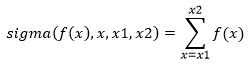
That is, the expression
is equivalent to
Another important loop primitive is makelist. While sigma returns the sum of distinct values created inside a loop, makelist returns a list containing each value. For example, the expression
will return the list
More specifically, the expression
is equivalent to
The primitive each is similar to makelist except that each allows you to provide a list of specific input values for x rather than supply start and end values. That is, the expression
is the same as
Refer to the About Primitives directory for a more complete description of these and other loop primitives.
lower
String with all characters converted to lowercase
| Category | Explanation |
|---|---|
| Format | lower(text) |
| Arguments | {text} text Input text string |
| Returns | {text} text with all characters converted to lowercase |
| Examples | |
| See also | upper |
lrand
Pseudo-random number from a lognormal distribution
| Category | Explanation |
|---|---|
| Format | lrand(mean,std) |
| Arguments | (unit) mean Optional distribution mean; default=1 (unit) std Optional distribution standard deviation; default=1 |
| Returns | (unit) Pseudo-random number from a lognormal distribution |
| Description | lrand generates random numbers drawn from a set with a lognormal probability distribution. The sequence of numbers generated by lrand has a period that is essentially infinite. In addition, there are no sensible sequential correlations. |
| Examples | |
| See also | rand, drand, trand, nrand, brand, prand, grand, wrand, betarand, crand, setrand, correlate |
m
Meter, length unit of measure
| Category | Explanation |
|---|---|
| Format | m |
| Defined as | base unit |
| See also | Predefined Units, Base Units |
mail
Sends an Internet e-mail message
| Category | Explanation |
|---|---|
| Format | mail(message,recipients,subject,sender) |
| Arguments | [any] message Message you wish to send; can include any numeric or text value including lists {text} recipients Internet mail address for the desired recipient(s) (text) subject Optional message subject; default = "None" (text) sender Optional Internet mail address for the sender; default = value set in the server properties page |
| Returns | [any] The value of message |
| Description | mail sends an e-mail message to any Internet mail recipient. This primitive can be used in applications monitoring real-time data and notify key individuals of special situations. If message is a numeric value, it is translated into a text string as it would be displayed. If message is a list, all elements in the list are translated separately and separated by commas. If message is a simple text string, the text is sent without translation. The argument recipients should include the desired recipient's e-mail address in standard Internet mail format (e.g., name@domain.com) If you want to send the message to more than one recipient, include a list of valid recipient addresses. |
| Examples | |
| "John.Doe@domain.com","Status") ``` | = mails the contents of the file Report.txt |
| See also | readhttp, dialog |
makelist
List of f(n) over a range of n
| Category | Explanation |
|---|---|
| Format | makelist(f(x),x,x1,x2,step) |
| Arguments | [any] f(x) Function or expression (node) x Name of the input variable in f(x) (num) x1 Lower limit (num) x2 Upper limit (num) step Optional step size; default=1 |
| Returns | [any] A list of f(x) where x is equal to all numbers from x1 to x2 inclusive, in increments of step |
| Description | makelist creates a temporary variable named x and then constructs a list by setting x equal to all numbers from x1 to x2 and repeatedly evaluating f(x). That is, makelist(f(x),x,x1,x2) = [f(x),f(x+1),...,f(x2)] If a node named x already exists, it is replaced for all evaluations of f(x) and is then restored to its original state. |
| Note | If the expression f(x) is a tree node rather than a function based on x, the reset primitive must be used to cause the tree to recalculate on each iteration. Constants retain their value from the first evaluation and return this value on all subsequent evaluations. To cause the constant to be reevaluated, use an expression similar to makelist({reset,f},x,x1,x2) rather than makelist(f,x,x1,x2) |
| Examples | |
| See also | Range, each, both, sigma, eachn, reset |
mask
Prevents calculation errors from terminating execution
| Category | Explanation |
|---|---|
| Format | mask(command,silent) |
| Arguments | [any] command Any valid expression (bool) silent Optional flag indicating if error and warning messages should be suppressed; default = true |
| Returns | [any] The value of command if successful or null if an error is encountered |
| Description | mask is used to evaluate an expression or branch in a tree while masking out all error conditions and messages. Normally, when an error is encountered the application currently running is halted. Using the mask primitive, the statement causing the error simply returns null and execution of the application continues. This primitive is useful in cases where expressions sometimes return errors when no logical error exists. For example, the readhttp and mail primitives perform network communications functions that return an error if the network to which you are attached encounters a communications problem. You can use the mask primitive to prevent your application from aborting so you can explicitly handle the problem in an appropriate manner. |
| See also | gate, readhttp, mail |
maskall
Prevents all errors from terminating execution
| Category | Explanation |
|---|---|
| Format | maskall(command,silent) |
| Arguments | [any] command Any valid expression (bool) silent Optional flag indicating if error and warning messages should be suppressed; default = true |
| Returns | [any] The value of command if successful or null if an error is encountered |
| Description | maskall is used to evaluate an expression or branch in a tree while masking out all errors, including system errors and user cancel events. maskall is equivalent to the mask function but also masks the following conditions: - User clicks Quit or Cancel button (also handled by maskcancel) - exit function encountered in a statement - Runtime and system errors |
| See also | mask, maskcancel, exit |
maskcancel
Prevents the Cancel button from terminating execution
| Category | Explanation |
|---|---|
| Format | maskcancel(command) |
| Arguments | [any] command Any valid expression |
| Returns | [any] The value of command if successful or null if an error is encountered |
| Description | maskcancel executes command while preventing the Cancel button from terminating execution. |
| See also | maskmaskall |
Math
Math object
| Category | Explanation |
|---|---|
| Format | Math(none) |
| Arguments | [any] none |
| Description | Math object |
max
Highest element in a list
| Category | Explanation |
|---|---|
| Format | max(list) *max(x1,x2,...*) |
| Arguments | [any] list Input list (any) x1, x2, ... Input values |
| Returns | (any) The largest element in list if only one argument is supplied or the largest of all arguments if more than one argument is supplied |
| Note | If list contains text strings, max returns the string that is last in an alphabetic sort of all elements. |
| Examples | |
| See also | best, pct, min, med, count, sum, prod, avg, std, variance, emv, bin |
maxwell
Maxwell, magnetic flux unit of measure
| Category | Explanation |
|---|---|
| Format | maxwell |
| Defined as | maxwell=1e-8*weber |
| See also | weber, Predefined Units, Base Units |
med
Median element in a list
| Category | Explanation |
|---|---|
| Format | med(list) med(x1,x2,...) |
| Arguments | [any] list Input list (any) x1, x2, ... Input values |
| Returns | (any) The median of all elements in list if only one argument is supplied or the median of all arguments if more than one argument is supplied |
| Description | The median value of a list is the value where there are an equal number of larger and smaller elements. If list contains an even number of elements, med returns the average of the two central values. If the central two elements are not numbers, med returns the first of these two. |
| Examples | |
| See also | pct, max, min, count, sum, prod, avg, std, variance, bin |
method
Creates a method pointer
| Category | Explanation |
|---|---|
| Format | method(function) |
| Arguments | (node) function |
| Description | Creates a method pointer |
med
Million Electron Volt, energy unit of measure
| Category | Explanation |
|---|---|
| Format | mev |
| Defined as | mev=1e6*ev |
| See also | ev, Predefined Units, Base Units |
mg
Milligram, mass unit of measure
| Category | Explanation |
|---|---|
| Format | mg |
| Defined as | mg=gm/1000 |
| See also | gm, Predefined Units, Base Units |
mi
Mile, length unit of measure
| Category | Explanation |
|---|---|
| Format | mi |
| Defined as | mi=5280*ft |
| See also | ft, Predefined Units, Base Units |
min
Lowest element in a list
| Category | Explanation |
|---|---|
| Format | min(list) *min(x1,x2,...*) |
| Arguments | [any] list Input list (any) x1, x2, ... Input values |
| Returns | (any) The smallest element in list if only one argument is supplied or the smallest of all arguments if more than one argument is supplied |
| Note | If list contains text strings, min returns the string that is first in an alphabetic sort of all elements. |
| Examples | |
| See also | pct, max, med, count, sum, prod, avg, std, variance, emv, bin |
m
Minimum of a function of one variable
| Category | Explanation |
|---|---|
| Format | minimize(f(x),x,x1,x2,x3) |
| Arguments | (real) f(x) Function or expression to be minimized (node) x Name of the input variable in f(x) (unit) x1 Initial guess for the value of x or lower limit on x (unit) x2 Optional central guess for x (unit) x3 Optional upper limit on x |
| Returns | (unit) The value of x where f(x) is minimized |
| Description | minimize finds the value of x such that f(x) is locally minimized. You must supply minimize with either a single point guess for the value of x or a set of three points defining the specific minimum you seek to isolate. minimize uses different methods to find the value of x depending on which of these starting methods you provide. If you provide values for x1, x2 and x3, these points must meet the following conditions: f(x1) > f(x2) and f(x3) > f(x2) and x1 < x2 < x3. If these conditions are met, minimize always finds a solution. If you provide a value for x1 only, minimize searches for a solution. If minimize fails to converge on a solution, try another value for x1. To maximize a function, simply multiply it by -1 and use the minimize primitive, e.g., minimize(-f(x),x,x1). minimize is an approximated function and is subject to the tolerance set by precision. minimize creates a temporary variable named x. If a node with this name already exists, it is replaced for all evaluations of f(x) and is then restored to its original state. |
| Note | If the expression f(x) is a tree node rather than a function based on x, the reset primitive must be used to cause the tree to recalculate on each iteration. Constants retain their value from the first evaluation and return this value on all subsequent evaluations. To cause the constant to be reevaluated, use an expression similar to minimize({reset,f},x,x1,x2) rather than minimize(f,x,x1,x2)) |
| Examples | |
| See also | precision, simplex, solve |
Minus
Operator -x, identifies a number as negative
| Category | Explanation |
|---|---|
| Format | -x |
| Arguments | (num) x Input number; may be real or complex |
| Returns | (num) 0 - x |
| Description | Identifies the number x as negative |
| Examples | |
| See Also | Plus, Subtract |
minute
Minute derived from a date-time serial number
| Category | Explanation |
|---|---|
| Format | minute(sernum) |
| Arguments | (unit) sernum Optional date and time serial number; default = now |
| Returns | (int) Minute implied by sernum (0-59) |
| Note | The serial number used by all date and time primitives is the number of seconds elapsed between an arbitrary base date and the specified date and time. Dates before the year 1584 are not valid. The serial numbers returned by the datenum and now primitives include the time unit of measure. Use formulas including the units yr, mo, wk, da, hr, mn, and sec to modify date serial numbers. |
| Examples | |
| See also | datenum, now, date, time, year, month, day, hour, second, weekday |
Mixed
Mixed prevents the report from summing the values of nodes within it
Note: This primitive can only be used in Report Writer.
See Create Custom Interfaces with Report Writer.
| Category | Explanation |
|---|---|
| Format | Mixed(list) |
| Arguments | list Keyword arguments; typically use Rollup as the keyword. |
| Returns | (text) Returns a text string format of minimum value-maximum value of the list. |
| Description | Wrap Mixed around a function definition to prevent the report from summing the values of the nodes within it. When you are in Display Mode in Report Writer, the default calculation sums the cells of the entities. For example, you may see percentages over 100%. If you wrap the function in Mixed, each entity is summed individually and a range by entity values displays (the minimum and maximum values). |
| Examples | Mixed([A,B,C,...]) |
| See also | Assumption, Rollup, RollupWhere |
mkv
Defines a branch in a Markov model
| Category | Explanation |
|---|---|
| Format | mkv(p1,s1,p2,s2,...) |
| Arguments | (real) p1, p2, ... Initialization value for state s or transition probability for moving from the current state to state s (node) s1, s2, ... State node name |
| Returns | (NA) Markov models chain forward rather than backwards, so mkv does not return a value |
| Description | mkv is used to build Markov models. In a Markov model the root node always branches out into all possible states. In the example below there are two states: Alive, and Dead. The values for arguments p1 and p2 determine the initial values for these states. After choosing Clear to reset the model and Run to execute the first stage, the model will have the following values. In this simulation there are initially 100 live people and no dead people. When Run is pressed a second time, the next stage is executed. In this stage's execution, the definition for Alive causes 90% of the people who are alive to remain alive and the remaining 10% transition to Dead. The values for p1 and p2 in the definition for Alive are interpreted differently than in the definition for Root. The definition Dead:=mkv is equivalent to Dead:=mkv(100%,Dead). This means that all people in the Dead state remain dead. Transition probabilities do not have to remain static, they can be calculated based on any formula using state values, stage number, etc. Note: This primitive is available only if you have the Decision Tree Add-In. |
| Examples | |
| See also | emv |
ml
Milliliter, volume unit of measure
| Category | Explanation |
|---|---|
| Format | ml |
| Defined as | ml=liter/1000 |
| See also | liter, Predefined Units, Base Units |
mm
Millimeter, length unit of measure
| Category | Explanation |
|---|---|
| Format | mm |
| Defined as | mm=m/1000 |
| See also | m, Predefined Units, Base Units |
mn
Minutes, time unit of measure
| Category | Explanation |
|---|---|
| Format | mn |
| Description | Minutes, time unit of measure For example, 30*mn or 30mn is equal to 30 minutes. |
| See also | da, half, hr, mo, qtr, wk, yr |
mo
Months, time unit of measure
| Category | Explanation |
|---|---|
| Format | mo |
| Description | Months, time unit of measure For example, 18*mo or 18mo is equal to 18 months. |
| See also | da, half, hr, mn, qtr, wk, yr |
model
Executes a command in the Model namespace
| Category | Explanation |
|---|---|
| Format | model(command) |
| Arguments | [any] command Any expression to evaluate |
| Returns | [any] The value of command when executed in the Model namespace |
| Description | Model causes an expression to be evaluated in the Model namespace. This level contains all dynamically loaded library components. |
| See also | primitive, unit, user, namespace |
mol
Mole, amount of substance unit of measure
| Category | Explanation |
|---|---|
| Format | mole |
| Defined as | base unit |
| See also | Predefined Units, Base Units |
month
Month derived from a date-time serial number
| Category | Explanation |
|---|---|
| Format | month(sernum) |
| Arguments | (unit) sernum Optional date and time serial number; default = now |
| Returns | (int) Month implied by sernum (1-12) |
| Description | The serial number used by all date and time primitives is the number of seconds elapsed between an arbitrary base date and the specified date and time. Dates before the year 1584 are not valid. The serial numbers returned by the datenum and now primitives include the time unit of measure. Use formulas including the units yr, mo, wk, da, hr, mn, and sec to modify date serial numbers. |
| See also | datenum, now, date, time, year, day, hour, minute, second, weekday |
movefile
Moves a disk file
| Category | Explanation |
|---|---|
| Format | movefile(source,dest) |
| Arguments | (text) source Path to the source file to move (text) dest Path to the move destination |
| Returns | (text) Destination of the moved file |
| Description | Moves a disk file |
| Examples | movefile("c:\\data.dat","d:\\data.dat") |
| See also | copyfile, deletefile, createdirectory, removedirectory, dir |
mph
Mile Per Hour, speed unit of measure
| Category | Explanation |
|---|---|
| Format | mph |
| Defined as | mph=mi/hr |
| See also | mi, hr, Predefined Units, Base Units |
Multiply
Operator x*y, numeric multiplication
| Category | Explanation |
|---|---|
| Format | A*B |
| Arguments | [num] A, B Any real numbers, complex numbers, vectors, or matrices to multiply |
| Returns | [num] Product of A and B |
| Description | Multiplication is carried out using one of the following methods as is appropriate for the input data: If A is an array and B is a single number, every element in A is multiplied by B: If A is a single number and B is an array, every element in B is multiplied by A: If both A and B are lists with the same lengths, the corresponding elements in A and B are multiplied: If A and B are matrices and the number of columns in A is equal to the number of rows in B, matrix multiplication is used: In all cases, elements are multiplied using complex multiplication where appropriate: |
| Examples | |
| See also | Implied Multiple, Divide |
mxsimplex
Linear program optimization based on matrix input data
| Category | Explanation |
|---|---|
| Format | mxsimplex(matrix,integer) |
| Arguments | [real] matrix Input matrix in normalized form [bool] integer Optional list of Boolean values indicating if the corresponding unknown should be restricted to integer values; Default=false, no integer values (If integer is a single value instead of a list, it indicates the number of unknowns that are integer.) |
| Returns | [real] Result of the simplex optimization on matrix |
| Description | Linear program optimization based on matrix input data |
| See also | simplex, simplex2, readsimplex |
namespace
Execute a command in the specified namespace
| Category | Explanation |
|---|---|
| Format | namespace(n,command) |
| Arguments | (int) n Namespace in which to execute command [any] command Any expression to evaluate |
| Returns | [any] The value of command when executed in the specified namespace |
| Description | Executes a command in the given namespace. The following are the n values for the built-in namespaces. |
| Examples | |
| See also | primitive, model, unit, user |
new
Operator new x(), creates a new object
| Category | Explanation |
|---|---|
| Format | new x() |
| Arguments | [any] x() Object constructor function |
| Returns | [any] An object initialized by x() |
| Description | This operator creates a new object by calling the constructor x() and returning the result as an object. |
| Examples | |
| See also | Property |
newton
Newton, force unit of measure
| Category | Explanation |
|---|---|
| Format | newton |
| Defined as | newton=m*kg/sec^2 |
| See also | m, kg, second, Predefined Units, Base Units |
no
Logical false
| Category | Explanation |
|---|---|
| Format | no |
| Arguments | None |
| Returns | (bool) false |
| Description | No is identical to false. |
| Examples | |
| See also | yes, true, false |
noriskaversion
Turns off risk aversion settings while executing a set of commands
| Category | Explanation |
|---|---|
| Format | noriskaversion(command) |
| Arguments | [any] command The command to evaluate with risk aversion turned off |
| Returns | [any] The result of evaluating the command with risk aversion turned off |
| Description | This function is used to turn off the effects of risk aversion while running a set of commands. Setting risk aversion changes the output of the emv function. Running a command using noriskaversion calculatse emv as if risk aversion was off (i.e., neutral). |
| See also | emv |
Not Equal
Operator x!=y, compares for inequality
| Category | Explanation |
|---|---|
| Format | x!=y |
| Arguments | [any] x, y Values to compare |
| Returns | (bool) True if x is not equal to y, false otherwise |
| Note | True is equal to all non-zero numbers. Text strings must match exactly, including case, to be equal. Lists and matrices are compared element-by-element. |
| Examples | |
| See also | compare, true, false, Equal, Greater than, Greater than or equal, Less Than, Less Than or Equal |
nounits
Evaluates an expression without unit processing
| Category | Explanation |
|---|---|
| Format | nounits(command) |
| Arguments | [any] command The expression to evaluate with unit processing turned off |
| Returns | [any] The result of evaluating the expression without unit processing |
| Description | nounits returns the result of evaluating the expression without unit processing. Any values with units attached are converted into base units before the expression is evaluated. |
| Examples | |
| See also | hasunits, reduceunits, stripunits, unitsof |
now
Serial number of the current date and time
| Category | Explanation |
|---|---|
| Format | now |
| Arguments | None |
| Returns | (unit) Serial number of the current date and time based on the system clock |
| Description | The serial number used by all date and time primitives is the number of seconds elapsed between an arbitrary base date and the specified date and time. Dates before the year 1584 are not valid. The serial numbers returned by the datenum and now primitives include the time unit of measure. Use formulas including the units yr, mo, wk, da, hr, mn, and sec to modify date serial numbers. |
| Examples | |
| See also | datetime, datenum, date, time, year, month, day, hour, second, weekday, elapsedtime |
npv
Net present value
| Category | Explanation |
|---|---|
| Format | npv(rate,cflist) |
| Arguments | (real) rate Interest rate per period (1=100%) [real] cflist List of cash flows; the first cash flow occurs at time 0 and all subsequent cash flows occur at the end of periods 1 to N |
| Returns | (real) The net present value of cash flows cflist discounted at an interest rate of rate |
| Description | npv calculates the net present value of a series of future cash flows using the following equation: |
| Examples | |
| See also | irr, pv, fv, pmt, term, rate, cf |
nrand
Pseudo-random number from a normal distribution
| Category | Explanation |
|---|---|
| Format | nrand(mean,std) |
| Arguments | (unit) mean Optional distribution mean; default=0 (unit) std Optional distribution standard deviation; default=1 |
| Returns | (unit) Pseudo-random number from a normal distribution |
| Description | nrand generates random numbers drawn from a set with a normal (Gaussian) probability distribution. The sequence of numbers generated by nrand has a period that is essentially infinite. In addition, there are no sensible sequential correlations. |
| Examples | |
| See also | rand, drand, trand, lrand, brand, prand, grand, wrand, betarand, crand, setrand, correlate |
null
Empty list
| Category | Explanation |
|---|---|
| Format | null |
| Arguments | None |
| Returns | null |
| Description | null is a special value indicating no value or an empty list. For example, the expression () returns null. |
| Examples | |
| See also | true, false |
Number
Number object constructor
| Category | Explanation |
|---|---|
| Format | Number(value) |
| Arguments | [any] value |
| Description | Number object constructor |
Object
General object constructor
| Category | Explanation |
|---|---|
| Format | Object(value) |
| Arguments | [any] value Any input value |
| Returns | [any] value |
| Description | This function is the general object constructor. Objects have the following built-in methods: toString() valueOf() |
| See also | this |
Object Literal
Operator {p1:x,p2:y,...}, creates an object
| Category | Explanation |
|---|---|
| Format | {p1:x,p2:y,...} |
| Arguments | (node) p1, p2 Property name [any] x, y Property value |
| Returns | [any] Object with all defined properties |
| Description | This operator is used to create objects with a literal expression. |
| Examples | |
| See also | new, Property |
ohm
Ohm, electric resistance unit of measure
| Category | Explanation |
|---|---|
| Format | ohm |
| Defined as | ohm-volt/amp |
| See also | volt, amp, Predefined Units, Base Units |
OnEnd
Node executed just before a model, component, or DLM ends
| Category | Explanation |
|---|---|
| Format | OnEnd |
| Arguments | None |
| Returns | None |
| Description | If a model has a node named OnEnd, it is executed just before the script execution ends when run web-based. Typically, you would create an OnEnd node as a floating node in your model to implement any clean-up functionality needed or save the user's results. OnEnd is guaranteed to run at the end of web execution even if the user cancels a script or the script ends because of an error. |
| See also | OnLoad, OnStart, Resource Tree |
OnLoad
Node executed when a model, component, or DLM is loaded
| Category | Explanation |
|---|---|
| Format | OnLoad |
| Arguments | None |
| Returns | None |
| Description | If a model has a node named OnLoad, it is executed when the model, component or DLM is loaded. Typically, you would create an OnLoad node as a floating node in your model to implement any initialization needed before the model, component, or DLM can be run. |
| See also | OnStart, OnEnd, Resource Tree |
OnStart
Node executed when a model, component, or DLM is started
| Category | Explanation |
|---|---|
| Format | OnStart |
| Arguments | None |
| Returns | None |
| Description | If a model has a node named OnStart, it is executed just before the script execution begins when run web-based. Typically, you would create an OnStart node as a floating node in your model to implement any functionality that should be run at the very beginning of your script. |
| See also | OnEnd, OnLoad, Resource Tree |
open
Opens a new document file
| Category | Explanation |
|---|---|
| Format | open(file) |
| Arguments | (text) file Name of the application file to open (as with all text strings, backslash characters () must be typed twice (\) to indicate a literal backslash as opposed to the start of a control code) |
| Returns | (text) file |
| Description | This primitive opens a document (model or script) that was previously saved and makes it the active document. open is useful in commands received via DDE. |
| Examples | |
| See also | exit |
Optional Return
Optional return of the value of the last expression in the definition's statement block.
In standard JavaScript, the return statement is required any time you want to return a value from a function call. In DScript, it is optional if you want to return the value of the last expression in the definition's statement block. That is, the following code
is the same as
This extension in DScript's lexical structure is required to allow DScript to support simple definitions. For example, the compound definition
can be replaced with the simple definition below:
In the simple definition, return is implied.
options
Causes component input values to display as a drop-down list
| Category | Explanation |
|---|---|
| Format | options(list,default,type) |
| Arguments | [any] list List of possible values for a component input (int) default Zero-based index of the option in list that is selected by default (bool) type Optional type code indicating if the selected item or selected item index should be returned, default=false (return the selected item). |
| Returns | [any] Selected item or index of the selected item in list. |
| Description | This primitive is used in building components to cause the component's properties dialog box to display a drop-down list of input values rather than allowing the user to enter a free-form value. When executed, this primitive behaves in the following way: options(list, default, false ) = list[default] options(list, default, true ) = default |
| Examples | |
| See also | units |
outputs
List of all nodes declared as outputs
| Category | Explanation |
|---|---|
| Format | outputs |
| Arguments | None |
| Returns | (text) List of all nodes declared as outputs |
| See also | all, treelist, rootnode, selectednode, endnodes, inputs |
oz
Ounce, mass unit of measure
| Category | Explanation |
|---|---|
| Format | oz |
| Defined as | oz=lb/16 |
| See also | lb, Predefined Units, Base Units |
ozf
Ounce, force unit of measure
| Category | Explanation |
|---|---|
| Format | ozf |
| Defined as | ozf=oz*gravity |
| See also | oz, Predefined Units, Base Units |
pa
Pascal, pressure unit of measure
| Category | Explanation |
|---|---|
| Format | pa |
| Defined as | pa=newton/m^2 |
| See also | newton, m, Predefined Units, Base Units |
Parentheses
Operator (x,y,...), evaluates a series of steps in the current namespace
| Category | Explanation |
|---|---|
| Format | (x,y,...) |
| Arguments | [any] x, y Any valid expression(s) |
| Returns | [any] The value of the last argument evaluated |
| Description | Parentheses are used to specify the order of evaluation for arithmetic expressions or to create a list of expressions to evaluate. If a list of expressions is evaluated, the value of the last expression is returned. () and {} are similar in that they both evaluate a list of expressions. However, nodes created while evaluating an expression in () are global while those created within {} cease to exist outside the braces. In most cases braces {} should be used instead of parentheses () when creating procedure that uses local variables. Braces ensure all nodes created within the braces are local and do not overwrite or in any way interfere with other nodes having the same name. |
| Examples | |
| See also | Procedure, List Literal |
parse
Parses a node definition into a list of arguments
| Category | Explanation |
|---|---|
| Format | parse(definition,start,intl) |
| Arguments | (text) definition Node definition to parse (int) start Optional position of definition at which to start parsing; default = 0 (bool) intl Optional flag to convert definition from international format to the required internal format; default=false |
| Returns | [text] List containing the arguments of definition |
| Description | Parses a node definition into a list of arguments. The first element of the list is the name of the node, followed by the arguments of the node function (if any). If the node is not a function or does not contain any arguments, the node name is returned as a single value. |
| Examples | |
| See also | show |
parseFloat
Floating point number derived from a text string
| Category | Explanation |
|---|---|
| Format | parseFloat(text) |
| Arguments | (test) text |
| Description | Floating point number derived from a text string |
parsehtmltable
Parses an HTML table into matrix data
| Category | Explanation |
|---|---|
| Format | parsehtmltable(text,index) |
| Arguments | (text) text HTML formulation of a data table (int) index Option table number to parse; default=1 |
| Returns | [text] Matrix of text strings where each string corresponds to an item in the HTML table |
| Description | Parses an HTML table into matrix data |
| Examples | |
| See also | createhtmltable |
parseInt
Integer derived from a text string
| Category | Explanation |
|---|---|
| Format | parseInt(text) |
| Arguments | (text) text |
| Description | Integer derived from a text string |
partslist
Builds a single consolidated object from a parts list of components
| Category | Explanation |
|---|---|
| Format | partslist([count,component],...) |
| Arguments | (int) count The number of this item in the assembly (object) object Sub-assembly component |
| Returns | (object) A single aggregated object with the same properties as the input components |
| Description | partslist is used to create an assembly object from a set of sub-assembly components. When you request the value of a consolidated object property, the partslist function requests the value of that property from each child component, multiplies it by the associated count, and adds the values. All properties exposed by the child components are available in the consolidated object. It is important to note partslist does not verify all input components have a value for a specific property. If a component does not define the property called on the parent object it contribute zero to the total. For example, Product.TotalCost ignores Part1 if it does not have a value for TotalCost, and returns the value of Part1.TotalCost + Part3.TotalCost. |
| Examples | |
| See also | consolidate, component, Property |
pct
Element at a specific percentile position in a list after sorting
| Category | Explanation |
|---|---|
| Format | pct(list,percent) |
| Arguments | [real] list Input list [real] percent Optional percentile to locate in the range 0 to 1, default=0.5 |
| Returns | (any) The element in list located at the percent percentile |
| Description | pct locates the element in a list of input data falling on the specified percentile. This primitive can be used like min, med, and max to determine the range or central value of a list of experimental data. Unlike these primitives, though, pct allows you to specify the specific percentile you wish to find. If the percentile you wish to locate lies between two elements in list, pct returns the average of the two. |
| Examples | |
| See also | max, min, med, count, sum, prod, avg, std, variance, bin |
Percent
Operator x%, divide by 100
| Category | Explanation |
|---|---|
| Format | x% |
| Arguments | [num] x Input number |
| Returns | [num] The value of x / 100 |
| Examples | |
| See also | Divide |
PI
3.14159
| Category | Explanation |
|---|---|
| Format | PI |
| Arguments | None |
| Returns | (real) 3.141592653589793 |
| Examples | |
| See also | sin, cos, tan, asin, acos, atan, atan2 |
Plus
Operator +x, identifies a number as positive
| Category | Explanation |
|---|---|
| Format | +x |
| Arguments | (num) x Input number; may be real or complex |
| Returns | (num) x |
| Description | Identifies the number x as positive. This notation is always superfluous because numbers are assumed to be positive. However, this operator sometimes improves the readability of equations. |
| Examples | |
| See also | Minus, Add |
pmt
Payment for an installment loan
| Category | Explanation |
|---|---|
| Format | pmt(pv,rate,term) |
| Arguments | (real) pv Principal (real) rate Periodic interest rate (1=100%) (real) term Number of periods |
| Returns | (real) The periodic payment on a loan of principal amount pv at an interest rate of rate over term periods |
| Description | The payment is calculated using the following equation: |
| Examples | |
| See also | pv, fv, term, rate, npv, irr, cf |
Power
Operator x^y, x raised to the power y
| Category | Explanation |
|---|---|
| Format | A^B |
| Arguments | [num] A Base, may be any real number, complex number, or matrix [num] B Power, may be any real, complex number, or list |
| Returns | [num] A raised to the power B |
| Note | If A is a matrix, it must be square and B must be a real integer. You can calculate the inverse of a matrix using the command A^-1. This function is performed using one of the following methods as is appropriate for the input data: If A is a list and B is a single number, every element in A is raised to the power B: If A is a single number and B is a list, A is raised to every element in B: If both A and B are lists with the same lengths, the corresponding elements in A and B are matched: If A is a matrix and B is a single integer, A is raised to the power B: In all cases, complex numbers are supported. |
| Examples | |
| See also | sqrt, exp |
prand
Pseudo-random number from a Poisson distribution
| Category | Explanation |
|---|---|
| Format | prand(mean) |
| Arguments | (real) mean Optional distribution mean; default=1 |
| Returns | (int) Pseudo-random number from a Poisson distribution |
| Description | Numbers returned by the prand primitive represent the number of random events occuring per unit of time. For example, the number of customers arriving in a given hour is represented by a Poisson distribution. This probability distribution is characterized by the mean number of events per unit time. The result returned by prand is always a positive integer. |
| Examples | |
| See also | rand, drand, trand, nrand, lrand, brand, grand, wrand, betarand, crand, setrand, correlate |
precision
Sets the precision for approximated functions
| Category | Explanation |
|---|---|
| Format | precision(digits) |
| Arguments | (int) digits Optional number of significant digits (1-14) |
| Returns | (int) Current setting for precision |
| Description | precision sets the maximum error tolerated in approximated primitives integral, root, and minimize. The time required for these primitives to converge is highly dependent on the desired precision. If no argument is supplied, precision returns the current setting without changing it. Precision is expressed as the number of significant digits. That is, the number of digits containing meaningful information. For example, if the precision is set to three and an approximated primitive is solving for PI (3.141592...), the result is 3.14-the last digit is never off by more than ±1. All of the following numbers are expressed to three significant digits: 12.3, 0.000123, 1.23e-12, 123000. Note the number of significant digits is different from the number of decimal places displayed. |
| Examples | |
| See also | integral, root, minimize |
primitive
Executes a command in the Primitive namespace
| Category | Explanation |
|---|---|
| Format | primitive(command) |
| Arguments | [any] command Any expression to evaluate |
| Returns | [any] The value of command when executed in the Primitive namespace |
| Description | Primitive causes an expression to be evaluated in the Primitive namespace. |
| See also | Do Primitive, model, unit, user, namespace |
print
Appends text to the output buffer
| Category | Explanation |
|---|---|
| Format | print(text) |
| Arguments | [any] text Text to append to the HTML output buffer |
| Returns | [any] text |
| Description | print appends text to the HTML output buffer. |
| Examples | |
| See also | flush, dialog, say |
Procedure
Operator {x,y,...}, evaluates a series of steps in a new namespace
| Category | Explanation |
|---|---|
| Format | {x,y,...} |
| Arguments | [any] x, y Any valid expression(s) |
| Returns | [any] The value of the last argument evaluated |
| Description | The Procedure operator is used to create a list of steps to execute. The expressions x, y, ... are evaluated in the order listed, and the result of the last expression is returned. Nodes created within the braces are visible only within the braces and do not interfere with other nodes having the same name. () and {} are similar in that they both evaluate a list of expressions. However, nodes created while evaluating an expression in () are global while those created within {} cease to exist outside the braces. In most cases braces {} should be used instead of parentheses () when creating procedure that uses local variables. Braces ensure all nodes created within the braces are local and do not overwrite or in any way interfere with other nodes having the same name. |
| Examples | |
| See also | Parentheses, List Literal, Object Literal |
prod
Product of all numbers in a list
| Category | Explanation |
|---|---|
| Format | prod(list) *prod(x1,x2,...*) |
| Arguments | [num] list Input list (num) x1, x2, ... Input numbers; may include real and complex numbers |
| Returns | (num) The numeric product of all elements in list if only one argument is supplied, the product of all arguments if more than one argument is supplied |
| Examples | |
| See also | count, sum, avg, std, variance, max, min, med |
programdir
File directory where the program resides
| Category | Explanation |
|---|---|
| Format | programdir |
| Arguments | None |
| Returns | (text) Name of the directory where the program files reside |
| Examples | |
| See also | componentdir, scriptdir |
Property
Operator x.y, accesses a named property in an object
| Category | Explanation |
|---|---|
| Format | x.y |
| Arguments | (object) x Name of an object or expression that evaluates to an object (node) y Name of the property or method to access |
| Returns | [any] Value of the property or method named y in the object x |
| Description | This operator is used to access an object property or method. |
| Examples | |
| See also | new, List Element, Function Call |
propname
Name of the currently executing method or property
| Category | Explanation |
|---|---|
| Format | propname |
| Arguments | None |
| Returns | [text] Name of the currently executing method or property |
| Description | propname returns the name of the currently executing method or property. Its primary use is in the handler for default methods and properties to determine the actual property or method called. The example below shows the use of the propname function in the definition of the consolidate function. |
| Examples | ``` consolidate (objects,...):=new _consolidate(arguments) |
| _consolidate(obj):={ | |
| .objlist=(obj); | |
| _consolidate.prototype.@=_consolidate @; | |
| } | |
| _consolidate @():={ | |
| if(propname=="inputs") | |
| null; | |
| else if(propname=="outputs") | |
| union(flatten(user(each(x.outputs,x,.objlist)))) | |
| else | |
| sum(user(each(x[propname],x,.objlist))); | |
| } ``` | |
| See also | Property, consolidate |
psi
Pound per Square Inch, pressure unit of measure
| Category | Explanation |
|---|---|
| Format | psi |
| Defined as | psi=lbf/in^2 |
| See also | lbf, in, Predefined Units, Base Units |
pt
Pint, volume unit of measure
| Category | Explanation |
|---|---|
| Format | pt |
| Defined as | pt=16*fl_oz |
| See also | fl_oz, Predefined Units, Base Units |
pv
Present value of an annuity
| Category | Explanation |
|---|---|
| Format | pv(pmt,rate,term) |
| Arguments | (real) pmt Periodic payment (real) rate Periodic interest rate (1=100%) (real) term Number of periods |
| Returns | (real) The present value of term periodic payments of pmt each discounted at a periodic interest rate of rate |
| Description | The present value is calculated using the following equation: |
| Examples | |
| See also | fv, pmt, term, rate, npv, irr, cf |
pvx
Present value of a cash stream
| Category | Explanation |
|---|---|
| Format | pvx(pmt,year,term,ir,dr) |
| Arguments | (num) pmt Periodic cash payment (real) year Optional year in which the cash value is incurred, default=0 (real) term Optional number of periods, default=1 (real) ir Optional inflation rate, default=Inflation Rate (real) dr Optional discount rate, default=Discount Rate |
| Returns | (unit) If the model is running a time-based analysis for a particular year, pvx returns the nominal cash flow in that year. Otherwise, pvx returns the present value of all cash flows. |
| Description | To use the pvx primitive, your model should also contain nodes defining the following values: - Inflation Rate = rate at which cash flow values increase - Discount Rate = discount rate for present value calculation When your model is running a time-dependent calculation, pvx returns the nominal cash flow in year t using the equation: When your model is running in normal mode, pvx calculates a present value using the equation: The inflation and discount rates can be time dependent. For example, the following equation models inflation with an autocorrelation of 65%: ``` Inflation Rate:={ |
| t<=0?=4%; | |
| 0.65(Inflation Rate{t-1}-4%)+4%+sqrt(1-0.65^2) | |
| nrand(0,2%); | |
} The *pmt* value should be entered in **t0** dollars and is automatically inflated at the **Inflation Rate**. For example, if you define: Inflation Rate:=5% and set t0 to January 1, 2000 Costs:=pvx(100,5,2) ``` represents a cash flow of 128 in year 2005 and 134 in year 2006. |
|
| Examples | |
| See also | Time Value, Time Assignment, t, t0, pv |
qt
Quart, volume unit of measure
| Category | Explanation |
|---|---|
| Format | qt |
| Defined as | qt=2*pt |
| See also | pt, Predefined Units, Base Units |
qtr
Quarter of a year, time unit of measure
| Category | Explanation |
|---|---|
| Format | qtr |
| Description | Quarter of a year, time unit of measure For example, 6*qtr or 6qtr is equal to 6 quarters. |
| See also | da, half, hr, mn, mo, wk, yr |
Quote
Operator "x", specifies a text string
| Category | Explanation |
|---|---|
| Format | "x" |
| Arguments | x Any alphanumeric string |
| Returns | (text) x |
| Description | Quotation marks are used to distinguish a portion of text in a command as a string as opposed to an expression to be evaluated. For example, the command say(2+3) causes 5 to be displayed while the command say("2+3") displays the text string 2+3. All ASCII and extended ASCII codes between 1 and 255 can be inserted into any text string using the backslash character () followed by the number of the desired code. To indicate a literal backslash is to be inserted as opposed to a code, a double backslash (\) must be used. A set of special characters can be used in place of a numeric code for inserting formatting characters. For example, \n causes the code to start a new line (ASCII 10) to be inserted. All recognized codes are listed in the table below. If the backslash is followed by an unrecognized character, the backslash and the following character are ignored. |
| Examples | |
| See also | tostring, eval, Add |
rand
Pseudo-random number from a uniform distribution
| Category | Explanation |
|---|---|
| Format | rand(x1,x2) |
| Arguments | (unit) x1 Optional lower limit; default=0 (unit) x2 Optional upper limit; default=1 |
| Returns | (unit) Pseudo-random number between x1 and x2 |
| Description | rand generates a random number equally likely to be any number between the lower and upper limits (x1 <= rand < x2). The sequence of numbers generated by rand has a period that is essentially infinite. In addition, there are no sensible sequential correlations. The random numbers have a granularity of better than 1e-10. |
| Examples | |
| See also | drand, trand, nrand, lrand, brand, prand, grand, wrand, betarand, crand, setrand, correlate |
Range
Operator x..y, creates a list of numbers from x to y
| Category | Explanation |
|---|---|
| Format | x..y |
| Arguments | [num] x Lower limit and optional second element [num] y Upper limit and optional step size |
| Returns | [num] A list of numbers between x and y inclusive |
| Description | The Range operator produces a list of numbers. Normally, the numbers are sequential from x to y in steps of 1. You can specify a different step size in either one of two ways. First, by specifying a pattern to follow (e.g., [x1,x2]..xn); or second, by explicitly specifying a step size (e.g., x1..[xn,step]). |
| Examples | |
| See also | List Literal, makelist |
rankcorrelation
Measures the correspondence between the two rankings
| Category | Explanation |
|---|---|
| Format | rankcorrelation(list1,list2) |
| Arguments | [real] list1, list2 Input lists |
| Returns | (real) The rank correlation coefficient between the two lists |
| Description | rankcorrelation measures the correspondence between the two rankings (list1, list2) and assigns a value to the correspondence. A coefficient of 1.0 implies 100% correlation and -1.0 implies 100% negative correlation. An increasing rank correlation implies increasing agreement between rankings. Both of the lists may be ranked data or one list may be ranked data and the other list may be loose input values. rankcorrelation can also be used to evaluate the extent to which two inputs deviate from a set rank by comparing the value returned by rankcorrelation to a set rank number. Use the correlation primitive to measure of the correlation coefficient for two lists. |
| Examples | ``` rankcorrelation([1,2,3,4,5],[1,2,3,4,5]) = 1 |
| rankcorrelation([1,2,3,4,5],[6,7,8,9,10]) = 1 | |
| rankcorrelation([5,4,3,2,1],[1,2,3,4,5]) = -1 | |
| rankcorrelation([1,2,3,4,5],[10,9,8,7,6]) = -1 | |
| rankcorrelation([1,3,5,4,2],[1,2,3,4,5]) = 0.3 | |
| rankcorrelation([1,2,3,5,4],[1,2,3,4,5]) = 0.9 ``` | |
| See also | correlation, variance, std, rsquared |
rate
Interest rate of investment
| Category | Explanation |
|---|---|
| Format | rate(fv,pv,term) |
| Arguments | (real) fv Future value (real) pv Present value (real) term Number of periods |
| Returns | (real) Periodic interest rate necessary for an investment of pv to grow to a future value of fv in term periods |
| Description | The interest rate is calculated using the following equation: |
| Examples | |
| See also | term, pv, fv, pmt, npv, irr, cf |
read
Loads the contents of a text file
| Category | Explanation |
|---|---|
| Format | read(file) |
| Arguments | (text) file Name of the file to read |
| Returns | (text) The contents of file |
| Description | read loads the contents of a file as a single text string. The file can be broken down into a list of records using a statement of the form tolist(read(file),"\n"). If file does not contain full path information, the file is assumed to reside in the same directory as the .mdl or .dsb application file. If you include path information, remember the backslash characters must be typed twice in text literals (e.g., "c:\temp.txt" instead of "c:\temp.txt"). |
| Examples | |
| See also | readbin, readcsv, readtxt, readhttp, readobj, write, append, getfile |
readbin
Loads the contents of a binary data file
| Category | Explanation |
|---|---|
| Format | readbin(file,password) |
| Arguments | (text) file Name of the file to read (text) password Optional password used to encrypt the contents of the saved file; default=no encryption |
| Returns | [any] The contents of file |
| Description | readbin loads the contents of a file as a matrix. The file must have been created using writebin. If you used a password when writing the file, you must use the same password to read the file. The functions readobj/writeobj and readbin/writebin are similar in that both read/write data use binary files. Readbin/writebin is recommended when password-protected files are needed, since readobj/writeobj do not support password-protecting files. In all other cases, readobj/writeobj is recommended because it saves data in a more compressed form and read/write data more quickly. If file does not contain full path information, the file is assumed to reside in the same directory as the .mdl or .dsb application file. If you include path information, remember the backslash characters must be typed twice in text literals (e.g., "c:\temp.txt" instead of "c:\temp.txt"). |
| Examples | |
| See Also | read, readcsv, readtxt, readobj, readhttp, writebin |
readcookie
Reads a persistent cookie from the user's Web browser
| Category | Explanation |
|---|---|
| Format | readcookie( name ) |
| Arguments | (text) name Cookie name |
| Returns | (text) Value of the cookie named name if it exists or null if it does not |
| Description | Reads a persistent cookie from the user's Web browser. |
| Examples | |
| See Also | writecookie, env, hostipaddress |
readcsv
Loads the contents of a comma-delimited data file
| Category | Explanation |
|---|---|
| Format | readcsv(file) |
| Arguments | (text) file Name of the file to read |
| Returns | [any] The contents of file |
| Description | readcsv loads the contents of a Comma Separated Value (CSV) file as a matrix. CSV format files are text files containing a one- or two-dimensional array of values separated by commas. Each record in the file is a column vector. DScript assumes any field containing a non-numeric character is a string and all others are numbers. Text fields containing a comma MUST be enclosed in quotation marks. If file does not contain full path information, the file is assumed to reside in the same directory as the .mdl or .dsb application file. If you include path information, remember the backslash characters must be typed twice in text literals (e.g., "c:\temp.txt" instead of "c:\temp.txt"). |
| Examples | |
| See also | read, readtxt, readhttp, readbin, readobj, writecsv, appendcsv |
readhttp
Reads a document from the Internet via the HTTP protocol
| Category | Explanation |
|---|---|
| Format | readhttp(url,file) |
| Arguments | (text) url Any valid Internet URL using the HTTP protocol including references to HTML documents and CGI scripts (text) file Optional name of a file where the data downloaded by readhttp should be stored |
| Returns | (text) The contents of the remote document specified by url |
| Description | readhttp establishes a link with a remote host via the Internet and requests a document. readhttp is similar to the read primitive in that it returns the entire contents of a document as a text string. readhttp is different from read in that the document you read can reside on any computer attached to the Internet or your corporate Intranet. If you supply a filename, the contents of the URL document is written to the file rather than returned as a text string. This allows you to download binary files. This primitive gives you programmatic access to the Internet. This allows you to retrieve up-to-date information from any Web site and automatically parse the data to extract valuable information. For example, you can easily build a library function that reads live stock prices from sites providing stock quoting services. If file does not contain full path information, the file is assumed to reside in the same directory as the .mdl or .dsb application file. If you include path information, remember the backslash characters must be typed twice in text literals (e.g., "c:\temp.txt" instead of "c:\temp.txt"). |
| Note | You must have an Internet connection for this primitive to operate. The connection can be through a LAN or dial-up connection so long as your network software uses the Windows Sockets protocol. |
| Examples | |
| exec-script.dsb-Result") ``` | = reads the value of a node named Result in a script named script.dsb |
| See also | read, mail, dialog |
readobj
Loads the contents of a binary data file
| Category | Explanation |
|---|---|
| Format | readobj(file) |
| Arguments | (text) file Name of the binary file to read |
| Returns | [any] The contents of file |
| Description | readobj loads the contents of the binary file written with writeobj or writebin (with no password). The functions readobj/writeobj and readbin/writebin are similar in that both read/write data using binary files. readbin and writebin are recommended when password-protected files are needed, since readobj and writeobj do not support password-protecting files. In all other cases, readobj and writeobj are recommended because they save data in a more compressed form and process data more quickly. If file does not contain full path information, the file is assumed to reside in the same directory as the .mdl or .dsb application file. If you include path information, remember the backslash characters must be typed twice in text literals (e.g., "c:\temp.txt" instead of "c:\temp.txt"). |
| Examples | |
| See also | read, readcsv, readtxt, readhttp, readbin, writeobj |
readsimplex
Imports comma-delimited data and performs a linear optimization
| Category | Explanation |
|---|---|
| Format | readsimplex(file,vector) |
| Arguments | (text) file Name if the file containing matrix data in CSV format [real] vector Optional Right-hand-side vector to replace the last column in the CSV file matrix |
| Returns | [real] Result of the simplex optimization |
| Description | Imports comma-delimited data and performs a linear optimization If file does not contain full path information, the file is assumed to reside in the same directory as the .mdl or .dsb application file. If you include path information, remember the backslash characters must be typed twice in text literals (e.g., "c:\temp.txt" instead of "c:\temp.txt"). |
| See also | simplex, simplex2, mxsimplex |
readtxt
Loads the contents of a tab-delimited data file
| Category | Explanation |
|---|---|
| Format | readtxt(file) |
| Arguments | (text) file Name of the file to read |
| Returns | [any] The contents of file |
| Description | readtxt loads the contents of a tab-delimited data file as a matrix. Tab-delimited files are text files containing a one- or two-dimensional array of values separated by tabs. Each record in the file is a column vector. DScript assumes any field containing a non-numeric character is a string and all others are numbers. If file does not contain full path information, the file is assumed to reside in the same directory as the .mdl or .dsb application file. If you include path information, remember the backslash characters must be typed twice in text literals (e.g., "c:\temp.txt" instead of "c:\temp.txt"). |
| Examples | |
| See also | read, readcsv, readhttp, writetxt, appendtxt |
readuserfile
Prompts a Web user for the name of a file and uploads its contents
| Category | Explanation |
|---|---|
| Format | readuserfile(message,default,title,buttons) |
| Arguments | (text) message Optional message to display; default=contents of the node's Form window (dialogtemplate) (any) default Optional default value to display in the text box; default="" (text) title Optional title displayed on the dialog box frame; default="" (int) buttons Optional code indicating the type of buttons displayed; default=0 (see dialog for details) |
| Returns | (text) The contents of the file selected by the user |
| Description | readuserfile prompts the user for the location of a file to upload from their computer. If you use this function in an HTML form, you must change the envelope to send data using multipart encoding. You do this by replacing the line: <form action="dscript" method="post"> with <form action="dscript" method="post" enctype="multipart/form-data"> |
| Examples | InputFile:=readuserfile("Please select the Input file") |
| See also | asknumber, askyesno, asktext. askmultitext, choose, say, dialog |
real
The real portion of a complex number
| Category | Explanation |
|---|---|
| Format | real(z) |
| Arguments | {num} z Complex number |
| Returns | {unit} The real portion of the complex number z |
| Examples | |
| See also | imag, abs, arg, I |
redirect
Transfers the user to a Web page outside the active script
| Category | Explanation |
|---|---|
| Format | redirect(url) |
| Arguments | (text) url URL of the destination page |
| Returns | null |
| Description | Transfers the user to a Web page outside the active script |
| Examples | |
| See also | dialog |
reduceunits
Number without units as it would display in the current unit system
| Category | Explanation |
|---|---|
| Format | reduceunits(x) |
| Arguments | (num) x Input value |
| Returns | (num) Number without units as it would display in the current unit system |
| Description | reduceunits strips off the units of the input and displays the value as it would display in the current unit system (but without units). The example below assumes the current unit system is Meter/Kilogram/Second. |
| Examples | |
| See also | nounits, hasunits, stripunits, unitsof, redunits |
redunits
Identifies a constant as a reduction unit
| Category | Explanation |
|---|---|
| Format | redunits(namespec) |
| Arguments | {node} namespec Optional list of node names to be identified as reduction units; default=null |
| Returns | [text] List of all active reduction units |
| Description | redunits is used to identify constants used as reduction units. The nodes in namespec must be constants and must already be created. If a preexisting reduction unit has the same dimensions as a new unit in namespec, the old reduction unit is no longer active in unit reduction. |
| Examples | |
| See also | Predefined Units |
Remainder
Operator x%y, remainder of x/y
| Category | Explanation |
|---|---|
| Format | A%B |
| Arguments | (real) x Any number (real) y Any number other than zero |
| Returns | (real) The remainder (modulo) of x/y |
| Examples | |
| See also | Divide |
remove
Removes a node from memory
| Category | Explanation |
|---|---|
| Format | remove(namespec) |
| Arguments | {node} namespec Any list of node names |
| Returns | [text] namespec |
| Description | remove eliminates all nodes in namespec and makes the memory occupied by these nodes available to the system. |
| Examples | |
| See also | all, treelist, rootnode, selectednode, endnodes, inputs, outputs, rename |
removedirectory
Deletes a file directory or folder
| Category | Explanation |
|---|---|
| Format | removedirectory(directory) |
| Arguments | (text) directory Path of the directory to remove |
| Returns | (text) Name of the directory removed |
| Description | Removes (deletes) a directory in the user's file system. |
| Examples | removedirectory("C:\\New Directory") |
| See also | createdirectory, copyfile, deletefile |
rename
Renames a node
| Category | Explanation |
|---|---|
| Format | rename( from, to ) |
| Arguments | (text) from Current name of a node (text) to New name of the node |
| Returns | (text) New name of the node |
| Description | Renames a node and modifies the definition of all parent nodes. |
| Examples | rename("NodeA","NodeB") |
| See also | remove, exists, show |
repeat
String created by repeating a substring a given number of times
| Category | Explanation |
|---|---|
| Format | repeat(text,n) |
| Arguments | (text) text Input text string (int) n Number of times to repeat text |
| Returns | (text) String containing text repeated n times |
| Examples | |
| See also | Add |
replace
Replaces a specific occurrence of a substring
| Category | Explanation |
|---|---|
| Format | replace(text,offset,len,rep) |
| Arguments | (text) text Input text string (int) offset Starting location of the text to replace (int) len Length of the text to replace (text) rep Replacement text |
| Returns | (text) text with len characters beginning at offset replaced with rep |
| Examples | |
| See also | substitute, find |
replist
Replaces a specific occurrence of a sublist
| Category | Explanation |
|---|---|
| Format | replist(list,offset,len,rep) |
| Arguments | [any] list Input list [int] offset Starting location of the sublist (int) len Length of the sublist to be replaced [any] rep Replacement list |
| Returns | [any] list with len elements beginning at offset replaced by rep |
| Description | replist can be used to remove, insert, or replace elements in a list. The offset argument can be a list of integers specifying a position deep within a hierarchical list. The first integer in the list is the offset on the first level; the second element is the offset on the second level, and so on. For example, the element at offset 2 in the list [[1,2],[3,4,5],[6,7]] is the sublist [3,4,5]. The element at offset [2,3] is the number 5. |
| Examples | |
| See also | Assign, List Element, index, sublist |
replybin
Sends data to the requesting host
| Category | Explanation |
|---|---|
| Format | replybin(data) |
| Arguments | [any] data Any data, including lists, matrices and objects |
| Returns | [any] The value of data |
| Description | replybin sends data to the requesting host. replybin is used in grid computing configurations to establish communications between hosts in the grid. |
| Examples | ``` Root:={ |
| "/ open a remote process /"; | |
| var sid=readhttp("http://127.0.0.1/CalcServer.dsb"); | |
| ; | |
| "/ request data from the process /"; | |
| var result=readhttp("http://127.0.0.1/dscript?READ-"+sid+"-PI"); | |
| ; | |
| "/ shut the remote process down /"; | |
| readhttp("http://127.0.0.1/dscript?EXEC-"+sid+"-EXIT"); | |
| ; | |
| return result; | |
| } | |
| Root:={ | |
| replybin(sessionid); | |
| while(1) | |
| waitforrequest; | |
| } ``` | |
| See also | waitforrequest, readhttp |
reset
Marks all constants as unevaluated
| Category | Explanation |
|---|---|
| Format | reset |
| Arguments | None |
| Returns | null |
| Description | Marks all constants as unevaluated. These constants retain their values in the case of circular references such as x:=x+1. Use clear to reset all values to null. |
| Examples | |
| See also | clear, remove |
Resource Tree
Node executed to load the resource tree for a model
| Category | Explanation |
|---|---|
| Format | Resource Tree |
| Arguments | None |
| Returns | None |
| Description | If a model has a node named Resource Tree, it is executed when the model, component, or DLM is loaded (before the OnLoad node). Resource Tree is intended to be used to load components that define functionality used in the model. |
| See also | OnEnd, OnLoad, OnStart |
return
Returns the specified value from a function call
The return statement is used to terminate execution of a node definition and optionally return a value. This statement has the format
For example, the following definition scans all elements in a list and returns the first negative value:
If you don't supply a return value with the return statement, e.g.,
the value null is returned. That is,
is the same as
| See also | Optional Return |
reverse
Reverses the order of all elements in a list
| Category | Explanation |
|---|---|
| Format | reverse(list) |
| Arguments | [any] list Input list |
| Returns | [any] list with all elements swapped from last to first |
| Examples | |
| See also | sort |
RGB
Build a RGB color value
| Category | Explanation |
|---|---|
| Format | RGB(R,G,B) |
| Arguments | (int) R Red value (int) G Green value (int) B Blue value |
| Returns | (int) RGB hex value |
| Examples |
Right Shift
Operator x>>y, shifts bits in a number right
| Category | Explanation |
|---|---|
| Format | x>>y |
| Arguments | (int) x, y Any integers |
| Returns | (int) The value of x with all bits shifted right y places |
| Description | This operator converts x from a floating-point number to a 32-bit integer, shifts all bits y places to the right, and returns the result as a floating-point number. The difference between Right Shift and Zero-Fill Right Shift is in how the sign bit is treated. With Right Shift, the sign is preserved by keeping the most significant bit unchanged. With Zero-Fill Right Shift, the most significant bit is set to zero. |
| Examples | |
| See also | Zero-Fill Right Shift, Left Shift, Bitwise And, [Bitwise Or](#bitwise_or "Operator x |
Rollup
Uses the current node name to show the sum of that record for each entity defined in the system
Note: This primitive can only be used in Report Writer.
See Create Custom Interfaces with Report Writer.
| Category | Explanation |
|---|---|
| Format | Rollup |
| Arguments | None |
| Returns | (any) Returns the value of Assumptions.activenode |
| Description | Uses the current node name to show the sum of that record for each entity defined in the system. The functionality is the same as the Assumption primitive, but Rollup breaks out by entity (explodes). In child entity, Rollup is equal to Assumption. Not flat. |
| Examples | |
| See also | activenode, Assumption, Mixed, RollupWhere |
RollupWhere
Dynamically builds a collapsible tree structure based on the attributes applied to records matching the filter you apply
Note: This primitive can only be used in Report Writer.
See Create Custom Interfaces with Report Writer.
| Category | Explanation |
|---|---|
| Format | RollupWhere |
| Arguments | |
| Returns | [real] Sum of the values of all records matching the filter you applied. |
| Description | Dynamically builds a collapsible tree structure based on the attributes applied to records matching the filter you apply. The filter is specified as an object, such as: {fieldName:\"Value\"} RollupWhere has the same functionality as the following options in pivot tables: - Record Filter (Filter) - Group Order (Fields) - Unit (Units) See Work with Pivot Tables. |
| Examples | Total Revenue:=RollupWhere({entity:"##ENTITY##",Function:"Revenue"},["Product_Name"],"Unit_$ASP") - entity:"##ENTITY##": Mandatory first argument. - Function:"Revenue": Filters to records with a Revenue attribute. - ["Product_Name"]: Further filters records with a Product_Name attribute. - "Unit_$ASP": Optional unit of measure. Any argument after the first must be enclosed in square brackets ( for example, ["Product_Name"]). |
| See also | Assumption, Mixed, Rollup |
root
Root, or zero, of a function
| Category | Explanation |
|---|---|
| Format | root(f(x),x,x1,x2) |
| Arguments | (unit) f(x) Function or expression to be solved (node) x Name of the input variable in f(x) (unit) x1 Initial guess for the value of x or lower limit on x (unit) x2 Optional upper limit on x |
| Returns | (unit) The value of x where f(x) = 0 |
| Description | root finds the value of x such that f(x) = 0. You must supply root with either a single point guess for the value of x or a lower- and upper-limit. Root uses different methods to find the value of x depending on which of these starting methods you provide. If you provide a value for both x1 and x2, the values f(x1) and f(x2) must be of different signs. If this condition is met, root always finds a solution. If you provide a value for x1 only, root searches for a solution by adjusting x1down hill until it finds a solution or until a local minimum is encountered. If root fails to converge on a solution, try another value for x1. root is an approximated function and is subject to the tolerance set by precision. root creates a temporary variable named x. If a node with this name already exists, it is replaced for all evaluations of f(x) and is then restored to its original state. |
| Note | If the expression f(x) is a tree node rather than a function based on x, the reset primitive must be used to cause the tree to recalculate on each iteration. Constants retain their value from the first evaluation and return this value on all subsequent evaluations. To cause the constant to be reevaluated, use an expression similar to root({reset,f},x,x1,x2) rather than root(f,x,x1,x2)) |
| Examples | |
| See also | precision, solve, minimize |
rootnode
Name of the root node in the active tree
| Category | Explanation |
|---|---|
| Format | rootnode(sheet,type) |
| Arguments | (text) sheet Optional name of the tree sheet; default = topsheet (int) type Option flag indicating if the main root or paged branch root should be returned; default = false (main root) |
| Returns | (text) Name of the root node in the active tree or an empty string if no tree is active |
| See also | all, treelist, selectednode, endnodes, inputs, outputs |
round
Rounds a number to a given number of decimals
| Category | Explanation |
|---|---|
| Format | round(x,n) |
| Arguments | (num) x Any real or complex number to be rounded (int) n Optional number of decimal places, between -308 and 15; default=0 |
| Returns | (num) x rounded to n decimal places |
| Description | If n is positive, x is rounded to the nth decimal place. If n is negative, x is rounded to the left of the decimal point. For example, round(x,-3) rounds x to the nearest thousand. If the first digit discarded is 5 or greater, the preceding digit is rounded up. |
| Examples | |
| See also | floor, ceil, integer |
rsquared
R-squared measure of fit for a regression line
| Category | Explanation |
|---|---|
| Format | rsquared([x1,x2,...],y,zero) |
| Arguments | [real] [x1,x2] Lists of independent values [real] y List of dependent values (bool) zero Optional zero y-intercept; default=no |
| Returns | (real) Unadjusted R-squared (value between 0 and 1) |
| Description | R-squared is a measure of how well a least-squares regression line fits a set of input data points. A value of 1 implies a perfect fit while 0 means there is no correlation between the x- and y-values. Expressed a different way, R-squared is the percent of variance in the dependent values y that can be explained by the independent values x1, x2, ... rsquared is designed to be used in conjunction with linefit. |
| Examples | Fit a line of the form y(x)=b+m*x to the data points: (1,7), (3,15), (4,14), (7,20), and (8,30). and calculate the R-squared measure of fit. |
| See also | linefit, stderror, correlation |
safeexp
Exponential (E^x), with a trap to prevent overflow
| Category | Explanation |
|---|---|
| Format | safeexp(x) |
| Arguments | (comp) x Argument to exponential function |
| Returns | (comp) Exponential (E^x), with a trap to prevent overflow or underflow |
| Description | safeexp returns the exponential of a value while trapping to prevent overflow and underflow errors |
| Examples | |
| See also | exp |
save
Saves the current document to a file
| Category | Explanation |
|---|---|
| Format | save(file) |
| Arguments | (text) file File name (as with all text strings, backslash characters () must be typed twice (\) to indicate a literal backslash as opposed to the start of a control code) |
| Returns | (text) file |
| Description | This primitive saves the current document (model or script) to a file. |
| Examples | |
| See also | close |
say
Displays a message
| Category | Explanation |
|---|---|
| Format | say(message,title,buttons) |
| Arguments | [any] message Optional message to display; default=contents of the node's Form window (dialogtemplate) (text) title Optional title displayed on the dialog box frame; default="" (int) buttons Optional code indicating the type of buttons displayed; default=0 (see dialog) |
| Returns | null |
| Description | The value of message is displayed in a dialog box or HTML form. When Logical Look-Ahead is active, this function is gated to prevent unnecessary user input in expressions using Logical And/Logical Or. |
| See also | dialog, form, append, write, watch, Logical And, [Logical Or](#logical_or "Operator x |
scriptdir
File directory where the executing script resides
| Category | Explanation |
|---|---|
| Format | scriptdir |
| Arguments | None |
| Returns | (text) Name of the directory where the active model or script resides |
| Examples | |
| See also | programdir, componentdir |
sec
Second, time unit of measure
| Category | Explanation |
|---|---|
| Format | sec |
| Defined as | base unit |
| See also | Predefined Units, Base Units |
second
Second derived from a date-time serial number
| Category | Explanation |
|---|---|
| Format | second(sernum) |
| Arguments | (unit) sernum Optional date and time serial number; default = now |
| Returns | (int) second implied by sernum (0-59) |
| Note | The serial number used by all date and time primitives is the number of seconds elapsed between an arbitrary base date and the specified date and time. Dates before the year 1584 are not valid. The serial numbers returned by the datenum and now primitives include the time unit of measure. Use formulas including the units yr, mo, wk, da, hr, mn, and sec to modify date serial numbers. |
| Examples | |
| See also | datenum, now, date, time, year, month, day, hour, minute, weekday |
selecteditem
Extracts the selected drop-down menu item from a dialog result list
| Category | Explanation |
|---|---|
| Format | selecteditem(data) |
| Arguments | [any] data Single element from a dialog result list |
| Returns | (any) Selected item in data |
| Description | Extracts the selected drop-down menu item from a dialog result list |
| See also | dialog |
selectednode
Name of the selected tree node(s)
| Category | Explanation |
|---|---|
| Format | selectednode(all) |
| Arguments | (bool) all Optional flag indicating if all selected nodes should be returned, false=primary node only, true=all selected nodes; default=false |
| Returns | (text) Name of the currently selected tree node(s) in the active tree or null if no node is selected |
| Description | Use this primitive to create custom menu entries. The node returned by this primitive does not necessarily exist in cases where the user has highlighted an undefined node. |
| Examples | |
| See also | all, treelist, rootnode, endnodes, inputs, outputs |
selrand
Sets probability of list items and selects an item
| Category | Explanation |
|---|---|
| Format | selrand(probs) |
| Arguments | (real) probs A list of values |
| Returns | (real) Returns the index number of a list item |
| Description | selrand sets the probability of items in a list (probs) and selects an item according to that probability. |
| Examples | |
| See also | setrand, rand, drand, trand, nrand, lrand, brand, prand, grand, wrand, betarand, crand, correlate |
sessionid
Unique ID assigned to the session by the Web server
| Category | Explanation |
|---|---|
| Format | sessionid |
| Arguments | None |
| Returns | (text) The unique ID assigned to the active session by the Web server |
| Description | Each session is assigned a unique ID number by the Web server in order to keep transactions with distinct users separate. You can use this number for asynchronous communication with the session or in constructing unique file names. |
| See also | env, readcookie, hostipaddress |
setauthentication
Sends user authentication information to the Vanguard server
| Category | Explanation |
|---|---|
| Format | setauthentication(username,password,domain) |
| Arguments | (any) username Name of a user from the Users.pas file used by Vanguard server. (any) password Password for the user account specified by username. (any) domain Domain name hosted by the Vanguard server. |
| Returns | Null |
| Description | setauthentication is used to send user authentication information to the Vanguard server. setauthentication is also used to run a script under an authenticated user account. User input from a Web form can be passed as arguments to setauthentication. setauthentication is also used to permit a child component to access content in a parent component when the child component does not have authenticated access by default. |
| Examples | setauthentication("John Smith","1p1p1","vanguardsw.com") |
| See also | form |
setcormat
Sets the correlation matrix to use in a Monte Carlo simulation
| Category | Explanation |
|---|---|
| Format | setcormat(cormat) |
| Arguments | [any] cormat (Optional) |
| Description | Sets the correlation matrix to use in a Monte Carlo simulation |
setinterval
Sets an interrupt that is called periodically during long calculations
| Category | Explanation |
|---|---|
| Format | setinterval(function,seconds) |
| Arguments | (node) function Node called during long calculations (unit) seconds Number of seconds between successive calls of function |
| Returns | null |
| Description | setinterval enables you to designate a function to call regularly during long calculations to provide feedback to the user. For example, you could display an incrementing progress bar to users during a long calculation. Note: Make sure the node listed in the function argument is a function (even if it has no parameters) rather than a constant if you want the function to be called repeatedly during long calculations. |
| Examples | |
| See also | status |
setlanguage
Selects an existing language for local comments and form fields
| Category | Explanation |
|---|---|
| Format | _setlanguage(language) |
| Arguments | (text) language Required. Name of a language to apply to form text; default = "" |
| Returns | [null] |
| Description | _setlanguage is used to select an existing language for local comments and form fields or HTML forms Languages are added using the Forms toolbar in CCH Tagetik Supply Chain Planning Studio. In CCH Tagetik Supply Chain Planning Studio, text is written in a language and then a name for the new language is created by entering a name in the Forms toolbar. For example, English language form text in a script could be rewritten in French in the script and then the user could enter the name "French" in the Forms toolbar. The script now has form text in English and French. To switch from English to French, _setlanguage is used. When you run the model in a browser you can reference the language name using the URL parameter Language and the text associated with that language name is applied. |
| Examples | ``` _setlanguage("French") |
| http://localhost/Model.dsb?Language=french ``` | |
| See also | dialogparam, ustointl |
setrand
Seeds the random number generators
| Category | Explanation |
|---|---|
| Format | setrand(seed) |
| Arguments | (real) seed Value used to initialize the random number generators |
| Returns | (real) The value of seed |
| Description | setrand initializes the random number generators. Each time the system is first started, the random number generators are seeded with the current date and time. This ensures the sequence of numbers generated are unique for each session. You can explicitly seed the generators using setrand to guarantee a repeatable sequence of numbers is generated. There is no need to initialize the random number generators using setrand if repeatability is not needed. |
| Examples | |
| See also | rand, drand, trand, nrand, lrand, brand,, prand, grand, wrand, betarand, crand, correlate |
settimebase
Sets the period zero and the period length for time-based projections
| Category | Explanation |
|---|---|
| Format | _settimebase(t0,dt) |
| Arguments | (int) t0 Date and time serial number corresponding to the Period zero date (unit) dt Period length in a time-based model |
| Returns | [null] |
| Description | Before using any of the CCH Tagetik Supply Chain Planning Studio time-based projection tools, you must set the date corresponding to period zero (start period) and the period length. _settimebase sets the period zero and the period length. Values entered here control the operation of the Time Assignment (x{y}) and Time Value (x?=y) operators, as well as the t, t0, dt, pvx primitives. To set the period zero and period length in CCH Tagetik Supply Chain Planning Studio, click Tools, click Dynamic Projections, and then click Set Time base. Use the following unit predefined units for period length: yr = 365.25*da mo = yr/12 wk = 7*da da = 24*hr |
| Examples | |
| See also | t0, dt, Predefined Units, pvx, t, Time Assignment, Time Value, todate, tx |
show
Definition or formula used to create a node
| Category | Explanation |
|---|---|
| Format | show(namespec,expand) |
| Arguments | {node} namespec Optional list of node names; default=all (bool) expand Optional flag indicating if the node definitions should be expanded using line breaks and tabs; default=false |
| Returns | (text) A block of text containing the definitions of all nodes in namespec |
| Description | show is used to display the definition attached to a node or a list of nodes. If more than one node is specified, the definitions are separated by new line characters (\n). Wildcard characters * (any group of characters) and ? (any single character) can be used in namespec. |
| Examples | |
| See also | all, treelist, rootnode, selectednode, endnodes, inputs, outputs, parse |
showlog
Contents of the session log buffer in HTML format
| Category | Explanation |
|---|---|
| Format | showlog |
| Arguments | None |
| Returns | (text) HTML presentation of the history buffer contents |
| Description | Converts the contents of the session history buffer to HTML for display |
| See also | writelog |
siemens
Siemens, electric conductance unit of measure
| Category | Explanation |
|---|---|
| Format | siemens |
| Defined as | siemens=amp/volt |
| See also | amp, volt, Predefined Units, Base Units |
sigma
Summation of a function between specified limits
| Category | Explanation |
|---|---|
| Format | sigma(f(x),x,x1,x2,step) |
| Arguments | (num) f(x) Function or expression to be summed (node) x Name of the input variable in f(x) (num) x1 Lower limit (num) x2 Upper limit (num) step Optional step size; default=1 |
| Returns | (num) Sum of f(x) for x equal to all numbers from x1 to x2 inclusive in increments of step |
| Description | sigma is equivalent to the standard mathematical expression sigma creates a temporary variable named x. If a node with this name already exists, it is replaced for all evaluations of f(x) and is then restored to its original state. If the upper limit in the summation is infinity, sigma adds terms until the magnitude of the last term is less than the maximum error allowed based on the precision setting. This technique provides a result accurate to the required precision if the series being summed is an alternating power series such as the Taylor series expansion for sin(x). |
| Note | If the expression f(x) is a tree node rather than a function based on x, the reset primitive must be used to cause the tree to recalculate on each iteration. Constants retain their value from the first evaluation and return this value on all subsequent evaluations. To cause the constant to be reevaluated, use an expression similar to sigma({reset,f},x,x1,x2) rather than sigma(f,x,x1,x2) |
| Examples | |
| See also | sum, About the For Statement, infinity, precision |
simplex
Linear optimization of a function of many variables
| Category | Explanation |
|---|---|
| Format | simplex([obj,c1,c2,...],unknowns,integer) |
| Arguments | (real) obj Objective function to maximize (real) c1,c2,... List of constraints [node] unknowns List of unknowns [bool] integer Optional list of Boolean values indicating if the corresponding unknown should be restricted to integer values; Default=false, no integer values (If integer is a single value instead of a list, it indicates the number of unknowns that are integer.) |
| Returns | [real] List of optimum values for all unknowns (values are returned in the same order as specified in unknowns) |
| Description | simplex performs a linear optimization using the Simplex method. Specifically, simplex finds the positive values of all unknowns that maximize the objective function subject to a list of constraints on the unknowns. This process is usually referred to as linear programming. The objective and constraints can be any linear function of the unknowns. These equations can each be a model referencing any number of subordinate equations and they can even use approximated primitives such as integral and root. However, each of the equations must ultimately be linear with respect to all of the unknowns. simplex checks for linearity and issues an error message if this restriction is not met. An implicit set of constraints always in effect is that all unknowns must be zero or greater. If you want to minimize rather than maximize an objective function, multiply the function by -1 and specify this modified equation as the objective. The definitions for operators <, >, <=, >=, and == are superseded while interpreting the constraint equations. |
| Examples | Find the values of x, y, and z that maximize the equation 3x-y+4z subject to the constraints c1 and c2: ``` c1: x+y+z<=10 |
c2: y>=4 **Note**: Implicit constraints x >= 0, y >= 0 and z >= 0 also apply. This resulting list \[0,4,6\] means the values *x*=0, *y*=4, *z*=6, maximize the objective function **Obj** subject to the constraints **C1** and **C2**. There is no need to create the nodes **Obj**, **C1**, and **C2**. This problem can have been solved using the single definition Result:=simplex([3x-y+4z,x+y+z<=10,y>=4],"x,y,z") ``` |
|
| See also | simplex2, mxsimplex, minimize, solve |
simplex2
Linear optimization of a function of many variables
| Category | Explanation |
|---|---|
| Format | simplex2([obj,c1,c2,...],unknown,dimensions,integer) |
| Arguments | (real) obj Objective function to maximize (real) c1,c2,... List of constraints [node] unknowns Name of the solution matrix [int] dimensions Size of the solution matrix [bool] integer Optional list of Boolean values indicating if the corresponding unknown should be restricted to integer values; Default=false, no integer values (If integer is a single value instead of a list, it indicates the number of unknowns that are integer beginning with the first.) |
| Returns | [real] Matrix of optimum values for all unknowns (values are returned in the same order as specified in unknowns) |
| Description | simplex2 performs a linear optimization using the Simplex method. This primitive is similar to simplex except it allows you to specify the objective and constraint equations in matrix form. The definitions for operators <, >, <=, >=, and == are superseded while interpreting the constraint equations. |
| See also | simplex, mxsimplex, minimize, solve |
sin
Sine
| Category | Explanation |
|---|---|
| Format | sin(x) |
| Arguments | {comp} x Angle in radians, may be any real or complex number |
| Returns | {comp} The sine of angle x |
| Examples | |
| See also | cos, tan, asin, acos, atan, atan2, PI |
sleep
Pauses execution for a specific amount of time
| Category | Explanation |
|---|---|
| Format | sleep(time) |
| Arguments | (unit) time Amount of time the application should be paused |
| Returns | (unit) time |
| Description | sleep causes the system to enter into a CPU-efficient wait state and yield control of the processor to other applications. The amount of time the system pauses is determined by the time parameter. Normally, you specify this parameter using time units (e.g., 2sec, 3hr). If you do not specify time units, the number you specify is assumed to be in seconds. |
| Examples | |
| See also | beep |
slug
Slug, mass unit of measure
| Category | Explanation |
|---|---|
| Format | slug |
| Defined as | slug=lb*gravity/(ft/sec^2) |
| See also | lb, gravity, ft, sec, Predefined Units, Base Units |
socket_accept
Waits for a TCP/IP socket connection from a remote client
| Category | Explanation |
|---|---|
| Format | socket_accept(port) |
| Arguments | (int) port Port number |
| Returns | (int) Socket handle used in calls to socket_send, socket_receive and socket_close |
| Description | socket_accept waits for a TCP/IP socket connection from a remote client and returns a handle to the socket connection. A call to socket_accept causes the current script to wait until a data request is received by the client on the specified port before returning the socket handle and continuing. |
| Examples | ``` var socket=socket_accept(1024); |
| if(socket!=null) { | |
| var block; | |
| while(1) { | |
| block=socket_receive(socket,1024); | |
| if(block==null) | |
| break; | |
| data+=block; | |
| } | |
| socket_close(socket); | |
| } ``` | |
| See also | socket_close, socket_connect, socket_receive, socket_send |
socket_close
Closes a TCP/IP socket connection
| Category | Explanation |
|---|---|
| Format | socket_close(socket) |
| Arguments | (int) socket Socket handle created by a previous call to socket_connect or socket_accept |
| Returns | null |
| Description | Closes a socket opened with socket_connect or socket_accept. |
| Examples | ``` var socket=socket_connect("www.vanguardsw.com"); |
| if(socket!=null) { | |
| socket_send(socket,"GET /default.htm HTTP/1.0\r\n\r\n"); | |
| var block; | |
| while(1) { | |
| block=socket_receive(socket,1024); | |
| if(block==null) | |
| break; | |
| data+=block; | |
| } | |
| socket_close(socket); | |
| } ``` | |
| See also | socket_accept, socket_connect, socket_receive, socket_send |
socket_connect
Connects to a remote TCP/IP server
| Category | Explanation |
|---|---|
| Format | socket_connect(url) |
| Arguments | (text) url |
| Returns | (int) Socket handle used in calls to socket_send, socket_receive and socket_close |
| Description | Connects to a remote TCP/IP server |
| Examples | ``` var socket=socket_connect("www.vanguardsw.com"); |
| if(socket!=null) { | |
| socket_send(socket,"GET /default.htm HTTP/1.0\r\n\r\n"); | |
| var block; | |
| while(1) { | |
| block=socket_receive(socket,1024); | |
| if(block==null) | |
| break; | |
| data+=block; | |
| } | |
| socket_close(socket); | |
| } ``` | |
| See also | socket_accept, socket_close, socket_receive, socket_send |
socket_receive
Receives data on a TCP/IP socket connection
| Category | Explanation |
|---|---|
| Format | socket_receive(socket,bytes) |
| Arguments | (int) socket Socket handle created by a previous call to socket_connect or socket_accept (int) bytes Maximum number of bytes to receive |
| Returns | (text) Data received from host on the specified socket, or null if no more data is waiting |
| Description | Receives data on a TCP/IP socket connection |
| Examples | ``` var socket=socket_connect("www.vanguardsw.com"); |
| if(socket!=null) { | |
| socket_send(socket,"GET /default.htm HTTP/1.0\r\n\r\n"); | |
| var block; | |
| while(1) { | |
| block=socket_receive(socket,1024); | |
| if(block==null) | |
| break; | |
| data+=block; | |
| } | |
| socket_close(socket); | |
| } ``` | |
| See also | socket_accept, socket_close, socket_connect, socket_send |
socket_send
Sends data on a TCP/IP socket connection
| Category | Explanation |
|---|---|
| Format | socket_send(socket,data) |
| Arguments | (int) socket Socket handle created by a previous call to socket_connect or socket_accept (text) dataData to send to the remote host |
| Returns | null |
| Description | Sends data on a TCP/IP socket connection |
| Examples | ``` var socket=socket_connect("www.vanguardsw.com"); |
| if(socket!=null) { | |
| socket_send(socket,"GET /default.htm HTTP/1.0\r\n\r\n"); | |
| var block; | |
| while(1) { | |
| block=socket_receive(socket,1024); | |
| if(block==null) | |
| break; | |
| data+=block; | |
| } | |
| socket_close(socket); | |
| } ``` | |
| See also | socket_accept, socket_close, socket_connect, socket_receive |
solve
Solution to a set of simultaneous linear equations
| Category | Explanation |
|---|---|
| Format | solve([e1,e2,…],unknowns**) |
| Arguments | [real] [e1,e2,...] List if linear equations to be solved [node] unknowns List if unknowns |
| Returns | [real] List containing the value of each unknown needed to set all equations to zero simultaneously (values are returned in the same order as specified in unknowns) |
| Description | solve finds the solutions to a set of simultaneous equations. Each equation can be a model referencing any number of subordinate nodes and the equation can even use approximated primitives such as integral and root. However, each of the equations must ultimately be linear with respect to all of the unknowns. solve checks for linearity and issues an error message if this restriction is not met. If there are fewer equations specified than unknowns, an infinite number of exact solutions exist and solve returns only one of them. If there are more equations than unknowns, it is likely that no exact solution exists. In this case, solve performs a linear regression to find the set of unknown values minimizing the sum of the squared errors. That is, If there are fewer equations than unknowns, or if two or more of the equations are linearly dependent, the following message is issued: |
| Note | The definition for operator == is superseded while interpreting the equations to be solved. |
| Examples | Find the values of x, y, and z satisfying the following set of equations: ``` e1: x+y+z = 9 |
| e2: x-y+2z = 0 | |
e3: f(x,y) = -2z where f(x,y) = 12-3x-y The resulting list \[3,5,1\] means the solution *x*=3, *y*=5, and *z*=1 sets all equations (e1, e2, and e3) equal to zero simultaneously. There is no need to create the nodes **E1**, **E2**, and **E3**. This problem can been solved using the single definition. Result:=solve([x+y+z==9,x-y+2z==0,12-3x-y==-2z],"x,y,z") ``` |
|
| See also | root, linefit |
sort
List sorted from lowest to highest value
| Category | Explanation |
|---|---|
| Format | sort(list,index) |
| Arguments | [any] list List to be sorted [any] index Optional list of index elements used to define the sort order for list; default=list |
| Returns | [any] list sorted from lowest to highest value |
| Description | sort orders the elements of list from lowest to highest value. If the elements are text strings, the elements are placed in alphabetical order. If index is supplied, the elements of list are sorted based on the value of the corresponding element in index. |
| Examples | |
| See also | reverse |
sql
Performs a SQL query via ODBC with standard DSN data
| Category | Explanation |
|---|---|
| Format | sql(database,username,password,query,cache) |
| Arguments | |
| Returns | [any] Result of the database query |
| Description | Performs an SQL query via ODBC with standard DSN data. |
| See also | sqlquery |
sqlgetsource
Prompts a local user for an ODBC data source
| Category | Explanation |
|---|---|
| Format | sqlgetsource |
| Arguments | None |
| Returns | (text) Database source specification for input into sqlquery |
| Description | Prompts a local user for an ODBC data source. |
| See also | sqlquery |
sqlquery
Performs a SQL query via ODBC with extended DSN data
| Category | Explanation |
|---|---|
| Format | sqlquery(driver,query,cache) |
| Arguments | |
| Returns | [any] Result of the database query |
| Description | Performs an SQL query via ODBC with extended DSN data |
| See also | sql, sqlgetsource |
sqrt
Square root
| Category | Explanation |
|---|---|
| Format | sqrt(x) |
| Arguments | {num} x Any real or complex number |
| Returns | {num} Positive square root of x |
| Examples | |
| See also | Power |
status
Displays a message on the Status Bar
| Category | Explanation |
|---|---|
| Format | status(message) |
| Arguments | [any] message Any text or numeric value to display |
| Returns | [any] The value of message |
| Description | status displays a message on the Status Bar and continues execution of the current application. This primitive can be used to monitor the status of very long calculations or provide instructions to users when asking for input. |
| Examples | |
| See also | watch, say, dialog, asknumber, askyesno |
std
Standard deviation of all numbers in a list
| Category | Explanation |
|---|---|
| Format | std(list) std(x1,x2,...) |
| Arguments | [num] list Input list (must contain at least two elements) (num) x1, x2, ... Input values |
| Returns | (num) The standard deviation of all elements in list if only one argument is supplied or the standard deviation of all arguments if more than one argument is supplied |
| Description | The N-1 (unbiased) method is used to calculate the standard deviation with the following formula: |
| Examples | |
| See also | variance, correlation, count, sum, prod, avg, max, min, med |
stderror
Standard error for each coefficient in a regression analysis
| Category | Explanation |
|---|---|
| Format | stderror([x1,x2,...],y,zero) |
| Arguments | [real] [x1,x2] Lists of independent values [real] y List of dependent values (bool) zero Optional zero y-intercept; default=no |
| Returns | [real] List including the standard error for each regression coefficient b, m1, m2, ..., mn |
| Description | The standard error for a least-squares regression coefficient is a measure of how well the coefficient matches the input data points. More specifically, it represents the standard deviation of the regression coefficient. stderror is designed to be used in conjunction with linefit. |
| Examples | Fit a line of the form y(x)=b+m*x to the data points: (1,7), (3,15), (4,14), (7,20), and (8,30). and calculate the standard error for each coefficient. |
| See also | linefit, rsquared |
string
String object constructor
| Category | Explanation |
|---|---|
| Format | string(value) |
| Arguments | [any] value |
| Description | String object constructor |
striphtml
Number with all units of measure removed
| Category | Explanation |
|---|---|
| Format | striphtml(text) |
| Arguments | (text) text Input text |
| Returns | (text) Text string with HTML codes removed |
| Description | Returns a text string with HTML codes removed. |
| Examples |