Report Bursting Overview
The Report Bursting functionality allows for the massive creation of CCH® Tagetik reports, both interactively (from user interface) and by scheduled data processing.
The reports are created from a Collaborative Office document or from a Form.
The Report bursting function allows defining:
- the structure of the report to generate
- the logics the report will be filled with, with specific data for each recipient
- how the report should be generated (in what format, if at a specific date or according to a cyclic scheduling, etc.)
For example, if you want to generate a report of sales for the managers of various regions or a P&L account for all subsidiaries or for all cost centres of a big organization, you just have to define the report's structure once and then use the "Report Bursting" function to generate the reports for all recipients automatically, providing only the relevant information
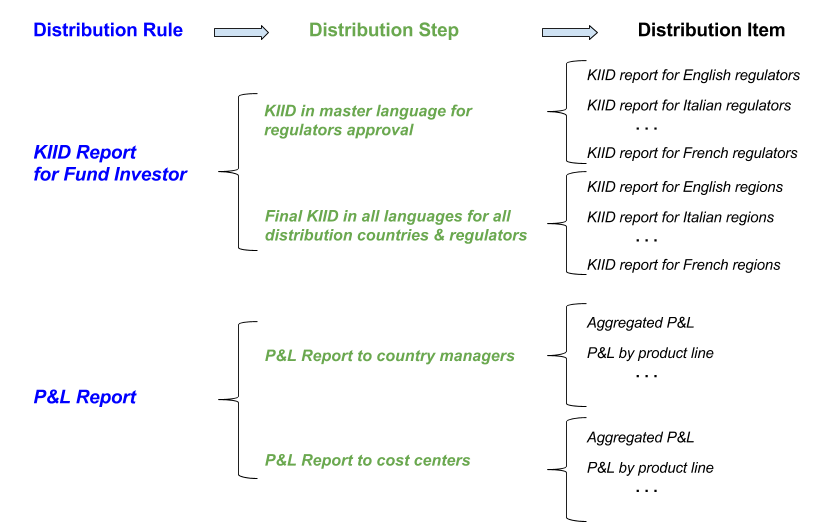
In order to define which reports have to be generated and the logics with which they should be filled and saved, it is necessary to create a Distribution Rule with the specific data for each recipient. It is possible to define several distribution rules for various reporting needs or for various recipients types. For example, we could have a distribution rule for the generation of the KIID report for fund investors, another rule for the P&L Account report, for subsidiary and for cost centre.
A distribution rule consists of several Distribution steps that allow distinguishing different reports generation and distribution rules.
With a single data processing, it is possible to generate all reports defined for a distribution step but it is not possible to generate all steps of a distribution rule.
The Distribution items are defined in a distribution Step and represent the highest level of detail of the Report Bursting setting. A Distribution item defines:
- the structure of the form or of the Collaborative Office document to use to produce the report
- the filters to apply to data in order to generate the final report. Those filters can be dynamic, meaning that it is possible to specify a CCH® Tagetik hierarchy's node in the distribution Item and then generate a different report for each lowest level element associated with that node or to the descending nodes
-
the report's format
-
any validations
-
the name of the file that will contain the final report. Also in this case, it is possible to specify the name with a dynamic syntax that then will result in a different name for each generated report