Collaborative Office
Collaborative Office Overview
The disclosure process of entity financial data or, in general, of business information both for external purposes (Stock Market, national banks, control authorities, ...) and for internal ones, requires the creation of an information which is not only related to the tables containing numbers, but that provides also comments on the performances, on the investments and in general on important happenings and operations which have occurred during the period concerned.
This complex process, generally called "Last mile", includes the production and the communication of financial information. Often this process is managed manually and, as a consequence, it is "time consuming" and error prone.
Very often the process manager has to face many problems, such as:
- the need for an integration among the information of several sources (ERP, consolidation systems, ...);
- the need for a collection of additional information missing from the feeding systems (market share, competitors performance, ...);
- the need for a collaboration with the various Entity’s areas (selling, marketing, production, ...) for the collection of comments;
- the need for the production of information based on predefined technological standards, such as the XBRL.
The “Last Mile” can be divided into two main sub-processes:
- the Financial Close, Consolidation and Reporting process which starts from the extraction of data from the accounting systems and ends with the provision of the consolidation reporting;
- the Disclosure Management process which is fed from the consolidation reporting book produced by the previous step and ends with the final document ready for the publication.
Tagetik allows managing the whole “Last Mile” process within a unique application environment, publishing final data through any type of report and "narrative" documents and supports the XBRL technology. Tagetik guarantees a full support to the “Last Mile” process at various levels, and in particular allows you to:
- manage the whole “Last Mile” process in “Fully Integrated” mode, namely starting from the closing processes up to the information disclosure, with many advantages in terms of process tracing, interface deletion, shortening of data processing time and reduction of the TCO;
- manage the Disclosure sub-process in “Stand-alone” mode, namely connected directly to the source systems already present in the Entity or in “Hybrid” mode, which requires to load data into the Tagetik database and thus to use the built-in utilities of Tagetik such as the ETL, the reporting, the predefined financial intelligence, ...
The above mentioned approaches give several advantages, in particular Tagetik Collaborative Office allows you to:
- prepare the reporting and the related documents to publish using one application tool only ;
- connect to any data source (eg. ERP, consolidation system, ...) already present in the Entity;
- manage a process workflow organized in steps, activities and responsibilities;
- manage the collaboration among the various business functions for collecting information (notes, comments, ...);
- define some validation and control rules which allow to verify the coherence of the information inserted into the documents;
- define various versions of the same document or parts of it and then compare them;
- manage the change of the values' unit of measure (Scaling), the amounts rounding (Rounding) and their effect (Balancing), namely the automatic calculation of the balancing through rounding operations;
- improve the clearness of the process thanks to the presence of Audit-trail tools, which guarantee the traceability of the activities;
- produce narrative documents in various formats (PDF, PPT, ...);
- produce the XBRL variation thanks to the taxonomy's import utility, to the information mapping utility, to the possibility of defining the XBRL document instance containing contexts of measure and thanks to the possibility of producing the XML file for the required instances.
Tagetik Collaborative Office works through two parallel interfaces:
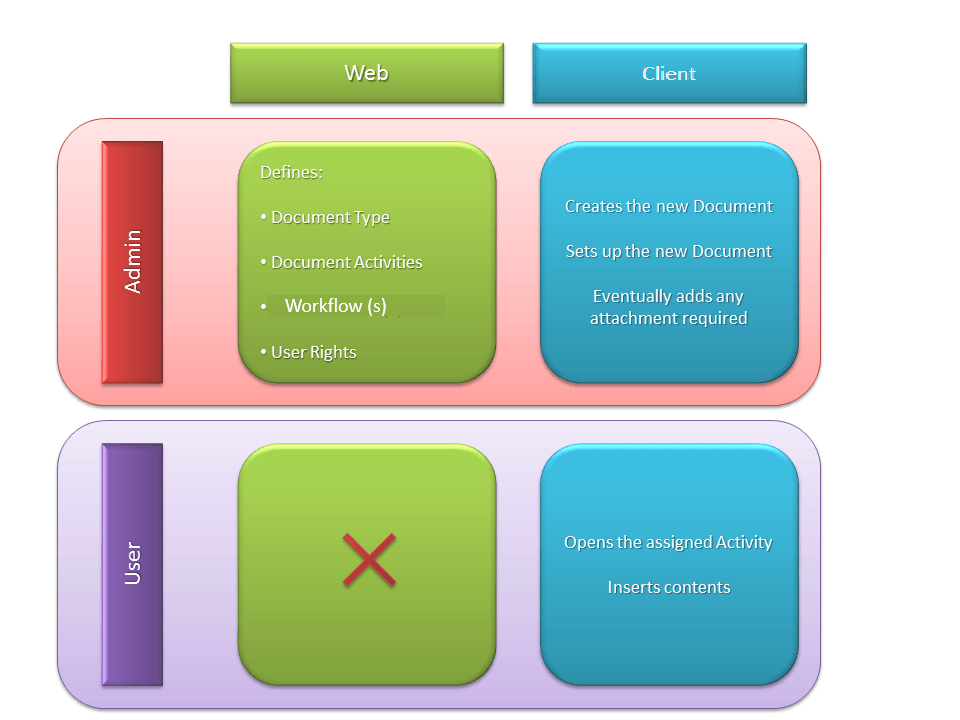
- Web interfaceIt allows the system manager to work on the document setup activities. This interface allows to:
- define the documents types and their structure;
- relate a customized workflow ro the document or to the single activities to perform;
- define possible batch processes that support the system usage;
- restrict the access of the final users to specific parts of the document setting the appropriate user rights.
The final user dos not have to perform any activity through this interface.
- Word interface: through the Microsoft .NET client:
- the system manager can:
- define the documents properties;
- provide attached documents useful for the editing;
- insert within the single parts of the document a minimal content which cannot be deleted by the document's manager user;
- the final user can access the activities he is responsible for and insert the contents fully exploiting the MS Word and PowerPoint utilities.
Document structure
One of the greatest advantages given by the Collaborative Office module is that it provides an organized and flexible structure for the collaborative production of a document. This structure is defined in its main features through the Web interface.
The structure of a Document can be outlined as follows:
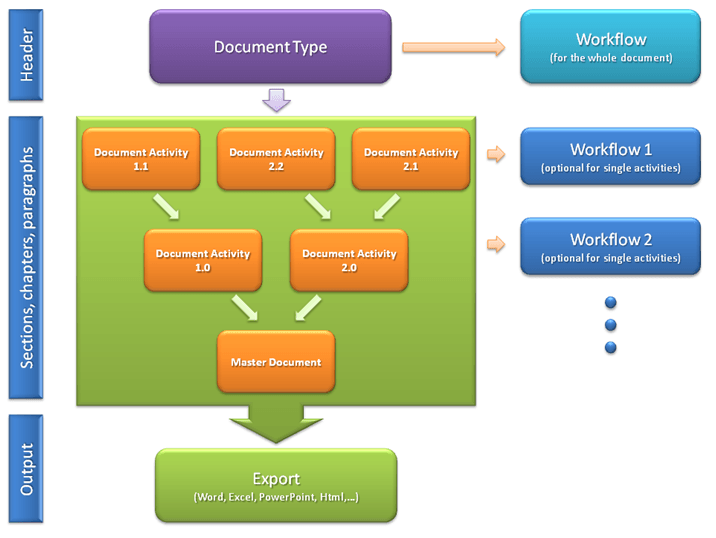
the Document is structured on two levels:
- Document type. A Document type represents the type of document the user wants to create, such as the Annual Report, the Board Book, etc. For each document type it is necessary to define its structure, relate them to an approval workflow and define the access/edit user rights. Actually the document type is the basic template for the creation of the word document (Master Document) and it is used by the contributor users to produce the final document to be published. As previously stated, this activity is performed by the administrator user through the web interface. A document type can be shared by several documents produced through the Collaborative Office module (for example, a financial report, realized according to the same structure for consecutive years, can use more than one time the same document type or the "10Q Statment" model (limited to the American market) can be considered as a document type and then used for producing the quarterly documentation);
- Document activity. These are the single parts (chapters, sections, paragraphs, ...) the document type is made up of and they can include contents added by the users (texts, images, tables) or just be an organizational element without contents. The document activities are crated by the administrator user during the definitions of the document type's structure. The document activities can be organized on several levels (hierarchy) or on one single level (flat). The highest level of the structure is the system document activity named “Master Document” which includes the consolidation result of all its subparts (document activity). The “Master Document” usually corresponds to the final document which has to be published and only in some cases the “Master Document” may not correspond to the final document but may represent just a node for the documents management. At level of single document activity it is possible to relate an ad-hoc workflow so as to manage/check the activities progress status and assign specific access/edit rights to single users or groups of users
After defining the document type and the various document activities, in order to complete the document structure is necessary to define, in each document activity, the tables, the check/validation rules and any contents (texts, indexes...) shared by the document. Such information can be defined through the Word interface.
When all the Document Activities have been completed and submitted, it is possible to have the Document all in a single file which includes all the inserted contents and can be saved in several formats (Word, Pdf, Html, etc.).
Workflow
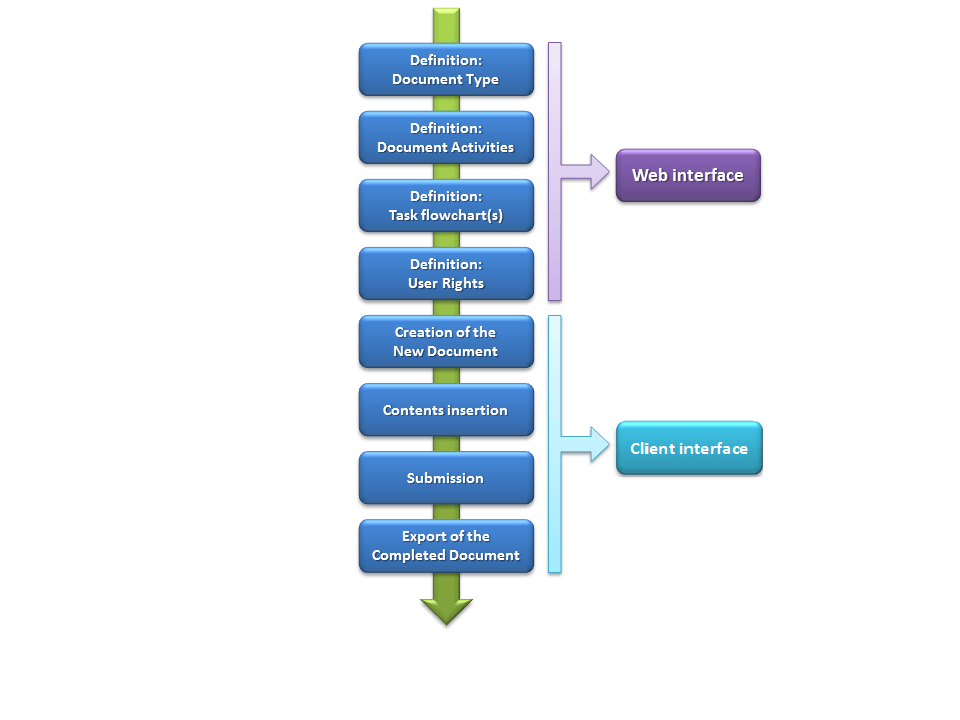
This paragraph provides a recap of the various subsequent activities and the related interfaces to use in order to manage the processes of creation, preparation and publication of a document.
Through the Web interface the system administrator defines the document nature (document type), the related structure (document activity), the operational/approval workflow to use for the editing and for the access rights. After defining such information, it is necessary to create the word document which will be used by the final users to insert the information to be published (comments, tables, graphs, ...)