Allocation & Closing
Allocation & Closing Overview
Nowadays the companies operate in a very competitive market and manage a large amount of products, sales channels and customers. So they have to apply some methods for checking the production costs and the sales revenues in order to guarantee a responsible financial management of the resources. Therefore it is necessary to have a "fast closing" of the business in order to monitor the business trend quickly and to implement a cost and revenues allocation method in which the business units or cost centers are directly responsible for the services they use.
Tagetik provides a powerful allocation engine which, according to the double entry logic, allows you to perform the accounting closing, namely to generate automatic journals of accounting data in order to get a "fast closing" without waiting for the accounting closing (for example, the registration of accruals and deferrals).
The Allocation & Closing engine of Tagetik allows you to:
- turn over the costs and / or revenues on specific business units, products, services or activities which generated them directly or indirectly. The system uses specific drivers (preset or calculated by the procedure itself), which can be accounting or statistic values (gross margin, sales revenues, units, sq m, etc.).
For example, if we wan to allocate the administrative costs on different departments, we can select as driver the number of invoices issued by each department.
Other examples are the allocation of the IT costs according to the number of existing terminals in each cost center or the management of the charge-back according to a "market price" logic rather that to the "full price" logic.
- adjust data from the general accounting or other subsystems.
This is useful whenever it is necessary to perform a "fast" monthly closing with a partial set of original data. In this case it is possible to retrieve data from different "feeding subsets" and use them to "fill the gaps", defining the master subsystem for each n-tuple (account - custom dimension).
For example, it is possible to adjust the energy costs using the amounts inserted in the Budget scenario or retrieve the information about the assets from an external assets management system.
In this case Tagetik compares the amounts deriving from the accounting with those defined at Budget level and generates an accounting data automatic journal in order to obtain budget data as final amount. The system can also generate the related BS counterparty; starting from an accounting data "balanced" with the automatic balancing, Tagetik keeps such balancing.
Another example is the "adjustment" of data deriving from the invoicing system or from the personnel costs which are calculated according to a HR system rather than FS data.
- perform What if analysis
Different allocation models can be applied to the same set of original data in order to compare then the obtained results.
For example, if the user is not sure that the number of laptops or the number of employees is the best driver for allocating the IT costs, it is possible to create some allocation models, run them and compare the results in a report. This allows making more reliable decisions.
In order to obtain the results described above, the engine manages two "families" of data processing:
- the ALLOCATIONS, which are divided into the following types:
- allocation, in this case data is shared according to the percentages obtained by a driver (which is always defined with an account)
- allocation on accounts, in this case data on an account (or accounts hierarchy node) is shared on other accounts with the percentages obtained by a driver (defined with several accounts)
- partial allocation, in this case data is not wholly allocated since the definition of the driver is "partial". For further details see the example below.
- reclassification, in this case the amount on a source n-tuple is completely allocated on a target n-tuple (it is a 100% allocation in which no driver is required)
-
transfer price (PxQ), in this case the amount to allocate is calculated as "Price X Quantity"
-
the SCENARIO TARGET MATCHING which, unlike the "out-and-out" allocations, consists in imposing a specific amount on data. This is used when, for management purposes, the monthly closings have to be done but owned data is partial and data present on other scenarios are used to complete it. For example when actual values are completed with budget data. The following data processing types belong to this family:
- Scenario Target Matching, in this case the amount defined for the same data on the "target scenario", namely the one containing the target values, is imposed on data present on the current scenario.
- Calculated Target Matching, in this case the system calculates the "target" amounts to be "imposed". The target amount is obtained as the percentage of a reference account (Calculated Target Matching (through "fixed %")). If such percentage is calculated, we speak of Calculated Target Matching (through "calculated %" as a ratio)
The data processing type to be run, together with the other information, is defined in the Allocation & Closing rules which are used by the system to generate the related double entries.
 Allocations and monthly splitting work on the basis of the entity currency amount . If this amount is not defined, the system returns null or incorrect values
The examples below describe the above mentioned data processing types.
EXAMPLES
Example 1: Allocations Family
- Allocation: Assume that we allocate the amount 100 attributed to the account PL00001 and to the cost center C00 on the cost centers C01 and C02 according to the driver shown in the table below.
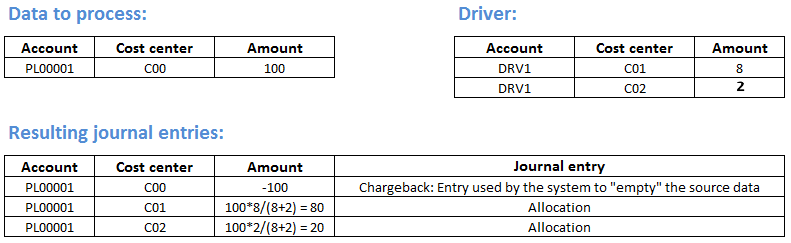
We can see that:
- the driver indicates the "weight" used by the system to split 100 on the two cost centers C01 and Co2
-
the system always writes the entries according to the double entry logic, so the sum of the amounts related to the write off and allocation entries is always 0.
-
Allocation on accounts: Assume that we allocate the amount 100 attributed to the account PL00001 (independently of the monthly splitting on the custom dimensions 1...5) on the accounts PL00002 and PL00003 according to the drivers DRV1 and DRV2 shows in the table below.
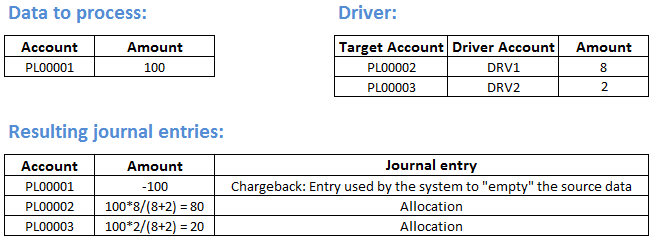
We can see that:
- the drivers indicate the "weight" used by the system to split 100 on the two accounts PL00002 and PL00003
- the data processing generates the allocation entries on PL00002 and PL00003 as follows:
- 100 for the contribution of the driver DRV1 divided by the sum of both drivers' contribution
- 100 for the contribution of the driver DRV2 divided by the sum of both drivers' contribution
-
the system always writes the entries according to the double entry logic, so the sum of the amounts related to the write off and allocation entries is always 0.
-
Partial allocation: Assume that we allocate the amount 100 attributed to the account PL00001 and to the cost center C00 on the cost centers C01 and C02 according to the driver shown in the table below.
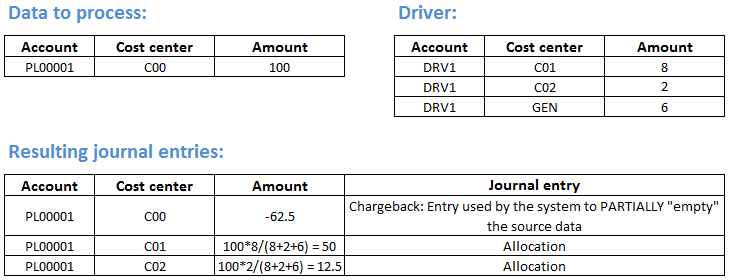
We can see that:
- the cost center C00 allocates "data to allocate" (100 on the account PL00001) according to the driver DRV1 filtered on the cost centers C01 and C02
- the DRV1 is defined on C01 and C02, and the total value is calculated omitting this filter (therefore it considers also the amount on NC)
- the allocation is "partial" since only part of data has been allocated (62,5)
-
the system always writes the entries according to the double entry logic, so the sum of the amounts related to the write off and allocation entries is always 0.
-
Reclassification: we allocate the amount 100 attributed to the account PL00001, cost center C00 and product P01 on the product P02.
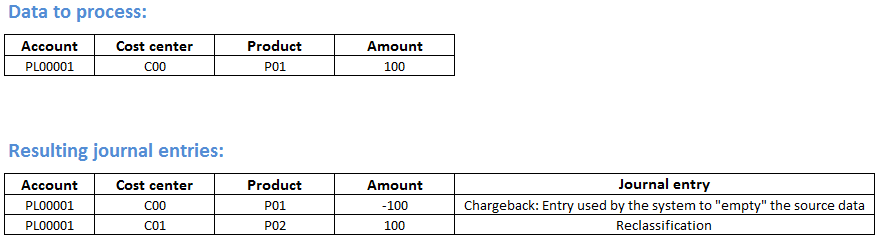
Also in this case the system writes the entries according to the double entry logic, so the sum of the amounts related to the write off and reclassification entries is always 0.
- Transfer price: Assume that the prices are defined on the cost center C01 (source "entity") for the products P01 and P02 and that the cost centers C02 and C03 are the target "entities" where we have the quantities on the products P01 and P02. Finally, assume that the account on which to perform the write off is PL00001 and the one on which to perform the allocation is PL00002.
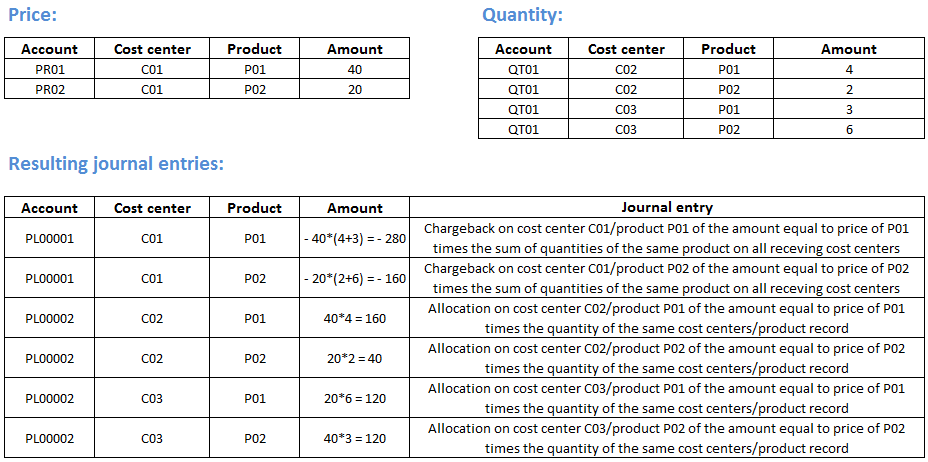
Also in this case the system writes the entries according to the double entry logic, so the sum of the amounts related to the chargeback and allocation entries is always 0.
Example 2: Scenario Target Matching
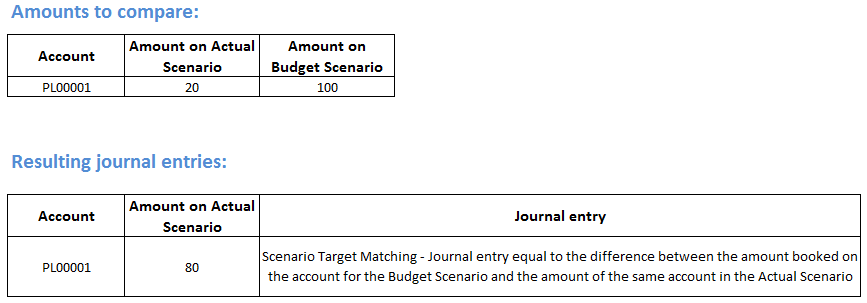
- Scenario Target Matching: We assume that we have the account PL00001 which at the actual amount from the accounting system is 20 but we know that it is a partial value (since some invoices still have to be registered) and we want to adjust it with the budget value.
- Calculated Target Matching (through "fixed %"): Assume that we have the account PL00001 equal to 50, that the reference account (namely the account according to which the system must calculate the amount to be imposed) is 100 and that the percentage to be used is 65%.
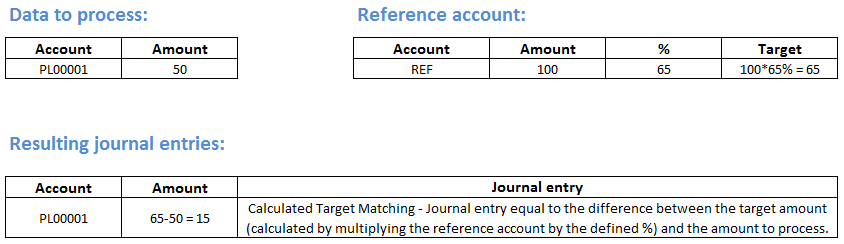
We can see that the system:
- calculates the "target" amount to be imposed by applying the percentage to the value of the reference account
-
defines a entry equal to the difference between the "target" amount and the account's value
-
Calculated Target Matching (through "calculated %" as a ratio): we have the account PL00001 whose value is 40 on the Actual Scenario and 50 on the Budget scenario, and the REF reference account (namely the account according to which the system must calculate the amount to be imposed) is 120 on the Actual Scenario and 100 on the Budget Scenario.
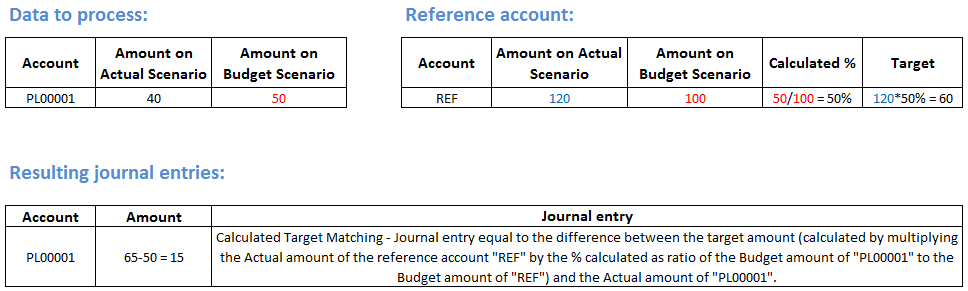
We can see that the system:
- calculates the percentage as the relationship between the value of the account PL00001 and the reference account, retrieving both values from the reference scenario (in this case the Budget)
- calculates the "target" amount to be imposed by applying the calculated percentage to the value the reference account has in the current scenario (in this case Actual)
- generates an entry equal to the difference between the "target" amount and the value the account has in the current scenario
"Allocation & Closing" module parametrization
Generally the allocation & closing rules are defined by the system administrator and, according to the rule, they are valid for a specific entity or for all entities of the group. The settings can be customized by each user, according to the degree of "freedom" let by the administrator.
The system parametrization can be:
- general parametrization (defined by the administrator)
- user parametrization (defined by each user)
General parametrization
This activity is up to the system administrator and involves the following areas:
- Administration. It includes the parametrization of the basic information for the data processing, namely:
- Data Model: necessary for the definition of the basic tables for all processes used in Tagetik, so also for the allocation and closing data processing (accounts plan, currencies, dimensions, etc.).
- Process: necessary for the execution of the allocation and closing data processing
- Rules. It includes the parametrization of the rules the data processing needs in order to generate the entries, namely:
- Allocation & closing rules: defines all the executable allocation and closing rules
- User rights. It includes the parametrization of the user rights on data, specifically it defines the:
- Routine closing restrictions: necessary to restrict the usage of the defined allocation and closing "rules"
User activities
It can be managed only from the User Tools menu present in the administrator user web interface. According to the restriction defined by the administrator, Here the user can:
- customize the provided parametrization
- run the allocation and closing data processing which generates the double entries.