The drill down function
Description
The drill-down function allows the user to view the components that make up an aggregated figure.
Cell, Row or Column drill downs can be run. The functionality can be deactivated on individual forms.
Example
The value 1000 is reported in a cell of European revenue. The cell drill down shows that the value is made up of:
| Account | Amount |
|---|---|
| Revenues - Italy | 80 |
| Revenues - France | 150 |
| Revenues - Spain | 70 |
| Revenues - UK | 330 |
| Revenues - Germany | 370 |
| Revenues - Europe | 1000 |
Example of row/column drill down
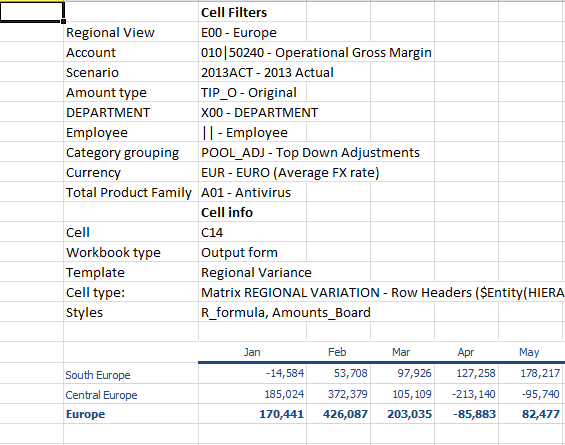
In this example, the Excel file shows a row of sales revenues for Europe and a Regional View hierarchy that groups entities by geographical area. With drill down on the row, the user can see how the individual European areas (South Europe and Central Europe) contribute to the generation of the European monthly revenues.
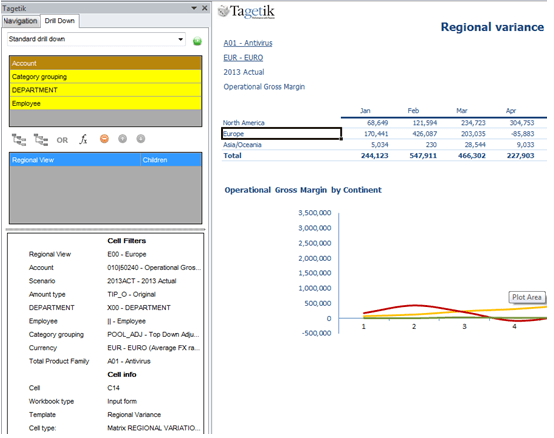
Those figures are shown in a new Excel sheet, which can be saved. In this example, the source cell properties are reported in the Drill Down column at the bottom left within Cell info. If the starting form had a header area, then this would also be reported in the results sheet.