Hyperlinks
Purpose of the function
Hyperlinks allow you to link several forms belonging to the working application database. They are used for navigation and data entry purposes. For example, they can be inserted in a cockpit to guide access to forms or in an item of a form to allow the user to automatically see the source data of that item. A link can also activate a series of advanced actions, such as saving and printing files, and running macros or data processing.
Characteristics
Hyperlinks appear as hypertextual Excel links and can be positioned on matrix rows/columns or in any of the form's cells which does not contain a data structure (i.e. matrices, queries and cell fields).
They are created from the Action List Wizard window by defining the hyperlink and the actions that must be run when the hyperlink is opened, together with the run order. It is possible to define sequential actions or nest one action within another. Nested actions are indicated with the identification number of the action in which they are nested and a decimal number corresponding to the run order.
If a node is selected rather than a single form, all the forms in that node will open when the hyperlink is selected.
Note: several actions cannot be run sequentially via hyperlinks from web forms.
Example
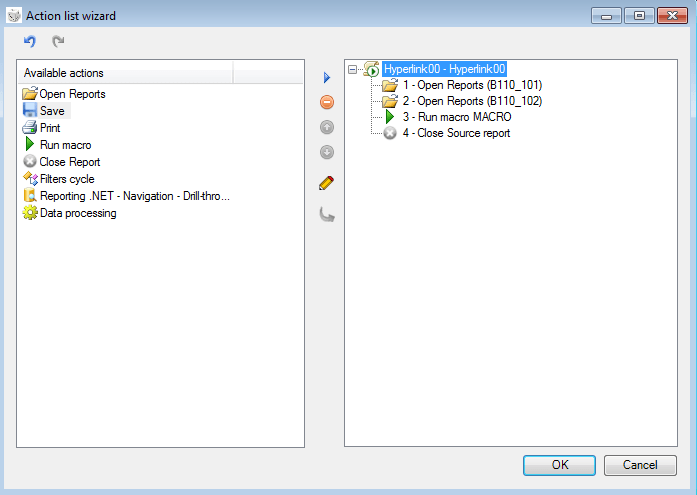
This example shows the Action List Wizard window in which the following sequence of actions, to be run once the hyperlink has been selected, was defined: open two reports, run a macro and close the source report.
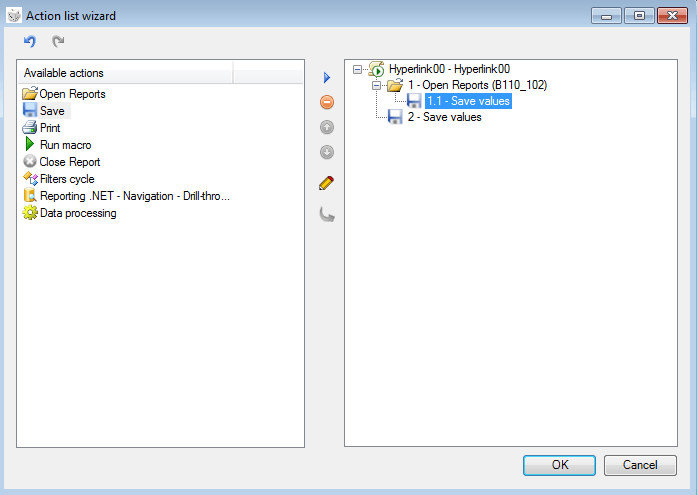
In this example, in contrast, two Save actions have been inserted. Action 1.1 - Save values is nested in Open report. The values contained in form B110_102 are automatically saved when the report is opened. Action 2 - Save values is not nested. This action saves the values of the source report after actions 1 and 1.1 have been run.
Filters cycle example
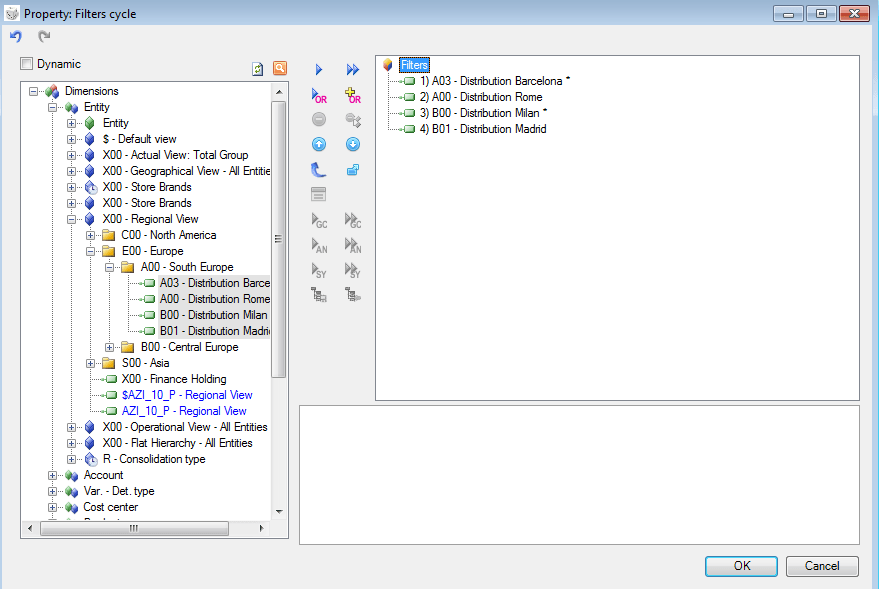
This example illustrates how to open the same report for all entities. To do this, first of all a Filters cycle action that has those entities as filters must be defined.
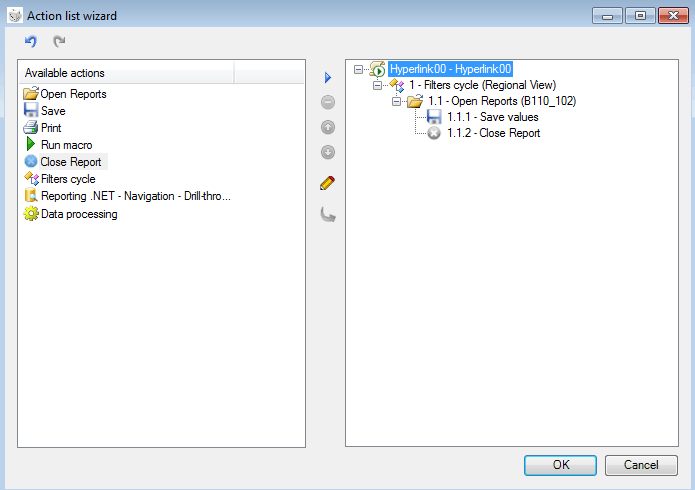
Next, the Open report action to be nested in Filters cycle, the action with which to save the values and the action for closing the report are defined. Thus, each of these actions is repeated four times, once for every entity of the filters set in the Filters cycle window.
This cycle works by running the report in data entry mode, as it involves the saving of values.
Hyperlinks in matrices
In matrices, hyperlinks can be positioned in header cells and cells containing values. The definition of the actions that must be run when that hyperlink is opened is the same as the definition described for the links inserted directly in the report. The only differences are as follows:
- If the Inherit from the source report option is activated for the Open report action, the parameters are inherited from the filters present on the cell in the report in use, from which the hyperlink is opened.
For example, for a matrix that has several entities on its rows, the report opened from the hyperlink is filtered on the entity present in the row from which the hyperlink was opened. Specifically, if the entity of the first row were A00, the corresponding report would be opened with the filter on entity A00.
- The query of a Reporting.NET Navigation - Drill-through action is run according to the filters present in the cell in use, from which the hyperlink is opened.
For more details on the hyperlink settings, see Table of row/column filter properties.