Analytical allocations
Function
The Allocations operation allows you to distribute an amount originally present on an individual item among several items, in order to itemise it. In particular, allocation allows you to distribute a value present on an item of a source dataset dimension among one or several dimensional fields of the target dataset.
For example, the cost of a service can be distributed across departments that have benefited from it by taking account of the products that they ordered.
To perform this distribution, the source dataset/type of dataset and driver dataset must be defined.
The driver dataset determines the detailed allocation coefficient for one or several dimensions to which it is possible to allocate. Any dimensional field can be used as the allocation dimension, except for Scenario, Period, Entity, Currency and Var. - Detail type.
It is also possible to define SQL filters to be applied to the data to be allocated.
Allocation details
To define an allocation operation, the data to be allocated and its target must be defined. A single operation can contain several details. This allows you to defined different methods for allocating various portions of the dataset to be allocated. Every detail deals with different portions of data in terms of the data to be allocated. If this does not occur, the system will generate duplicates.
The details are processed simultaneously. When several details share the same data tuple, the corresponding amount is allocated according to the information present on all details that are applied. This causes the amounts to be duplicated.
Allocated data generation conditions and restrictions Allocated data can be generated under the following conditions:
- The target dataset/type of the results of the operation has been defined on the activity.
- The corresponding source dataset/type, target and driver are different.
- For every source dataset field containing the data (measure) to be allocated, there is a numeric field with the same name on the target dataset.
- For every driver dimension on which data is being allocated, the target dataset has a dimensional field linked to the same dimension as the driver on which the data is being allocated (the code may be different).
Allocated data generation process
The allocated data is generated according to the following process:
| Step | Description |
|---|---|
| 1 | The allocated amount is inserted into the measure (numeric field) of the activity's output dataset with the same name as the measure to be allocated from the dataset to be treated. |
| 2 | The value of the receiving dimensions is recovered by the driver and stored in a field in the output dataset. This field may not have the same name but must its type must be dimensional. The dimension must be the same as the driver allocation dimension. |
| 3 | Every other dimensional field present on the output dataset is populated by reading the field of the dataset to be treated, which has the same dimensional type, if it exists. |
| 4 | Every other non-dimensional field present on the output dataset is populated by reading the field of the same name in the dataset to be processed, if it exists. |
Particular details of use cases for allocation
- To allocate separate portions of the same source dataset in different ways, you can define a single operation with several details.
- To allocate data that has already been allocated, it is necessary to create two different activities, in sequence, each containing one operation. The operation present in the second activity will have the target dataset/type of the previous activity as the dataset/type to be allocated.
- Activities containing allocation operations can be configured to be run in parallel, like any other activity. However, logical dependencies which prevent the various activities from running in parallel must not exist.
- Once any SQL filter present on the operation has been applied, the amount to be allocated is reported on the target dataset. If the treatment of part of the amount to be allocated is not specified in the definition of the details, the non-allocated data are reported in the target dataset without undergoing transformations.
Example
This example shows the allocation operation for the following data on the Account, Cost Centre and Product dimensions:
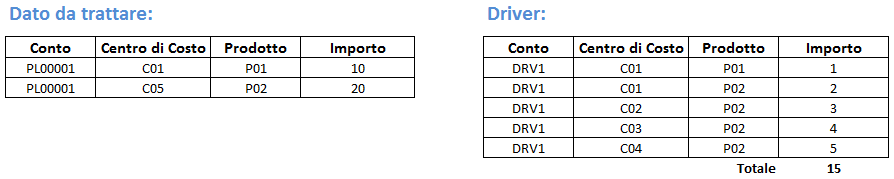
In this case, the calculation performed by the system for the Cost Centre custom dimension changes depending on the partialisation of the specified driver (the Other filters based on data to allocate parameter in the operations details). The possible options are listed below.
- No filter: every row of the data to be processed uses every row of the driver to allocate.
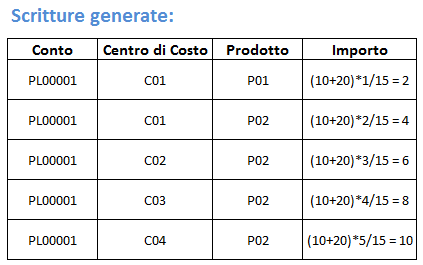
- Filter on lowest level elements: every row of the data to be processed uses the driver rows defined on the same cost centre.
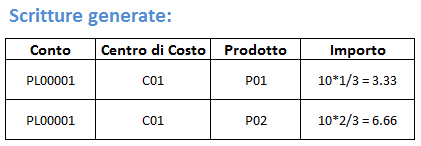
In this example, the second row of the data to be processed was not allocated because the driver has no rows on C05. The driver rows defined on cost centres other than C01 were not used.